
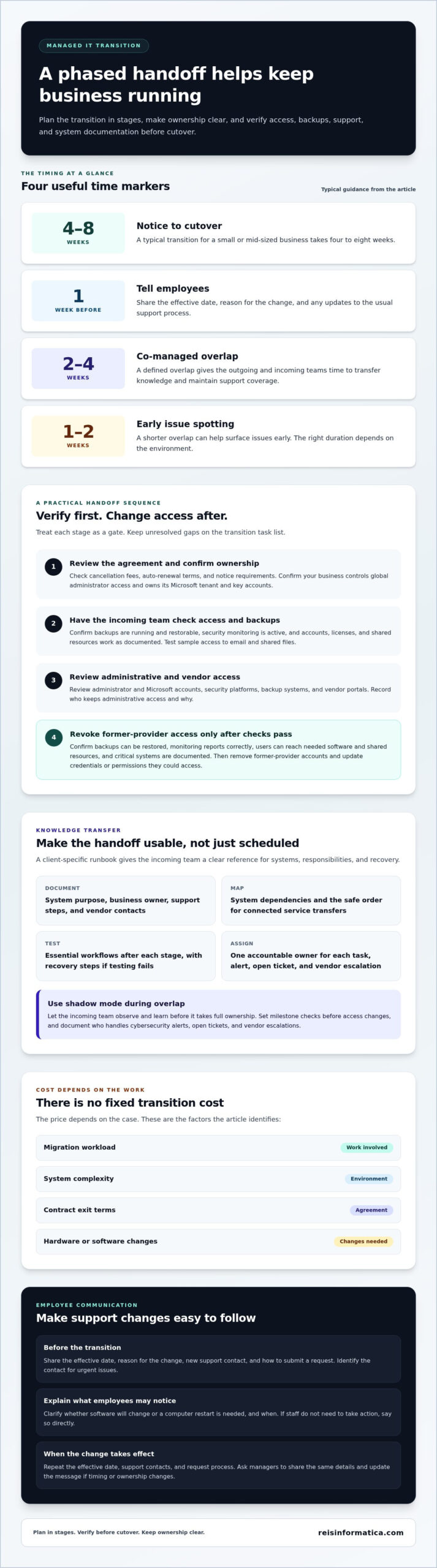
Switching IT providers doesn’t have to disrupt your business. The practical answer to how to switch managed IT providers without disrupting your business is to plan a phased handoff and verify access, backups, support, and system ownership before cutover. For a small or mid-sized business, a typical transition takes four to eight weeks from notice to cutover.
Recurring support issues, unclear communication, or an approach that no longer fits your business may signal it’s time for a change. A carefully managed transition protects daily operations while the incoming team learns how your systems work.
This guide explains when to switch and how to prepare employees, transfer essential knowledge, and safeguard data and systems. You’ll learn to plan the handoff in manageable stages, so employees know what to expect and support stays organized throughout the change.
Key Takeaways
- Review your contract’s exit terms and confirm your business controls administrator access, system ownership, and critical documentation before making the change.
- Tell employees when the transition takes effect, how to request support, and which contact to use for urgent issues.
- Use a phased handoff with documented knowledge transfer so the incoming team can learn your environment and responsibilities before taking full ownership.
- Inventory credentials, licenses, backups, vendors, and open support issues to help protect data and keep essential systems working during the switch.
When is it time to switch managed IT providers?
In Canada, switching costs depend on the work involved and your contract’s exit terms. The price depends on the case and is provided after a quote request; key factors include migration workload, system complexity, contract terms, and hardware or software changes.
- Review your agreement before setting a transition date. Note cancellation fees, auto-renewal terms, and notice requirements. Confirm that your business controls global administrator access and owns its Microsoft tenant, an isolated set of resources under one owner. If your current provider controls the tenant or key accounts, resolve ownership and access before planning the handoff.
- Ask the incoming provider to review access and backups before making system changes. Confirm backups are running and restorable, security monitoring is active, and user accounts, licenses, and shared resources work as documented. For example, test a sample user’s access to email and shared files. Track any gaps as transition tasks, not routine setup.
- Validate security access during onboarding. Review administrator accounts, Microsoft accounts, security platforms, backup systems, and vendor portals, then remove access the former provider no longer needs. Include Microsoft Secure Score monitoring in the review and compare changes over time to spot settings that need attention. Record who retains administrative access and why.
- Revoke the outgoing provider’s remaining access only after the checks pass. Confirm backups are restorable, monitoring reports correctly, users can access the software and shared resources they need, and critical systems are documented. Then remove former-provider accounts and update credentials or permissions they could access. If recurring support problems or poor visibility prompted the switch, use these checks to confirm the handoff addresses them.
There is no fixed cost. It depends on migration work, system complexity, contract exit terms, and any hardware or software changes.
How should you communicate the IT provider change to employees?
Use a clear timeline so employees know what’s changing and where to get help. Explain the support process before the transition, then reinforce it when the new arrangement takes effect.
-
Notify Employees of Support Changes
Tell employees about the provider change one week before it happens. State the effective date, reason for the change, and whether their usual support process will change. For example, explain if staff will have a different support contact or software on their work devices. Give employees time to ask questions, and wait to announce changes until the timeline and responsibilities are clear.
-
Explain New Support Contacts and Processes
Share the incoming support team’s contact details and explain how to submit a request. Clarify what details employees should include, such as the affected device, application, or business task. Identify the contact for urgent issues and explain how the support team will share updates. If managed IT services are changing, make clear who owns each part of the process during any overlap.
- Explain practical changes employees may notice. Tell them whether software will change, whether they need to restart a computer, and when to do so. If staff don’t need to take action, say so directly. Clear instructions help employees distinguish planned transition work from problems that need a support ticket.
- Repeat the key information when the change takes effect. Send a short reminder with the effective date, support contacts, and how to request help. Ask managers to share the same details with their teams so employees get consistent instructions. Keep the message somewhere staff already use, and update it if the timeline or support ownership changes.
Structured knowledge transfer and client-specific runbooks
Plan the handoff around documented tasks, business priorities, and clear ownership. When considering how to switch managed IT providers without disrupting your business, include privacy and security in the transition plan. Identify data being transferred, limit access to authorized people, and document safeguards. Applicable requirements depend on your organization and the data it handles.
-
Sequence System Transfers and Downtime
Ask the incoming provider to map system dependencies before scheduling transfers. A client-specific runbook should record each system’s purpose, business owner, support steps, vendor contacts, and recovery procedure. Move connected services in a safe order, then test essential workflows after each stage. Schedule work during a low-activity period, and avoid combining the transition with a major software rollout or network redesign.
For example, a professional services firm may need its document system, email, and client applications available together. Record which processes can pause, how much downtime they can tolerate, and the fallback if testing fails.
-
Plan a Phased Transition and Provider Overlap
Arrange a defined overlap so the outgoing and incoming teams can transfer knowledge without leaving support gaps. A co-managed overlap commonly lasts two to four weeks, depending on the environment; one to two weeks can help surface issues early. Assign one accountable owner to each task, since two active contracts alone don’t establish responsibility.
Use shadow mode, where the incoming team observes and learns before taking full ownership. Set milestone checks before access changes, and document who handles cybersecurity alerts, open tickets, and vendor escalations during the overlap. This makes the plan actionable, not just a calendar of dates.
-
Prepare the MSP Transition Plan
Include systems, responsibilities, timelines, risks, testing, communications, and recovery steps. A typical small or mid-sized business switch takes four to eight weeks from notice to clean cutover; the broader transition can take 30 to 90 days, depending on systems, vendors, and documentation quality.
Schedule executive alignment and stakeholder interviews before technical work begins. Add formal knowledge-transfer sessions, readiness milestones, and a client-specific runbook. For a business planning how to switch managed IT providers without disrupting your business, this connects technical work to employee needs and critical deadlines. Avoid pairing the handoff with major office moves or server replacements.
What happens to my data and systems during the switch?
Keep business data and systems under your control throughout the handoff. Ask the outgoing MSP for administrative credentials, network documentation, inventories, backup details, licensing information, vendor contacts, open issues, and security tool information.
-
Inventory Systems, Accounts, and Credentials
Create a working inventory of hardware, software, servers, network devices, user accounts, administrator accounts, and licenses. Record each item’s business owner, purpose, renewal details, and support contact. Include cloud accounts, domains, Microsoft 365, backup systems, and vendor portals. This list helps the incoming team identify dependencies and spot missing access before cutover. Don’t assume provider-installed hardware or software belongs to your business; establish ownership for each item.
-
Collect IT Documentation and Access Details
Request the records needed to operate and support each system. The outgoing MSP should provide network configurations, device and server inventories, licensing details, backup information, vendor contacts, current projects, and unresolved support tickets. Gather domain registrar access, firewall and server login details, administrator credentials, contract terms, and renewal dates. Compare these with your inventory and record gaps for onboarding. The incoming provider can use that list to rebuild missing documentation.
-
Handle Passwords, Administrator Accounts, and Data
Transfer credentials securely with an encrypted password manager, not email or shared documents. Keep business-owned administrator accounts under your control, grant the incoming team only the access it needs, and update credentials the former MSP could use. Confirm data locations and backup ownership before migration work starts. Record open issues and access changes, then remove old permissions after the new team has working access and critical systems are accounted for.
Before cutover, compare the inventory with actual users and devices. Confirm employee access, software licenses, vendor contacts, and recovery instructions are documented. This gives the incoming team a practical reference and helps maintain continuity when questions arise.
Plan your IT transition with professional IT services to organize system access, documentation, and handoff responsibilities.
Reisinformatica.com: Managed IT Services
Reis Informatica helps businesses plan provider changes with managed IT services that support day-to-day systems and operations. Turn to the team for a structured handoff, clearer technology ownership, or ongoing management after the transition.
If the change calls for a closer review of security controls, Reis Informatica’s cybersecurity services can support that work. Its private and public cloud services and products can help businesses review where their systems and data operate. Organizations exploring practical uses of AI can also consider AI Business Solutions alongside IT planning.
The right next step depends on your current environment, business priorities, and the systems that need support. Contact Reis Informatica to discuss your IT transition.
Make your next IT partnership a business decision
A provider change is also an opportunity to align technology with how your business wants to operate. Consider which capabilities support that direction, from managed IT and cybersecurity to private and public cloud services. Clear priorities connect technology decisions to business goals, rather than reducing the transition to a change of support contacts.
Use what you’ve learned about how to switch managed IT providers without disrupting your business to start a focused conversation about your goals, existing systems, and support needs. Reis Informatica offers managed IT services, cybersecurity services, and private and public cloud services and products for businesses assessing their IT needs.
Contact reisinformatica.com to discuss your switch and take a considered next step toward technology that supports your plans.
Frequently Asked Questions
Can I switch MSPs if I am mid-contract?
Yes. A mid-contract switch is governed by your agreement’s notice, renewal, termination, and exit terms. Review those clauses before sending notice, including requirements for returning equipment or transferring records. Ask the current provider for a written handover plan and identify who handles support during the change. If renewal is approaching, align the notice date with the incoming team’s onboarding schedule.
How can you avoid downtime when changing MSPs?
Protect business-critical workflows first: identify which systems employees need to serve customers, process payments, or access records. Schedule changes around operational demands, test key tasks before marking a stage complete, and document a fallback if a test fails. Businesses in Kitchener, Waterloo, Cambridge, Mississauga, Milton, Calgary, Halifax, and London can use the same approach while accounting for their own busiest periods.
How long until everything is back to normal?
Plan for a settling-in period after the technical handoff, not just a cutover date. Organizations switching managed services providers should expect an enhanced-support hypercare period lasting 30-60 days after the transition. During that time, track recurring issues, employee feedback, and unresolved work so the team can distinguish routine adjustment from a gap that needs attention.
How should you handle the handover between MSPs?
Give the handover a clear owner and shared record of decisions. Use a responsibility matrix to show who approves changes, handles urgent incidents, and updates business leaders during the overlap. Review open tickets together and agree which team owns each next action. A short, scheduled handoff meeting can resolve unclear details faster than long email threads.
What are the signs you may need a new IT provider?
Look for a pattern, not one frustrating support request. Repeated unresolved tickets, unclear explanations after incidents, security concerns without follow-up, or technology plans that no longer match business priorities can signal a poor fit. Consider whether leaders can see what’s being worked on and who owns next steps. These signs matter most when they persist despite clear discussions.
What does a clean MSP transition actually look like?
A clean transition has clear ownership, working support routes, and documented sign-off for essential business tasks. Employees can complete representative workflows, such as accessing a shared file or using a core application, while the incoming team can explain how issues are escalated. Close the transition with an agreed list of remaining tasks, owners, and review dates, rather than treating cutover as the finish line.