
Choosing business antivirus takes more than comparing familiar names or checking whether devices are covered. For businesses in Kitchener, Waterloo, Cambridge, Mississauga, Milton, Calgary, Halifax, and London, the right choice depends on how your team works, which devices it uses, and who will manage alerts and updates.
Antivirus can help prevent and detect threats, but it isn’t a complete security strategy. It doesn’t take responsibility for every risk, such as stolen account credentials, secure backups, or responding to an incident. This guide explains what business antivirus can and can’t do, which features matter when comparing options, and how to assign the security responsibilities that remain with your team.
You’ll also learn when managed or co-managed cybersecurity can bring those responsibilities together. Reis Informatica’s Cyberscopic program supports both approaches, backed by an in-house Security Operations Center. The goal is a clearer path to protection that fits your operations, without leaving you to guess where antivirus ends and broader security begins.
Key Takeaways
- Use this business antivirus guide for companies in Kitchener, Waterloo, Cambridge, Mississauga, Milton, Calgary, Halifax, and London to match protection to your devices, users, and operating needs.
- Compare options by device coverage, administration, alert handling, and who owns ongoing support.
- Take a practical four-step approach: inventory devices, identify business needs, assign responsibilities, and review coverage.
- Learn when managed or co-managed cybersecurity, including Reis Informatica’s Cyberscopic program, can help coordinate security work.
Business antivirus in Kitchener, Waterloo, Cambridge, Mississauga, Milton, Calgary, Halifax, and London: what it protects and where it fits
Business antivirus is software that helps identify and address malicious activity on company devices. It’s one security control, not a complete cybersecurity program. That distinction matters for businesses comparing options in Guelph and these other Canadian communities. Protecting a laptop is useful, but business protection also needs clear oversight across devices and users, rather than relying on each person to manage security alone.
What does business antivirus protect against?
Antivirus software is designed to detect or help block malware, a broad term for harmful software. This can include ransomware, which can lock access to files or systems and disrupt everyday work. The tools and methods behind antivirus have evolved over time; Antivirus Software Explained offers background on its history and approaches. In practice, protection depends on proper configuration, current updates, and someone reviewing how the software is working. Check that every work device is covered, updates are being applied, and alerts have an assigned owner. Installing antivirus is a starting point, not a set-and-forget plan.
Why antivirus alone may not cover every business risk
A device can have antivirus and still be exposed through a compromised account, a weakly protected network, or a user tricked into sharing login details. Backups and response processes matter too. If an incident interrupts access to important files, the business needs a plan for recovery and decision-making. That broader view is the focus of business cybersecurity services, which can coordinate protection beyond individual devices.
Make ownership explicit: who checks coverage, manages updates, reviews alerts, and decides what to do if a warning appears? A managed or co-managed approach can help define those responsibilities. Technology planning may also include other business priorities, such as AI business solutions, alongside security controls.
Business antivirus features: compare protection, management, and support
For business antivirus Guelph buyers, the comparison shouldn’t stop at what a tool detects. Ask which devices it covers and who will keep protection current, review alerts, and coordinate follow-up. Compare both the protection a solution provides and who is responsible for managing it.
| Area | What to compare |
|---|---|
| Device coverage | Which company devices and operating environments are included, and how are new or replacement devices brought into coverage? |
| Administration | Who oversees settings and updates: an internal staff member, a service provider, or both? |
| Alert handling | Who reviews warnings, decides whether action is needed, and communicates next steps? |
| Support ownership | Who handles routine questions and coordinates technical follow-up when protection needs attention? |
Questions to ask when comparing business antivirus
Map the proposed coverage against the devices your team actually uses, including equipment assigned to remote staff. Then write down who is responsible for each task. A product that is installed but not regularly updated, or whose alerts go unread, can leave gaps between deployment and day-to-day oversight. Document who handles updates, who receives and reviews alerts, and how a concern reaches the person responsible for action.
Standalone software or managed cybersecurity?
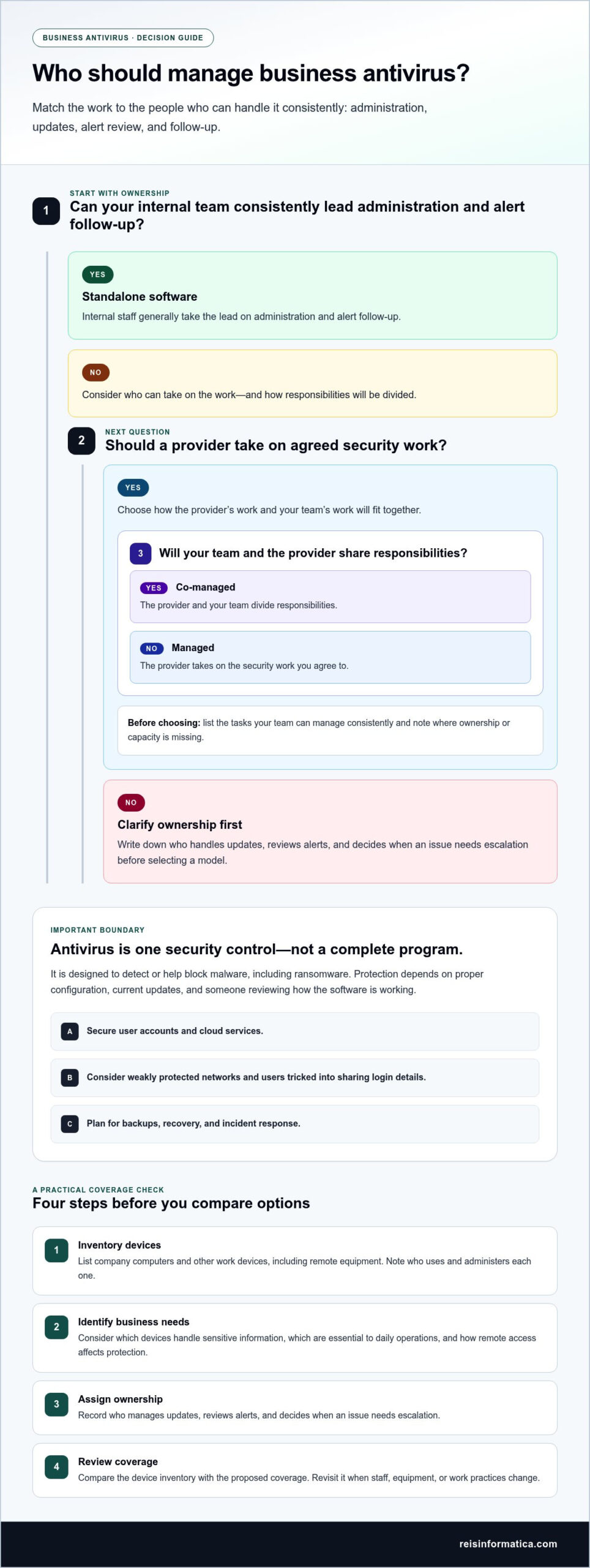
With standalone software, internal staff generally take the lead on administration and alert follow-up. In a managed model, a provider takes on agreed security work; co-management divides responsibilities between the provider and your team. Neither model removes the need to secure user accounts and cloud services. These are related layers, as described in this business cybersecurity service overview. Before selecting a model, list the tasks your team can manage consistently and where ownership or capacity is missing.
How Guelph businesses can choose the right antivirus approach
A practical choice starts with your actual devices and responsibilities, not a feature list alone. This four-step process helps business antivirus Guelph decisions reflect how your team works and what it needs to keep operating.
- Inventory devices. List company computers and other work devices, including those used remotely. Note who uses each one and who administers it today.
- Identify business needs. Consider which devices handle sensitive information and which are essential to daily operations. Remote access may also affect how your team needs protection managed.
- Assign ownership. Record who manages updates, reviews security alerts, and decides when an issue needs escalation. Make the handoff clear before choosing software or a service model.
- Review coverage. Compare the inventory with the devices and operating environments included in the proposed approach. Revisit the list when staff, equipment, or work practices change.
How to assess your company’s devices and responsibilities
Start with a simple device register and name an owner for each security task. If an alert appears on a remote employee’s computer, the response should not depend on guessing who will see it. Define who receives the warning, who assesses it, and who communicates next steps. If different people handle updates and alerts, record both responsibilities so nothing falls between roles.
When does a managed approach make sense?
Use this quick check to identify where support may be useful:
- Your team has the time and knowledge to manage updates and review alerts consistently.
- A named person can coordinate follow-up and escalation when a device raises a concern.
- Your business needs ongoing help with these responsibilities or related IT operations.
If internal capacity is limited, external management may be worth evaluating. A co-managed arrangement can also divide work between your staff and a provider. For support that connects security responsibilities with day-to-day IT operations, explore managed IT services.
Managed business antivirus and cybersecurity support for Guelph companies
Antivirus is one part of a broader security approach. If managing devices, reviewing alerts, and coordinating follow-up puts pressure on your team, a managed or co-managed model can make responsibilities clearer. Reis Informatica’s Cyberscopic program supports both approaches, helping businesses shape cybersecurity support around the work their internal team can take on.
What managed and co-managed cybersecurity mean
With managed support, an external team takes an ongoing role in cybersecurity management. With co-managed support, that team works alongside your internal IT staff, with duties divided between them. Agree on ownership: who oversees security work, who handles alerts, and how concerns are escalated. A clear division helps prevent tasks from falling between teams, while recognizing that no one model can eliminate risk.
Reis Informatica has operated since 2001, has a certified Canadian team, and runs an in-house 24/7 Security Operations Center (SOC) without outsourcing. These details describe the team and operating structure behind Cyberscopic as Guelph businesses assess support for their antivirus and wider cybersecurity needs.
A practical next step for Guelph business decision-makers
Before discussing options, prepare a current device inventory and a short list of security responsibilities. Include who manages updates, reviews alerts, and coordinates follow-up today. Note where ownership is unclear or where your team would prefer additional support. This gives the conversation a practical starting point, focused on your priorities and the division of work that suits your operations.
If you’re ready to discuss your company’s security needs, explore Reis Informatica’s cybersecurity services. A focused conversation can help clarify where antivirus fits, what your team wants to manage internally, and whether managed or co-managed support is the right approach.
Make security planning part of business growth
Your security approach should keep pace as your business changes. New staff, devices, or ways of working can shift who needs access and who is responsible for keeping systems protected. Treat the business antivirus Guelph decision as part of ongoing operational planning, not a choice you make once and then forget.
Decide who owns the conversation internally and how security priorities will be revisited as the company evolves. That person can keep responsibilities visible and bring the right questions forward before a change creates confusion. Clear ownership makes it easier to align technology decisions with the needs of the business.
Reis Informatica’s Cyberscopic program supports managed and co-managed cybersecurity, so the level of external involvement can align with your team’s role. Explore a cybersecurity approach for your business and take a practical step toward security planning that supports your next stage of growth.
Frequently Asked Questions
Is antivirus enough to protect a business?
No. Antivirus can help address threats on devices, but it doesn’t manage every way a business can be exposed. For example, a staff member might be tricked into sharing account details, or the business might lack a clear process for restoring important files after a disruption. Review device protection alongside account security, backups, and a practical response plan so gaps don’t go unnoticed.
Can a small business use consumer antivirus software?
Possibly, but suitability depends on the software’s licence terms and how your business needs to manage its devices. A tool intended for individual use may not provide the administration or visibility your team needs across several work computers. Before choosing, consider who will oversee coverage, manage settings, and handle support questions as your device list changes.
What should business antivirus include?
Look for a solution that fits the devices and operating environments your business uses, with a clear way to manage its deployment and updates. Also define how alerts are reviewed and who handles follow-up. For example, a company with staff across Kitchener, Waterloo, Cambridge, Mississauga, Milton, Calgary, Halifax, and London may need consistent ownership across locations, not just protection on individual devices.
How much does business antivirus cost?
There isn’t one price that applies to every business. Costs depend on factors such as the number and types of devices, the software selected, and whether administration or ongoing cybersecurity support is part of the arrangement. To compare proposals fairly, separate software licensing from management and support, then assess each against your device inventory and the responsibilities your team needs covered.
When should a business consider managed cybersecurity instead of antivirus alone?
Consider managed cybersecurity if your team can’t consistently oversee security tasks, if alerts don’t have a clear owner, or if coordinating follow-up competes with other business priorities. It can also suit a company that wants to share responsibilities with an internal IT team rather than handle every task alone. The right model depends on the work your staff can own and the support they need.