
A cloud migration is a business transition, not simply a transfer of technology. For Kitchener leaders, cloud migration services Kitchener businesses can use should start with a practical question: which systems belong in the cloud, and how can they move without disrupting work, putting data at risk, or creating cost surprises?
Those concerns are reasonable. Not every workload needs the same approach, and moving everything at once may not suit your operations. A clear plan helps you compare options and make decisions based on business priorities, security needs, and the way your team works.
This guide explains common migration approaches in plain language, outlines the planning and safeguards that help protect continuity, and explores what support looks like after a move. You’ll also see how cloud, managed IT, and cybersecurity considerations fit together, so you can assess a next step with a local technology partner like Reis Informatica.
Key Takeaways
- Choose public, private, or hybrid cloud based on each workload’s needs for control, flexibility, and oversight.
- A phased migration can help you move selected systems while keeping day-to-day operations in view.
- Build in safeguards such as backups, access controls, testing, and rollback planning to help manage disruption and data risk.
- Evaluate cloud migration services Kitchener businesses can use alongside managed IT and cybersecurity support to plan for ongoing ownership.
What Cloud Migration Services Mean for Kitchener Businesses
For a Kitchener business, cloud migration means moving selected data, applications, or computing infrastructure from on-site systems into a cloud environment. It doesn’t require moving everything at once. Cloud migration services Kitchener businesses use should begin with what the organization needs to accomplish, not with a platform chosen because it’s popular.
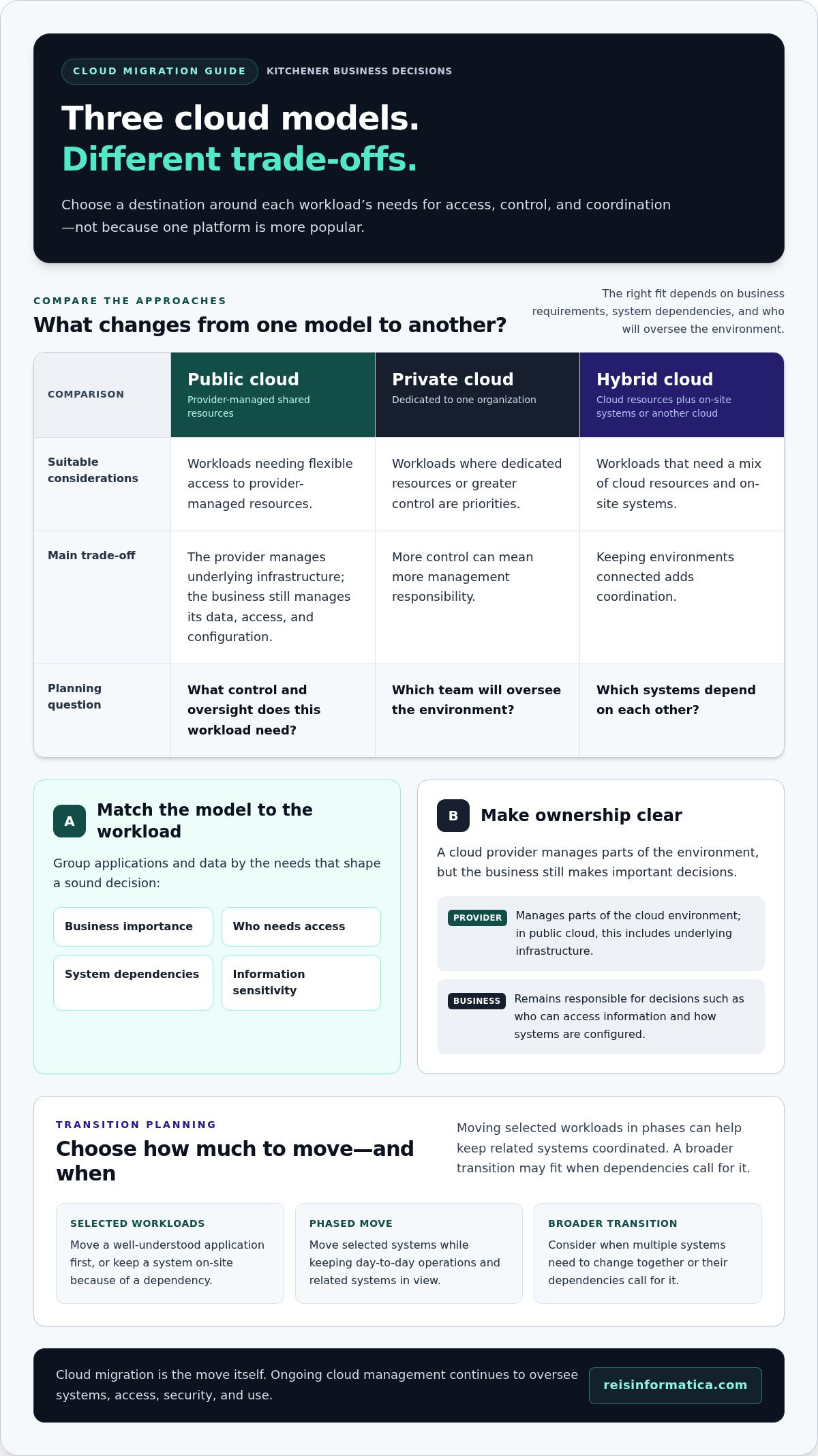
Cloud environments come in different forms. A public cloud uses computing resources shared across customers and managed by a provider. A private cloud is set up for one organization, offering more dedicated control. A hybrid cloud combines cloud resources with on-site systems or another cloud environment. These are deployment models, not migration plans. Migration is the move itself; ongoing cloud management covers the continuing work of overseeing systems, access, security, and use. Cloud computing provides a broader introduction to these models.
Which business needs can cloud migration address?
A cloud move may support flexible access for staff working across locations, make it easier to adjust computing resources as demand changes, or reduce reliance on equipment maintained on-site. It can also help a business respond to changing operational needs, such as replacing an aging system. Results depend on the workload, its design, how the environment is configured, and how it’s managed afterward. Migration alone doesn’t guarantee lower costs, stronger security, or better performance.
What should leaders assess before moving systems?
Start with business impact. Identify which applications are critical, who uses them, what data they handle, and which systems or processes they depend on. Consider operating hours, acceptable disruption, and any practical limits on when changes can happen. This gives decision-makers a clearer basis for comparing options and deciding what should move, stay in place, or be reviewed further. A business-first assessment keeps the cloud decision tied to day-to-day priorities.
Compare Cloud Migration Approaches for Your Kitchener Organization
There’s no single migration model that fits every business. A Kitchener organization might move a well-understood application first, keep a system on-site because of a dependency, or plan a broader transition when multiple systems need to change together. The right destination and timing depend on business requirements, not on which platform is most popular.
How do you match a migration approach to workloads?
Group applications and data by business importance, who needs access, what other systems they rely on, and how sensitive the information is. For example, a workload used by staff across locations may have different access needs from a system tied closely to on-site equipment. Moving selected workloads in phases can help keep related systems coordinated; a broader transition may make sense when dependencies call for it.
Approach | Suitable considerations | Trade-offs and planning questions
Public cloud | Workloads needing flexible access to provider-managed resources. | The provider manages underlying infrastructure, while the business still needs to manage its data, access, and configuration. What control and oversight does the workload need?
Private cloud | Workloads where dedicated resources or greater control are priorities. | More control can mean more management responsibility. Which team will oversee the environment?
Hybrid cloud | Workloads that need a mix of cloud resources and on-site systems. | Keeping environments connected adds coordination. Which systems depend on each other?
What are the practical trade-offs of each cloud model?
In any model, using a cloud provider doesn’t transfer every responsibility. The provider manages parts of the environment, while the business remains responsible for decisions such as who can access information and how systems are configured. That division should be clear before migration begins. Mission Cloud’s Cloud Migration Best Practices also highlights planning and risk management as considerations for a more deliberate transition. Reis Informatica’s cloud services can be considered alongside those planning needs.
Plan a Lower-Risk Cloud Migration in Kitchener
A controlled migration starts before anyone moves data. For cloud migration services Kitchener businesses can rely on, readiness means having a clear view of what’s changing, who owns each decision, and how the team will confirm systems are working afterward.
Migration readiness means documented workloads, dependencies, protections, and validation criteria. Use that foundation to guide the transition:
- Assess workloads: Record what each application does, who uses it, and how important it is to daily operations.
- Plan dependencies: Map connections between applications, data, users, and on-site systems.
- Prepare safeguards: Confirm backups, access controls, and a practical rollback plan.
- Migrate and validate: Move according to the agreed plan, then test access, data, and key workflows.
- Monitor: Track issues and performance after the move, with a named owner responsible for follow-up.
How can a business prepare for downtime and data risks?
Identify which operations must stay available and agree on acceptable disruption windows with the people who run them. A system supporting essential daily work may need a different schedule from one used less often. Decide who approves changes, who communicates them to staff, and how updates will reach affected teams. Backups, access controls, and testing help protect information and reveal problems; rollback planning gives the team a defined response if a move doesn’t pass validation.
What should happen after workloads move?
Migration isn’t complete just because a system starts in its new environment. Check that the right users can access it, test important tasks with staff, and monitor for issues that weren’t apparent during initial testing. Make sure users know what has changed and where to report problems. Assign an owner to triage issues and coordinate fixes so concerns don’t fall between teams.
Reis Informatica connects cloud planning with ongoing business technology needs. Explore cloud services as part of planning a transition that supports operational continuity.
Choose Cloud Migration Services in Kitchener That Support the Whole Business
A sound decision considers more than where a system will run. Cloud migration services Kitchener businesses choose should connect technical choices to business goals, day-to-day responsibilities, and the support needed after the transition. Use these questions to frame the evaluation:
- Business goals: What operational need should the move address?
- Workload fit: Does each application suit the proposed environment and its dependencies?
- Security: How will data, access, and user permissions be managed?
- Continuity: How will essential work be supported during changes?
- Ongoing ownership: Who will manage, monitor, and coordinate issues afterward?
What does a business-focused migration partner contribute?
A partner should help translate technical choices into practical business decisions. That means explaining trade-offs clearly, connecting workloads to operational priorities, and making responsibilities visible before changes begin. Cloud planning also needs to account for managed IT and cybersecurity, since access, protection, and ongoing support remain important after a workload moves. Reis Informatica’s cloud services can be considered alongside those broader needs.
How can Kitchener leaders take the next step?
Bring together a concise picture of your current systems, the goals behind a potential move, known constraints, and the people who will make or approve decisions. Include operational concerns, such as which teams rely on each system, and security questions about data access and protection. This gives the discussion a useful starting point without assuming that every workload should move.
Reis Informatica also provides managed IT and cybersecurity services, which can help leaders consider cloud decisions in the context of ongoing technology and security responsibilities. If you’re weighing a cloud transition for your Kitchener business, discuss your goals with Reis Informatica to explore the considerations that matter to your organization.
Make Your Next Cloud Decision With Confidence
A cloud transition doesn’t have to be an all-or-nothing decision. Treat it as a business choice you can shape around current priorities, then revisit as your systems, teams, and operating needs change. That keeps future decisions grounded in what your organization actually needs, rather than in assumptions about what every business should move.
As you consider cloud migration services Kitchener businesses can use, focus on a clear first step: identify the decision your organization needs to make now. It might be whether to move one workload, retain an existing system, or clarify who will own ongoing cloud oversight. A focused conversation can turn that question into a practical path forward without committing to a broader change before you’re ready.
Reis Informatica works with businesses on cloud services and related technology planning. Plan your next cloud decision with Reis Informatica, and take the next step with a clearer view of your priorities.
Frequently Asked Questions
What does a cloud migration service include?
Scope can vary, so agree on what the project will and won’t cover before work begins. For example, clarify whether it includes reviewing software licences, identifying data that no longer needs to be transferred, and documenting who will own decisions about each system. These details help a business compare cloud migration services Kitchener organizations may consider and avoid leaving important project responsibilities undefined.
How long does a cloud migration take for a business?
There’s no standard timeline. The estimate can change if older software needs compatibility work, data needs cleanup, or project decisions require approval from several teams. Ask for a schedule that separates assessment, preparation, the move, and acceptance checks, with the assumptions behind each stage made clear. That makes it easier to see what could affect timing and plan staff involvement without relying on a blanket estimate.
Is cloud migration disruptive to daily business operations?
It can affect how employees access familiar tools, even if core work continues. Staff may need to use a different sign-in process, reconnect a business application, or adjust a routine that depended on a local file location. Identify these user-facing changes in advance and give teams a simple way to get help. A small group of representative users can also flag confusing steps before the change reaches everyone.
Which cloud migration approach is best for a small or mid-sized business?
Business size alone doesn’t determine the right approach. Consider how much ongoing oversight your team can take on, who will make configuration decisions, and whether the workload requires specialized control. A business with limited internal IT capacity may value a straightforward operating model, while another may prioritize more direct control. Compare the responsibilities each option creates, not just its technical features.
How can Kitchener businesses protect data during cloud migration?
Reduce unnecessary exposure by deciding which information truly needs to move and removing outdated copies where appropriate. Use protected transfer methods, limit temporary copies, and keep a record of significant data-handling steps so the team can investigate an unexpected issue. Kitchener organizations should also document where information is intended to reside and who is responsible for managing it after the transition.