
What if your monthly software bill was actually a hidden security risk? With 92% of Canadian companies now operating in the cloud, Microsoft 365 licensing for business has become more than just a line item on a spreadsheet. It’s easy to feel overwhelmed by constant updates and the July 1, 2026, price increases for Basic and Standard plans. You want your team to have the best tools. However, you don’t want to overpay for features your staff won’t use or leave your data vulnerable because of a confusing tier system.
We understand that you need clarity to make the best decisions for your organization’s growth. This guide will help you find the right balance between productivity and protection by breaking down the 2026 pricing and feature sets. We’ll show you how to mix and match licenses to save money while ensuring your sensitive data stays secure. You’ll walk away with a clear roadmap to optimize your tech stack; this gives you the peace of mind to focus on your core business goals.
Key Takeaways
- Understand the 300-user limit that separates “Business” plans from “Enterprise” options to ensure your licensing structure scales smoothly as your team grows.
- Learn the critical differences between cloud-only access and desktop applications to provide your staff with the right tools without overpaying for unused features.
- Discover how to use Microsoft 365 licensing for business as a security foundation, utilizing advanced tools like Microsoft Intune to protect data on lost or stolen devices.
- Identify a clear strategy for finding “ghost licenses” and conducting quarterly audits to reclaim your budget and stop paying for former employees’ software seats.
Understanding the Microsoft 365 Licensing Landscape for Business
Microsoft 365 licensing for business is the foundation for modern Canadian business operations in 2026. It is no longer just about getting an email address or a copy of Excel. Instead, it represents a shift toward a digital workspace where security and productivity are joined together. When you select a license, you aren’t just buying a software download; you’re investing in a managed ecosystem that protects your company data while your team works from anywhere.
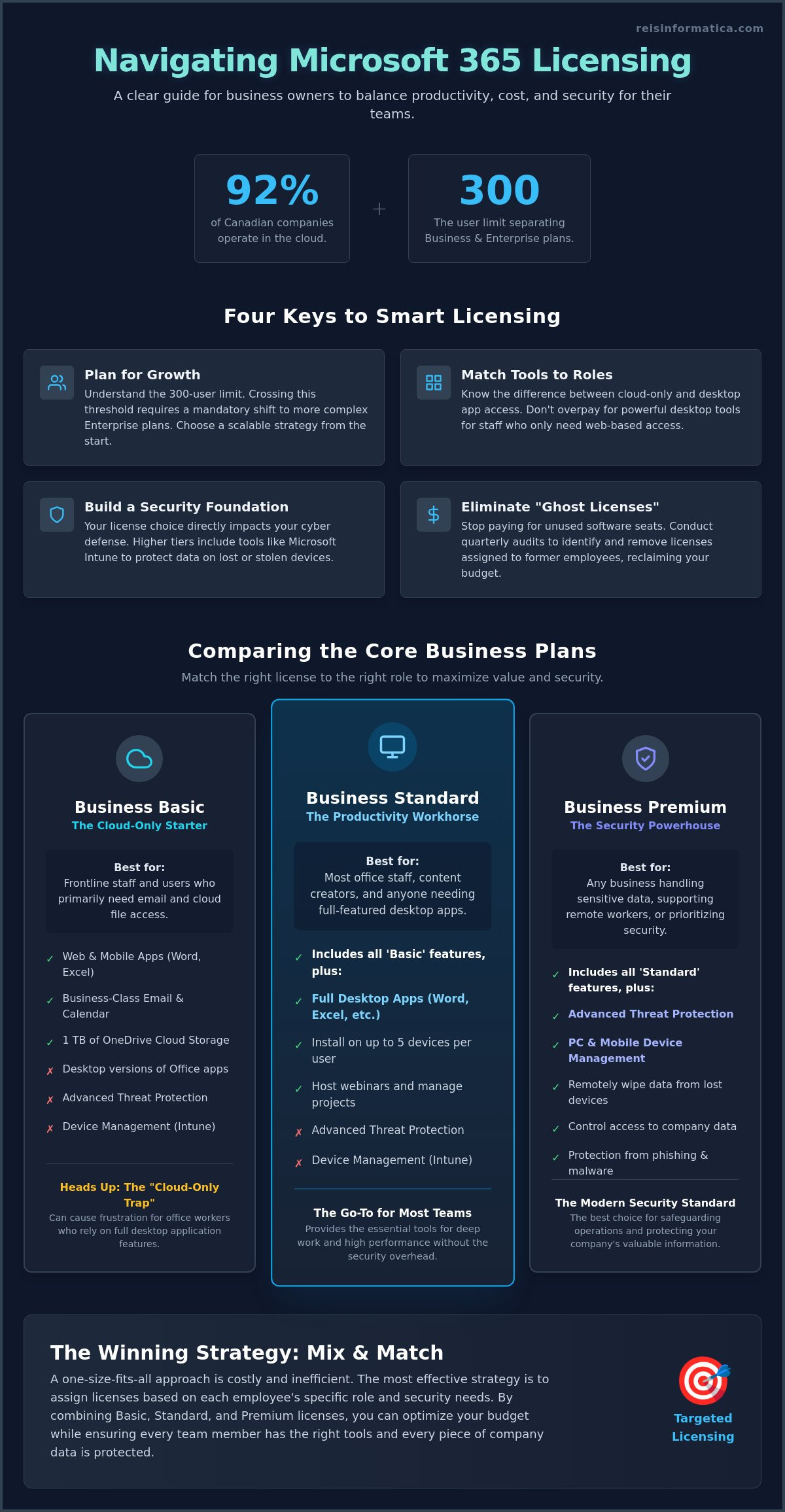
One of the most critical factors for Canadian leaders to understand is the 300-user limit. Microsoft strictly separates its offerings into “Business” and “Enterprise” tiers. If your organization is growing, hitting that 301st employee requires a mandatory shift to Enterprise plans. Choosing the wrong license early on can lead to operational friction and unnecessary costs as you scale. It’s about finding the right fit for your current team while keeping an eye on your future growth goals.
The Shift from Office 365 to Microsoft 365
The history and evolution of Microsoft 365 shows a clear transition from simple office tools to a security-first platform. In the past, you bought Office 365 primarily to write documents. Today, the name change reflects a move toward a holistic “secure cloud” environment. You are effectively buying a seat in a protected network where every file, login, and device is guarded by advanced cloud technology.
Who are the Business Plans Designed For?
These plans are specifically built for organizations with 1 to 300 employees. Whether you are operating in Kitchener, Waterloo, or anywhere else in Canada, these tiers offer the agility that small and medium-sized teams need. Because managing these licenses can become complex as you add more staff, many leaders use this guide to understand what managed IT services are and how they help maintain these ecosystems. This allows you to focus on your business while experts handle the technical configurations.
Comparing the Tiers: Business Basic, Standard, and Premium
Choosing the right Microsoft 365 licensing for business often feels like a balancing act between budget and functionality. While Microsoft offers several options, the most common choices for Canadian SMEs are Business Basic, Standard, and Premium. Each tier serves a specific purpose, but selecting the wrong one can lead to frustration or security gaps. It’s about matching the tool to the role rather than applying a one-size-fits-all approach.
Business Basic is often seen as the entry-level choice. It’s affordable, but it comes with a catch: it’s “cloud-only.” This means your team uses web-based versions of Word and Excel. While this works well for frontline staff who only need to check email, it can be a “trap” for office workers who need the full power of desktop applications. It’s a great way to save money on specific roles, but it shouldn’t be the default for everyone.
Business Standard is the true productivity workhorse. It includes the desktop versions of the apps your team uses every day. This tier is perfect for businesses that need to maintain high performance across distributed teams. For example, cloud services allow a project manager in Calgary to co-author a complex Excel file with a colleague in Halifax in real-time without the lag sometimes found in web browsers.
Business Basic vs. Business Standard
The primary difference comes down to the user experience. Basic users are limited to their browser, while Standard users get full installations on up to five devices. Both plans provide 1TB of OneDrive storage and professional email hosting. Having a professional email is non-negotiable for brand credibility in the Canadian market. If your team spends hours each day in deep work, the desktop apps in Standard are usually worth the extra investment to avoid operational friction.
When to Step Up to Business Premium
Business Premium is quickly becoming the 2026 standard for organizations that value data security. You can review the official Microsoft 365 for Business plan comparison to see the technical specs, but the real value is in protection. There is a “tipping point” where basic apps aren’t enough to safeguard your operations. Growing businesses in Mississauga and Milton are moving to Premium to gain advanced threat protection and remote device management. If you are concerned about your current security posture, exploring cybersecurity services can help you determine if your licensing aligns with your risk level.
The Security Factor: Why Licensing Impacts Your Cyber Defence
Many leaders view software as a tool for work, but in 2026, your choice of Microsoft 365 licensing for business is actually your first line of cyber defence. There is a significant security gap in basic plans that often goes unnoticed until a breach occurs. Moving beyond simple productivity means understanding how your license protects your company’s digital perimeter. While managing Microsoft 365 subscriptions and licenses can seem like a back-office task, it is the foundation of your risk management strategy.
Microsoft Defender for Business is a prime example of this protection. It is far more than just a standard antivirus. It provides endpoint detection and response; this means it doesn’t just block known viruses, it watches for suspicious behavior that could indicate a ransomware attack. This level of vigilance is built into the Premium tier, providing enterprise-grade security for smaller teams.
The power of Microsoft Intune adds another layer of physical security. Imagine an employee loses their laptop at a café in London or during a commute in Kitchener. With the right license, your IT team can remotely wipe that device before a thief can access sensitive files. This prevents a simple accident from turning into a full-scale data breach. For a more detailed look at these tools, you can explore our Microsoft 365 security guide.
Mitigating Modern Risks with Premium Licensing
Advanced licensing is the cornerstone of a modern cybersecurity services strategy. One of the most effective tools is Conditional Access. This ensures only the right people can access company data from approved locations and healthy devices. It acts as a digital gatekeeper, stopping unauthorized logins even if a password is stolen. It’s a proactive way to manage access without slowing down your team.
Identity protection is vital because compromised passwords remain a leading cause of breaches. Premium licenses include features that flag “risky” logins, such as someone trying to access your files from a different country minutes after you logged in from Ontario. Canadian businesses must prioritize these features. They are often required to meet cyber insurance standards and industry compliance regulations. If you want to ensure your operations are fully protected, book a security consultation with our experts today.
Optimizing Your Investment: How to Audit and Manage Licenses
Managing Microsoft 365 licensing for business isn’t a “set it and forget it” task. If you don’t keep a close eye on your subscriptions, you’ll likely fall victim to the “Ghost License” problem. This happens when businesses continue paying for seats assigned to employees who left the company months ago. Over time, these unused licenses drain thousands of dollars from your IT budget without providing any value. Conducting a quarterly audit ensures every dollar you spend translates to active productivity and protection.
You don’t have to give every staff member the same plan. Mixing and matching licenses is one of the smartest ways to optimize costs. For instance, your office-based leadership might need the advanced protection of Premium, while seasonal staff or frontline workers might only require the web-based tools of Basic. This tailored approach keeps your team equipped without overspending on features they won’t use. This is where managed IT services provide immense value. An external partner provides the oversight needed to keep costs predictable and your ecosystem lean.
A Checklist for License Optimization
To get started, follow these steps to review your current environment:
- Review User Roles: Match each employee’s daily tasks to the specific features of Basic, Standard, or Premium.
- Check Usage Metrics: Identify licenses that haven’t been logged into for 30 days or more.
- Centralize Management: Ensure all licenses are purchased through one portal to prevent “shadow IT,” where different departments buy software independently.
Centralized management isn’t just about saving money; it’s about closing security gaps. When licenses are scattered, it’s easy to lose track of who has access to your data. Working with a local Canadian partner in Waterloo or Cambridge adds a layer of strategic value. A nearby expert can conduct regular reviews to ensure your Microsoft 365 licensing for business stays aligned with your evolving goals. This proactive approach turns your software from a recurring expense into a finely tuned business asset.
Take Control of Your Digital Workspace
Managing Microsoft 365 licensing for business doesn’t have to be a source of stress. By now, you understand that the right license is a strategic shield for your data, especially with the 2026 price changes on the horizon. Remember that you can mix and match tiers to fit specific roles; this allows you to maximize productivity without paying for features your team doesn’t need. Regularly auditing your environment will also prevent “ghost licenses” from draining your budget while keeping your security posture strong.
As a Microsoft Gold Partner with local support across eight Canadian hubs, Reis Informatica specializes in cybersecurity-first IT management. We help you bridge the gap between technical complexity and practical business results. Our team is ready to ensure your operations are secure, compliant, and cost-efficient. Let Reis Informatica audit your Microsoft 365 environment for security and cost-savings today. We look forward to helping your business thrive in a secure and predictable cloud environment.
Frequently Asked Questions
Can I mix and match different Microsoft 365 business licenses?
Yes, you can absolutely mix and match licenses within your organization. This is a smart way to manage your Microsoft 365 licensing for business expenses. You might give your frontline staff Business Basic for email and web apps, while your executive team uses Business Premium for enhanced security. This flexibility ensures every employee has the tools they need without your company paying for unnecessary features.
What is the main difference between Microsoft 365 Business Standard and Premium?
The primary difference is the level of security and device management. While both tiers offer desktop apps like Word and Excel, Business Premium includes advanced tools like Microsoft Intune and Microsoft Defender for Business. These features allow you to remotely manage devices and protect against sophisticated cyber threats. If your team handles sensitive data or works remotely, the move to Premium is usually the right strategic choice.
Does Microsoft 365 licensing include a backup for my data?
No, Microsoft doesn’t provide a comprehensive backup of your data. They’re responsible for keeping the service available, but you’re responsible for the data itself. If a file is accidentally deleted or corrupted by ransomware, Microsoft’s standard tools might not be able to recover it after a certain period. Most Canadian businesses use a dedicated third-party backup service to ensure their information is always recoverable.
How do I know if I need an Enterprise (E3 or E5) license instead of a Business plan?
The most obvious sign is your headcount. Business plans are limited to a maximum of 300 users. If your team grows beyond that number, you’ll need to move to Enterprise plans like E3 or E5. Additionally, if your organization requires complex compliance features or advanced data analytics that aren’t available in the Business tier, an Enterprise license might be necessary for your operations.
Can I change my Microsoft 365 license tier later if my business grows?
Yes, you can change your license tier at any time. This flexibility is one of the best features of Microsoft 365 licensing for business. You can start with a lower tier and upgrade as your security needs become more complex or as your team grows. It’s a simple process that allows your technology to scale alongside your organization without any downtime for your employees.