What if vulnerability scanning for business Waterloo teams isn’t just about finding flaws, but deciding what to fix first? A scan can flag outdated software, misconfigurations, and other potential weaknesses. The report is only useful, however, when your team can decide what matters and take action without losing sight of day-to-day operations.
If you’re unsure what a scan checks or how to interpret its findings, start by looking at its scope. Results depend on which systems are included and how the scan is performed. A finding also needs context: not every alert presents the same risk to your systems, information, or business operations.
This guide explains what vulnerability scanning can and can’t tell you, what to agree on before a scan, and how to turn findings into prioritized, trackable work. You’ll learn how to connect technical issues to business impact, so your team can focus on practical security improvements rather than treating every alert as equally urgent.
Key Takeaways
- For vulnerability scanning for business Waterloo, define which systems are in scope so the results cover the assets your business needs to assess.
- Prioritize findings using business exposure, asset importance, and existing safeguards, not severity alone.
- Before a scan, identify asset owners and agree on timing, communication, access, exclusions, and operational safeguards with the technical provider.
- When comparing support, ask how findings will be explained, what remediation guidance is included, and whether completed fixes can be verified.
What Vulnerability Scanning Means for a Waterloo Business
Vulnerability scanning is an automated check of systems within an agreed scope to identify potential security weaknesses that may need review or remediation. For a business, vulnerability scanning for business Waterloo teams can provide a clearer view of technical issues, but the scan itself doesn’t resolve them. A vulnerability scanner checks systems for signs of known weaknesses and produces findings for someone to assess.
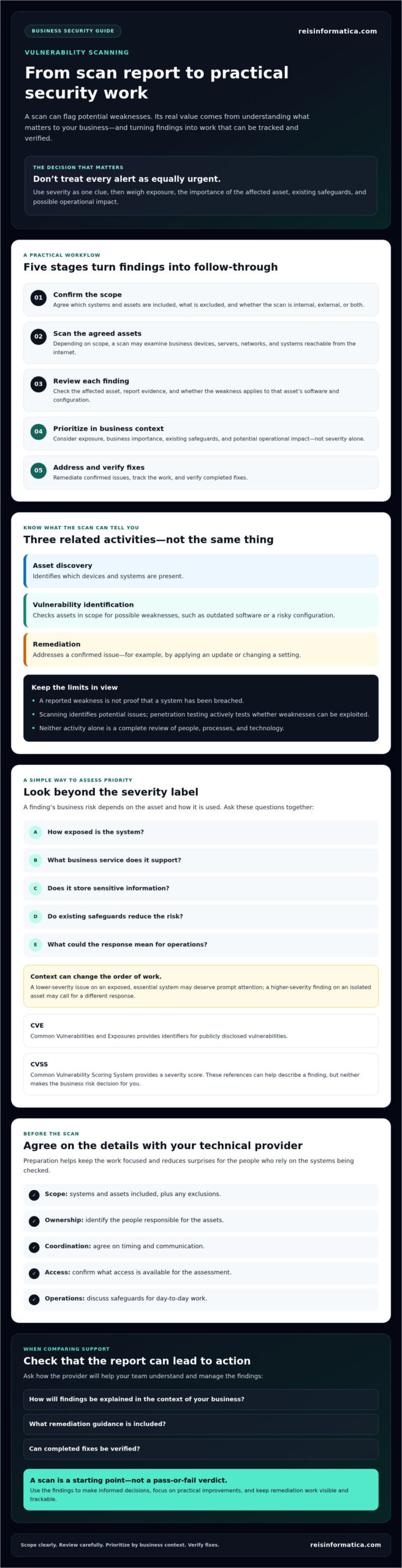
It helps to distinguish three related activities. Asset discovery identifies which devices and systems are present. Vulnerability identification checks assets in scope for possible weaknesses, such as outdated software or a risky configuration. Remediation means addressing a confirmed issue, for example by applying an update or changing a setting. These activities can form part of a wider security process, but they are not interchangeable.
What can a business vulnerability scan examine?
Depending on the agreed scope, a scan may examine business devices, servers, networks, and systems reachable from the internet. Coverage depends on which assets are included, the access available to the person or tool performing the scan, and the assessment method. Before work starts, confirm the assets and systems included, any exclusions, and whether the scan is internal, external, or both.
What scanning does not prove on its own
A reported weakness isn’t proof that someone has breached a system. It points to a potential issue that needs interpretation and, where appropriate, validation. Scanning is also different from penetration testing, which actively tests whether weaknesses can be exploited. Neither activity on its own is a complete review of your people, processes, and technology.
For Waterloo business leaders, a scan is a starting point for informed decisions, not a pass-or-fail verdict. Findings need context before they can guide security improvements.
How Vulnerability Scanning Findings Are Identified and Prioritized
A useful process moves from scope confirmation to scanning, review, prioritization, and verification of fixes. That sequence turns a technical report into work that owners can track. Severity helps indicate urgency, but it is only one factor in deciding what to address first.
Before assigning work, check the affected asset, the evidence in the report, and whether the weakness applies to that asset’s software and configuration. Then consider how exposed the system is, what business service it supports, and whether existing safeguards reduce the risk. This review can help prevent wasted effort on an inapplicable alert and avoid overlooking a weakness affecting an important business service.
How to interpret a vulnerability report
Look for the affected asset, a description of the potential weakness, its severity, and a recommended next step. Ask the technical provider which findings are confirmed, applicable to your environment, and relevant to your business. CVE, or Common Vulnerabilities and Exposures, provides identifiers for publicly disclosed vulnerabilities. CVSS, or Common Vulnerability Scoring System, provides a severity score. Both can help describe a finding, but neither makes the business risk decision for you. A technical reference can provide background; your asset and operating context help determine what to do next.
Why scan results need business context
Consider whether an affected system supports a critical business service, stores sensitive information, or can be reached from outside the organization. A lower-severity issue on an exposed, essential system may warrant prompt attention, while a higher-severity finding on an isolated asset may call for a different response. Weigh exposure, business importance, existing safeguards, and potential operational impact rather than relying on a single score.
For help considering scan results as part of broader security planning, review Reis Informatica’s cybersecurity services and ask how cybersecurity support could fit your organization’s needs.
How Waterloo Businesses Can Prepare for Scanning and Act on Results
Preparation helps keep a scan focused and reduces surprises for the people who rely on the systems being checked. For vulnerability scanning for business Waterloo teams, as well as organizations in Kitchener, Cambridge, Mississauga, Milton, Calgary, Halifax, and London, these decisions are useful to settle with the responsible technical provider before work begins:
- Name asset owners: Identify who understands each system and who can approve or coordinate changes.
- Define scope: Confirm which devices, networks, servers, or internet-facing systems are included, along with any exclusions.
- Agree on timing and communication: Decide when the scan will take place, who should be notified, and how questions or unexpected issues will be raised.
- Confirm access and safeguards: Ask what access is needed and how potentially disruptive activity will be managed to protect normal operations.
Questions to ask before a business scan
Ask what the scan can and can’t detect, how findings will be explained, and how the provider will communicate activity that could affect a system. Clarify who to contact if the scan produces an unexpected result, and how the provider will handle assets that are unavailable or outside the agreed scope. For additional background on security planning, consult this security planning reference.
From findings to verified remediation
Use a findings register to turn each applicable result into accountable work. Record the finding, affected asset, priority, responsible owner, next action, target date, and verification status. For example, an owner can review a recommended update, coordinate its installation, and then confirm through a suitable follow-up check whether the issue remains. If a finding relates to staff practices, cybersecurity awareness guidance may offer useful context.
Reis Informatica offers cybersecurity services. Ask how its cybersecurity support may fit your wider security planning and IT operations.
Choosing Vulnerability Scanning Support for Your Waterloo Business
The right support should make scan results useful to decision-makers, not simply deliver a technical report. When comparing vulnerability scanning for business Waterloo support, consider how clearly a provider defines the assets and systems in scope, explains findings, recommends next steps, and addresses how completed fixes can be checked.
What to confirm with a cybersecurity provider
Before engaging a provider, ask how they determine which assets are included, how findings are prioritized, and who will explain the results to business leaders. Clarify what the service covers and what it doesn’t. Ask whether remediation planning, follow-up scans, and ongoing monitoring are included or separate, and who is responsible for each step. Clear answers help you plan ownership, effort, and expectations.
Consider how scanning fits with your wider security measures. It can help identify potential weaknesses, but it doesn’t replace access controls, software updates, backups, staff awareness, or a response plan. Your business may also benefit from reviewing related network security guidance and cybersecurity awareness guidance as part of a broader approach.
When to connect scanning with wider IT planning
Bring findings into broader technology planning when fixes affect business-critical systems, compete for limited resources, or require coordination across teams. Clear ownership and priorities can help leaders balance security improvements with continuity and other technology needs. If strategic oversight is relevant, Reis Informatica’s fractional CIO guide may provide further context.
Reis Informatica offers cybersecurity services, managed IT services, and IT strategy and leadership support. Ask how these services may relate to your security and technology priorities, and clarify the scope of any vulnerability scanning or remediation support you’re considering.
Make Scan Findings Part of a Practical Security Plan
A vulnerability scan is most useful when it leads to clear, owned action. Define what’s in scope, review each finding in context, and set priorities based on exposure and the importance of affected systems. Then assign next steps, track progress, and verify whether completed fixes have addressed the issue.
For vulnerability scanning for business Waterloo, keep expectations clear: a scan can highlight potential weaknesses, but it doesn’t resolve them or replace other security measures. Before choosing support, ask how results will be explained and whether remediation planning or follow-up verification is included.
Reis Informatica offers cybersecurity services to businesses. Contact Reis Informatica to discuss your cybersecurity needs and ask what support is available for your business.
Frequently Asked Questions
What is vulnerability scanning for a business?
Vulnerability scanning is an automated method for identifying potential weaknesses in business systems included in an agreed scope. For vulnerability scanning for business Waterloo, treat the results as a starting point, not a complete security decision. Review findings for accuracy, prioritize them according to business risk, assign follow-up work, and verify fixes. A scan doesn’t repair issues or prove that a system has been breached.
Is vulnerability scanning safe for business systems?
Potential impact depends on which systems are scanned, how the scan is configured, and when it runs. Before scanning, confirm the scope, exclusions, access requirements, timing, and operational safeguards with the provider. Discuss extra precautions for critical systems and agree how unexpected issues will be communicated. Don’t assume every scan is risk-free; ask how the planned approach could affect your specific environment.
How often should a business run vulnerability scans?
There’s no universal scanning schedule that fits every organization. The right cadence can depend on changes to business assets, how exposed systems are, internal risk decisions, and any applicable requirements your business has independently confirmed. Whether your organization operates in Waterloo, Kitchener, Cambridge, Mississauga, Milton, Calgary, Halifax, or London, ask a qualified provider to help define and document a schedule that fits your environment.
Does vulnerability scanning replace penetration testing?
No. These activities answer different questions. Vulnerability scanning checks systems within an agreed scope for potential known weaknesses. Penetration testing goes further by assessing whether selected weaknesses can be exploited under defined conditions. Neither is a complete substitute for the other, and neither replaces broader security planning. Discuss your objectives with a qualified provider to determine which approach, or combination of approaches, fits your needs.
What should a business do after a vulnerability scan?
First, validate each finding and consider its relevance to your systems and business operations. Then prioritize the work, assign an owner, and plan an appropriate remediation step. Track progress and verify completed fixes through a suitable follow-up review. If a finding is unclear, ask the provider what evidence supports it and what action is recommended before treating it as a confirmed risk.