
What if the safest patching plan isn’t the one that updates every system at once? Granular patch management prioritizes updates according to security risk, business impact, and operational readiness. It helps teams focus on the patches that matter most without treating every system the same.
It’s understandable to feel caught between two risks: delaying an important security update or deploying it too quickly and disrupting essential applications or workflows. When patch status is spread across business systems, it can also be difficult to see what’s been addressed and what still needs attention.
This guide explains what makes patch management granular and how a risk-based approach differs from blanket or ad hoc updates. You’ll learn how factors such as active threats, system importance, and readiness can help determine what to patch first.
We’ll also cover practical ways to make deployment safer and more visible, including testing, staged rollouts, clear responsibilities, and status tracking. The result is a more deliberate process that supports cybersecurity while helping your business maintain continuity.
Key Takeaways
- Use granular patch management to prioritize updates based on the risk to your business, not just a fixed schedule.
- Build a clear picture of which systems are affected before deciding what needs attention first.
- Use a consistent workflow to catch deployment issues early and keep patch status visible.
- Compare patching approaches by who owns the work, how decisions are explained, and how exceptions are tracked.
What Is Granular Patch Management, and Why Does It Matter to Business?
Granular patch management means deciding which updates to deploy, where, and when based on the situation, rather than applying every available patch to every system on the same schedule. A patch may fix a security weakness, correct a software issue, or improve how a system works. Granular patch management is a risk-based way to sequence relevant updates around security needs and business operations.
Patch management covers the broader process of identifying, acquiring, installing, and verifying software updates. A granular approach adds business context to those decisions. The aim isn’t to avoid updates. It’s to make informed choices about priority and timing while accounting for vulnerability remediation, continuity, application dependencies, and the people who rely on those systems.
How Is Granular Patching Different from Routine Updates?
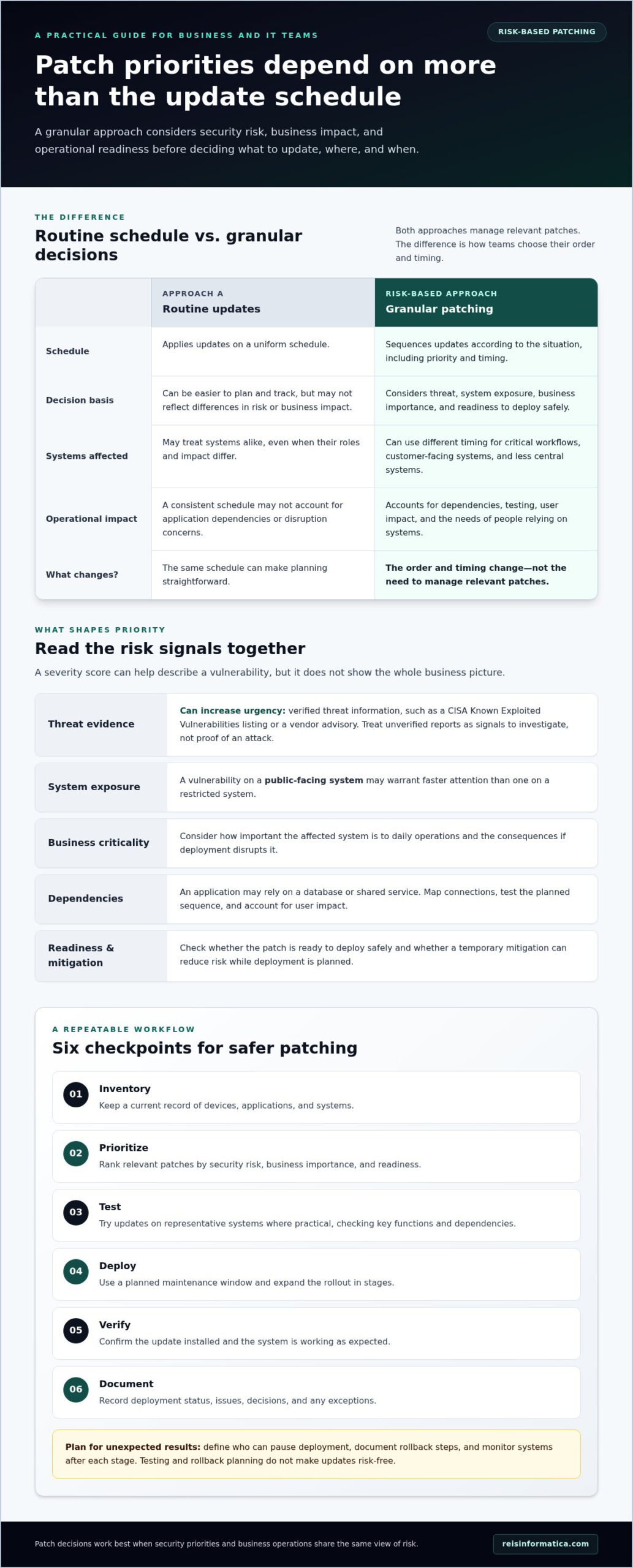
A uniform schedule can make updates easier to plan and track, but it may not reflect differences in risk or business impact. Risk-based sequencing considers which systems are exposed, how important they are, and whether a patch is ready to deploy safely. For example, an update affecting a system that supports a critical workflow may need a different rollout plan from one affecting a less central system. Prioritization changes the order and timing, not the need to manage relevant patches.
Why Should Business Leaders Care About Patch Priorities?
Clear patch status helps leaders understand where exposure remains, what’s been addressed, and whether systems are ready for an update. That visibility reduces guesswork when security urgency meets operational concerns. If an application depends on another system, or staff rely on it to serve customers, deployment may need coordination and testing. Leaders can help balance those needs by supporting timely action on higher-risk issues and giving IT teams the context and approval paths needed to limit disruption. Managed IT and cybersecurity planning can connect patch decisions with business continuity.
How Granular Patch Management Prioritizes Vulnerabilities and Systems
Effective granular patch management starts with knowing which devices, applications, and services are affected. IT teams then assess the risk and plan a deployment that accounts for both urgency and readiness. The NIST Guide to Enterprise Patch Management provides guidance on patching as preventive maintenance and the factors that can affect implementation.
The highest technical score alone doesn’t determine what gets patched first; priority depends on the threat, the affected system, and the consequences of disruption. A severity score, such as a CVSS score, can help describe a vulnerability, but it doesn’t show the whole business picture. Teams also need to consider whether a system is exposed, how important it is to daily operations, and whether a temporary mitigation can reduce risk while deployment is planned.
Which Factors Should Influence Patch Priority?
Consider severity alongside evidence of active exploitation, system exposure, and business criticality. Verified threat information, such as a vulnerability listed in CISA’s Known Exploited Vulnerabilities catalogue or a vendor advisory, can strengthen the case for urgency. Treat unverified reports as signals to investigate, not proof that a system is under attack. A vulnerability on a public-facing system may warrant faster attention than one on a restricted system, while available mitigations can help guide the interim plan.
How Do Asset Groups and Dependencies Affect Sequencing?
Group systems by business function, role, or maintenance needs so teams can plan updates around how the technology is used. For example, devices supporting a customer-facing application may need different timing from back-office systems. Dependencies matter, too: an application may rely on a database or shared service, so updating one component can affect the others. Map those connections, test the planned sequence, and account for user impact before expanding deployment.
These decisions work best when cybersecurity priorities and IT operations share the same view of risk and business impact. Business cybersecurity services can support a coordinated approach to risk management and operational continuity.
How to Build a Safer Granular Patch Management Workflow
A reliable workflow makes patching a repeatable process rather than a last-minute scramble. Granular patch management works best when teams can see what needs updating, why it matters, and what must happen before deployment. The following steps provide a practical way to organize that work:
- Inventory: Keep a current record of devices, applications, and systems.
- Prioritize: Rank relevant patches by security risk, business importance, and readiness.
- Test: Try updates on representative systems where practical, checking key functions and dependencies.
- Deploy: Use a planned maintenance window and expand rollout in stages.
- Verify: Confirm the update installed and the system is working as expected.
- Document: Record deployment status, issues, decisions, and any exceptions.
This sequence creates useful checkpoints. If an update affects a core business application during a limited rollout, teams can investigate before applying it more broadly. Testing won’t eliminate every issue, so plan for unexpected results: define who can pause deployment, identify documented rollback steps, and monitor systems after each stage. A rollback plan helps teams respond if needed, but it doesn’t make updates risk-free.
How Should Teams Test and Roll Out Patches?
Start with a representative group of systems that reflects the wider environment, then check critical applications, integrations, and user workflows. If results are acceptable, continue in stages rather than updating everything at once. Schedule work to limit disruption, communicate expected impacts, and use monitoring to spot performance or availability changes. Record what was tested and how to reverse the change if problems arise.
What Should a Patch Exception Process Include?
If a patch must be delayed, document the affected asset, reason, accountable owner, compensating action, and review point. An exception should have a clear rationale and a plan for reassessment, not become a permanent blind spot. Revisit it as risks, dependencies, or operational readiness change.
Coordinating these steps with managed IT services can connect patch decisions with broader operational planning. For a wider view of how patching fits into risk management, explore business cybersecurity services.
How to Evaluate Patch Management Support for Your Business
Compare patch management approaches by who owns the work, how decisions are made, and how clearly leaders can see progress. An ad hoc approach may leave priorities and follow-up dependent on individual requests. An internally managed process can provide direct oversight, but it relies on having the time and skills to maintain consistent records and reviews. A managed-service approach can coordinate patch oversight with broader IT operations, while clear reporting and responsibilities remain essential.
What Should a Business Review in a Patch Management Process?
Look for a documented process that explains who identifies updates, who approves deployment, and who follows up on issues. Reports should show what’s been updated, what remains outstanding, why certain patches were prioritized, and what risks or exceptions need attention. Exception records should name an accountable owner and include a reason and review point. This gives leaders a usable view of status and unresolved exposure, rather than a simple list of completed tasks.
Also review escalation paths. If a patch causes a problem or a high-priority update is delayed, teams should know who makes the decision and how the issue reaches the right business leaders. That visibility helps align granular patch management with security priorities and continuity planning.
When Can Managed IT Support Help?
Coordinating patch work takes time: teams need to maintain asset records, assess risk, schedule deployments, track exceptions, and communicate changes. Managed IT support can help reduce the internal burden of that ongoing oversight, while coordination with cybersecurity planning keeps operational decisions connected to risk management. For more context, explore this guide to managed IT services.
Reis Informatica provides managed IT services and cybersecurity services for businesses. For organizations in Kitchener, Waterloo, Cambridge, Mississauga, Milton, Calgary, Halifax, and London, coordinated IT support can help connect patch priorities with broader technology and security planning.
Make Patch Priorities Part of Your IT Plan
Effective patching isn’t about applying every update at once. It’s about understanding which systems are affected, weighing security risk against business impact, and choosing a deployment sequence that supports continuity. Granular patch management gives teams a structured way to make those decisions, while testing, verification, clear records, and regular reviews help keep the process accountable.
For business leaders, visibility matters as much as deployment. Clear reporting can show what’s been updated, what remains exposed, and where an exception needs attention. Connecting patch oversight with broader cybersecurity and operational planning helps keep urgent fixes linked to the systems and workflows they protect.
Reis Informatica provides managed IT services, supported by cybersecurity services. If you’re looking for a more coordinated approach to business technology, explore managed IT services for your business. Contact Reis Informatica to discuss a practical approach to patch management for your business in Kitchener, Waterloo, Cambridge, Mississauga, Milton, Calgary, Halifax, or London.
Frequently Asked Questions
What is granular patch management?
Granular patch management prioritizes and deploys software updates according to their risk, the importance of affected systems, and operational readiness. Rather than applying every update to every device at once, teams decide what needs attention first and plan deployment around business needs. The process still tracks relevant patches, but gives IT teams a clearer way to manage security and continuity together.
How is granular patch management different from automated patching?
Granular patch management is an approach to deciding which updates should be deployed, where, and in what order. Automated patching uses technology to carry out some deployment tasks, such as installing updates. They can work together: automation may help apply patches after teams set priorities and deployment rules. Automation alone doesn’t necessarily account for system importance, application dependencies, or the potential effect on business workflows.
How do you prioritize software patches?
Start by identifying the affected devices and applications, then assess vulnerability severity, evidence of active exploitation, system exposure, and business importance. Consider available mitigations and whether the update is ready to deploy safely. A severity score can inform the decision, but shouldn’t determine it alone. A lower-scored vulnerability affecting an exposed, business-critical system may deserve attention before a higher-scored issue with less operational impact.
Can patching disrupt business operations?
Yes. An update can affect an application, interrupt a workflow, or cause compatibility problems, so deployment should include appropriate testing and planning. Test on representative systems where practical, schedule a suitable maintenance window, and roll out in stages so teams can spot issues before broader deployment. Document rollback steps and monitor systems afterward. These safeguards help manage disruption, but no update process can eliminate every risk.
What should a patch management report show?
A useful report shows which assets are affected, which patches are installed or outstanding, and why updates were prioritized. It should also highlight unresolved risks, delayed patches, exceptions, accountable owners, and next review points. Clear reporting helps leaders understand the current picture without needing technical detail. For organizations in Kitchener, Waterloo, Cambridge, Mississauga, Milton, Calgary, Halifax, and London, consistent visibility can support coordinated IT oversight.