
What if a message that appears to come from your CEO is designed to get around your technical safeguards? Effective CEO phishing protection takes more than filtering suspicious email. A convincing request can arrive by email, text, or phone, then use urgency and authority to pressure someone into sending money or sharing sensitive data.
If you’re concerned that a targeted message could catch even careful employees off guard, it makes sense to look beyond technology alone. Email safeguards, secure account access, and a straightforward way to verify unusual requests all play a part. Employees also need to know they can pause and report a concern without being blamed for slowing things down.
This checklist shows how to assess safeguards against executive impersonation, reduce payment and data risks, and choose a response approach your team can maintain. You’ll see how to combine email authentication and account protections with clear verification and reporting steps, then decide who owns each action and how your business will respond if a suspicious request gets through.
Key Takeaways
- Learn how executive impersonation differs from broad phishing and why it can put business payments and data at risk.
- See how email authentication, account security, staff procedures, and incident response work together as CEO phishing protection.
- Compare security approaches by checking whether they address targeted executive impersonation, not just routine suspicious emails.
- Set clear ownership for verifying sensitive requests, reporting concerns, and coordinating the response when a suspicious message appears.
CEO phishing protection starts with understanding executive impersonation
CEO phishing protection means using safeguards to detect and respond to messages that impersonate or target senior leaders. The aim is to protect business decisions, not just inboxes. These messages may pressure an employee to send a payment, share sensitive information, or change access based on a request that appears to come from an executive.
Business email compromise (BEC) is a broad type of fraud in which criminals use email to deceive an organization into transferring money or sharing information. Unlike generic bulk phishing, which often sends similar messages to many recipients, BEC can be tailored to a specific business, person, or transaction. CEO fraud is one form of BEC; the Business Email Compromise overview provides more background on the wider category.
Executive impersonation is a deceptive message that borrows a leader’s identity or authority to influence a business decision. It may rely on urgency, confidentiality, or instructions to change the usual process. Because attempts can take different forms, employees need a reliable way to verify unusual requests rather than relying on one warning sign.
What makes executive impersonation a business risk?
A familiar name and convincing tone can make a request feel routine, especially when an employee is under pressure to act quickly. But a display name alone doesn’t prove who sent the message. A fraudulent request might ask for a payment, sensitive files, or account access while appearing to come from a trusted leader. That combination can put business information and operations at risk.
Which requests deserve an independent check?
Pause when a request unexpectedly changes payment details, asks for sensitive information, or gives unusual access instructions. Compare it with your established approval process. If it urges someone to skip a step or keep the request confidential, verify it through a separate, trusted channel, such as a known phone number. For practical guidance on people-focused prevention, read the cybersecurity awareness guide.
How layered CEO phishing protection combines email, identity, and people
Effective CEO phishing protection brings together four areas: email safeguards, account security, staff procedures, and incident response. Each layer addresses a different risk. Clear ownership helps your business act quickly if a suspicious message gets through.
Email filtering can flag or quarantine messages that appear suspicious before they reach employees. Domain authentication adds another safeguard. SPF identifies which mail servers are authorised to send messages for a domain, DKIM adds a digital signature that helps confirm a message’s source, and DMARC tells receiving systems how to handle messages that fail these checks. Together, these measures can make it harder for attackers to spoof your company’s domain. They won’t catch every impersonation attempt, particularly messages sent from a compromised account or a lookalike address.
No single control covers every route an impersonator might use, so effective protection depends on layers that support one another. The CEO fraud threat profile from New Jersey’s Cybersecurity & Communications Integration Cell describes how these attacks can involve research and social engineering. This is why technical safeguards need to be paired with sound decision-making.
What technical controls should leaders understand?
Multifactor authentication (MFA) asks users to prove their identity in more than one way, adding protection if a password is stolen. Conditional access can apply rules to sign-ins based on criteria chosen by the organization. Neither control replaces checking an unusual request. If your organization uses Microsoft 365, review email and account safeguards in the context of that environment. For related guidance, see our cybersecurity services.
Why do training and verification still matter?
Give employees a simple way to report concerns, and make clear who reviews reports and coordinates follow-up. Practise verifying sensitive requests through a separate, established channel, such as a known phone number, rather than replying to the message. A repeatable process helps staff pause, report, and get guidance without having to guess what to do next.
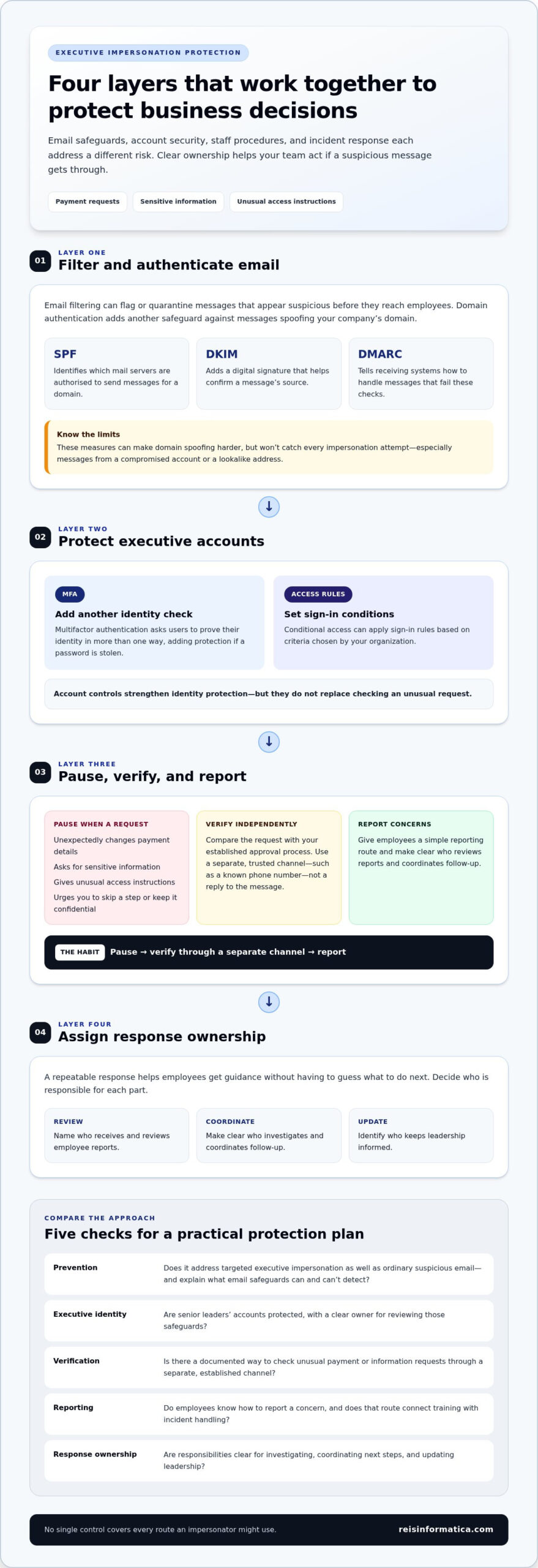
CEO phishing protection checklist for comparing security approaches
Use this checklist to compare how well an approach protects executive accounts and supports sound decisions. Check whether it addresses targeted impersonation as well as ordinary suspicious email. Look beyond feature names to the actions your team can review, assign, and sustain.
| Area | Questions to ask | What a clear approach covers |
|---|---|---|
| Prevention | Can it identify suspicious messages, including attempts aimed at executives? | Email safeguards, with a clear explanation of what they can and can’t detect. |
| Executive identity | Do senior leaders’ accounts have appropriate identity and access safeguards? | Defined account protections and a clear owner for reviewing them. |
| Verification | Is there a documented way to check unusual payment or information requests? | Staff verify requests through a separate, established channel instead of bypassing normal approvals. |
| Reporting | Do employees know how to report a concern? | A simple reporting route that connects staff training with incident handling. |
| Response ownership | Who investigates, coordinates next steps, and updates leadership? | Named responsibilities and a process for sharing useful updates with leaders. |
Look for gaps between the layers. Training has limited value if employees don’t know where to report a suspicious message. Technical alerts also need an assigned person to review them and decide what action to take. Check how concerns are escalated and what information leaders receive to make decisions.
Evaluate CEO phishing protection by its coverage, clear ownership, and readiness to respond. Compare your safeguards with the procedures your team can actually follow, then explore cybersecurity services for a broader approach to business protection.
Put CEO phishing protection into practice with clear ownership
Make CEO phishing protection a routine your team can follow, not a policy that sits unread. Start by identifying sensitive requests, such as payment changes, requests for confidential information, or access approvals. Set out how employees should verify each type of request, assign someone to receive reports, and review suspicious incidents to improve the process.
Clarify responsibilities before a concern appears. Employees should know where to report a message. A designated IT or security contact can assess it and coordinate next steps, while leadership receives updates when a business decision or broader response is needed. This gives staff a clear path and helps prevent uncertainty from delaying action.
What should happen when someone suspects CEO phishing?
Tell employees not to reply, open unexpected attachments, or follow instructions in a message they suspect is fraudulent. They should use the organization’s reporting route and preserve relevant details, such as the message and sender information, so the responsible team can review them. The assigned staff should assess the concern and follow established response procedures, including notifying the appropriate leaders when needed.
When does outside security support make sense?
Additional support can help when internal ownership, monitoring, or response responsibilities are unclear or difficult to sustain. Managed IT services can coordinate day-to-day technology support, while cybersecurity services can help connect safeguards with reporting and response processes. The aim is a workable approach that fits your people, systems, and business priorities.
Reis Informatica provides managed IT and cybersecurity services for businesses. Explore managed IT services to build a more coordinated approach to everyday technology support, security responsibilities, and response.
Make executive phishing resilience part of everyday operations
Reliable CEO phishing protection brings technology and people together. Email and account safeguards can reduce exposure, while a clear verification process helps employees pause before acting on unusual requests. Everyone should also know how to report a concern and who coordinates the response.
Use the checklist to identify gaps in prevention, executive account security, verification, reporting, and response ownership. Turn those findings into practical steps your team can follow and review. This makes protection easier to maintain as your business and its technology needs change.
Reis Informatica provides cybersecurity and managed IT services for businesses in Kitchener, Waterloo, Cambridge, Mississauga, Milton, Calgary, Halifax, and London. Explore practical cybersecurity support for your business and take a confident next step toward a more coordinated approach.
Frequently Asked Questions
What is CEO phishing protection?
CEO phishing protection is the combination of safeguards that helps a business detect and respond to messages impersonating or targeting senior leaders. These messages may try to influence payments, access permissions, or the sharing of sensitive information. Protection can include email and account safeguards, a clear way to verify unusual requests, employee reporting procedures, and assigned responsibility for reviewing and responding to concerns.
How can a business tell if an email from its CEO is fake?
Don’t rely on the sender’s display name alone, since it doesn’t prove who sent the message. Look for unexpected requests, pressure to act quickly, secrecy, or instructions to change normal approval steps. These signs don’t confirm an email is fraudulent, so verify unusual requests through a separate, trusted channel, such as a known phone number, before sending money or information.
Can multifactor authentication stop CEO phishing?
No. Multifactor authentication adds a layer of account protection by asking users to verify their identity in more than one way, but it can’t confirm whether a payment request or message is genuine. It also doesn’t prevent every form of impersonation. Combine it with email safeguards, careful handling of unusual requests, and a defined process for reporting suspicious messages.
What should an employee do after receiving a suspected CEO phishing email?
Don’t reply, open unexpected attachments, click links, or follow the message’s instructions. Report it using your organization’s designated route and preserve the message and relevant sender details for review. The assigned IT or security contact should assess the concern and follow established response procedures. If you’ve already acted on the request, report that promptly so the team can decide what steps to take.
Is phishing awareness training enough to protect executives?
No. Training helps employees recognize pressure tactics and practise safe decisions, but it works best alongside email and account safeguards, independent verification, and clear incident ownership. Businesses in Kitchener, Waterloo, Cambridge, Mississauga, Milton, Calgary, Halifax, and London can build a coordinated approach by connecting people-focused procedures with ongoing IT and cybersecurity support. Review the process regularly so staff know how to respond.