
What if the lowest Kitchener-Waterloo MSP pricing proposal costs more once you account for what it leaves out? A monthly fee can look straightforward until support limits, security tools, setup work, or larger projects appear as separate charges. The number only means something when you know what’s included and what your team will still need to manage.
This guide explains what shapes an MSP proposal, how to compare providers on equal terms, and how to plan a budget around your business’s support and security needs rather than an unsupported market average. You’ll learn how service scope, your IT environment, and the protection and strategic guidance you need can affect a proposal. You’ll also see how to spot assumptions that make quotes hard to compare, so you can assess managed IT as an operating model for day-to-day work.
Key Takeaways
- Kitchener-Waterloo MSP pricing reflects the support, security, users, devices, and infrastructure covered, so businesses can have very different needs.
- Separate ongoing managed IT from onboarding, transitions, and project work to see what may sit outside a monthly proposal.
- Compare proposals against the same scope, coverage, responsibilities, exclusions, and assumptions, not just the headline total.
- Document your priorities, current IT environment, support needs, and planned changes to shape a practical budget and tailored scope.
Kitchener-Waterloo MSP pricing: what are you paying for?
Kitchener-Waterloo MSP pricing covers an agreed scope of ongoing IT management and support, not simply access to a helpdesk. A Managed Service Provider (MSP) takes responsibility for defined technology services to help a business keep its systems reliable and aligned with its priorities. Ongoing services and one-time work are different: setting up a new office, migrating to the cloud, or completing a major upgrade may require a separate project scope.
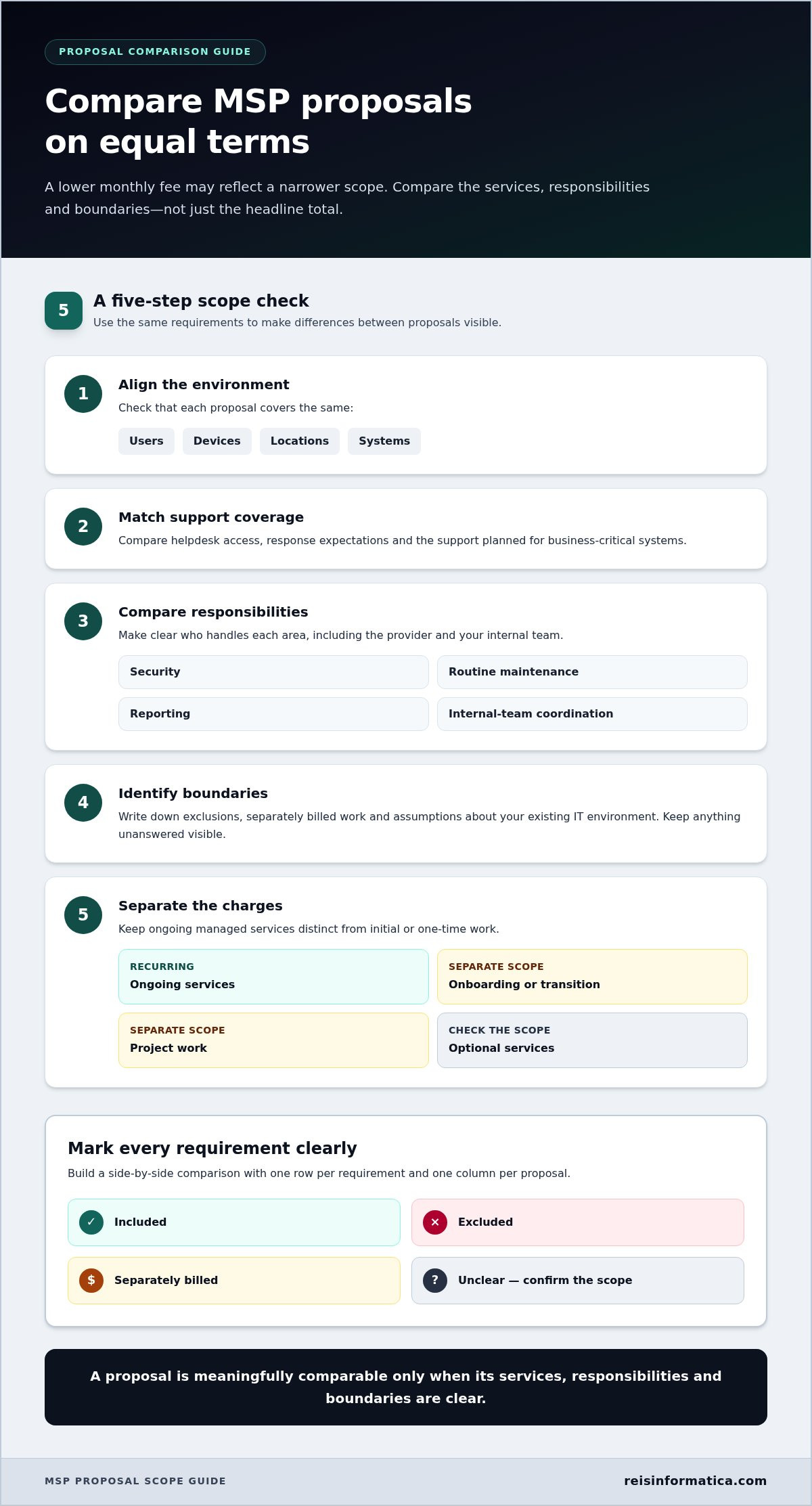
A proposal is only meaningfully comparable when its services, responsibilities, and boundaries are clear.
What does a managed IT services agreement usually describe?
An agreement sets out which services are covered, what the business and provider are each responsible for, and where ongoing support ends. It should explain how routine management and support are handled and identify project work or other separately scoped services. There is no universal package. Read the scope alongside the fee so you understand what the ongoing arrangement is designed to manage.
Why does one business need more support than another?
Support needs depend on more than headcount. A business with several locations, varied work patterns, or a mix of older systems and cloud services may need a different approach from a small team with a straightforward setup. Existing IT staff matter too. Some organizations need an external team to manage most technology, while others need support that complements internal resources.
Businesses in Kitchener and Waterloo work across a range of industries and technology environments, so a neighbouring company’s scope may not fit your own. Start with operational priorities: Which systems must stay available? What risks need attention? Where does your team need support? Clear answers help define managed IT as a planned operating model rather than an undefined helpdesk expense.
Which factors shape Kitchener-Waterloo managed IT costs?
Kitchener-Waterloo MSP pricing depends on the work included in the proposal, not just the size of your team. Scope may reflect the users and devices supported, helpdesk coverage, security needs, and condition of existing systems. A business with older on-site infrastructure may need different oversight from one that relies mainly on cloud services. The goal is to match support to operational needs rather than pay for an unclear bundle.
An MSP can act as an outsourced company that manages ongoing daily tasks, but each agreement defines those tasks differently. A clearly written managed IT services scope helps show how ongoing support fits into your operating model.
How do users, devices, and support needs affect a proposal?
The number and type of systems under management influence the work involved, as does the support your team needs to keep moving. For example, a business that depends on specialized or business-critical systems may need more careful monitoring and support planning than one with less complex day-to-day technology. Existing internal IT resources also shape responsibilities. The proposal should make clear which tasks the managed services team handles and which stay with your staff.
How should onboarding, cloud, and security work be treated?
Separate transition activities from steady-state services. Getting familiar with an environment, organizing access, or addressing existing issues may require initial work before routine management begins. Cloud setup or migration and major system changes are projects, not automatically part of ongoing support. Cloud management needs also depend on how your organization uses its services.
Security requirements shape the scope as well. The protections and ongoing oversight a business needs depend on its systems, priorities, and risk concerns. Cybersecurity services can be considered alongside managed IT, while project work and cloud requirements should be described separately. This distinction makes recurring services easier to understand and prevents one-time work from being mistaken for an ongoing inclusion.
How can you compare MSP proposals without hidden assumptions?
To assess Kitchener-Waterloo MSP pricing, compare each proposal against the same service requirements, not just the monthly total. The factors that shape managed IT costs vary with the services and responsibilities involved. A lower figure may reflect a narrower scope rather than better value.
Proposals are comparable only when their scope matches. Use this process to make differences visible:
- 1. Align the environment. Compare the users, devices, locations, and systems each proposal covers.
- 2. Match support coverage. Note helpdesk access, response expectations, and how business-critical systems are supported.
- 3. Compare responsibilities. Record who manages security, routine maintenance, reporting, and coordination with your internal team.
- 4. Identify boundaries. List exclusions, separately billed work, and assumptions about your existing IT environment.
- 5. Separate the charges. Distinguish recurring services from onboarding, project work, and optional services.
What should your comparison include?
Build a side-by-side table with one row for each requirement and one column for each proposal. Mark each item as included, excluded, separately billed, or unclear. For example, compare who handles routine security tasks, whether reporting is included, and how support applies to each location. This makes gaps easier to spot before you compare totals.
Worksheet prompt: For each proposal, record recurring services, onboarding or transition work, project work, optional services, exclusions, and assumptions. Keep unanswered items visible instead of treating them as included.
How can you assess value beyond the monthly fee?
Consider how the proposed coverage supports staff productivity, limits disruption to important work, and gives leadership useful visibility into IT operations. A defined, preventive service can support steadier operations in ways a headline total cannot show. For more context on the service model, read this managed IT services guide.
See how Reis Informatica’s managed IT team can help define a clear scope, including responsibilities and the work handled on an ongoing basis.
Build a Kitchener-Waterloo MSP budget around your business
A useful budget starts with what your business needs technology to do, not a market average. Document your priorities and current environment first, then use them to shape a written scope for a tailored proposal. This makes Kitchener-Waterloo MSP pricing more relevant to your operations and easier to plan for.
What should you prepare before requesting a tailored proposal?
Gather a practical overview. You do not need a technical inventory to start, but these details help define the work:
- Approximate number of users, business locations, and key systems.
- Recurring support challenges and technology issues that disrupt work.
- Systems or processes that are especially important to daily operations.
- Security, cloud, and IT strategy priorities, including planned changes.
- What your internal team currently handles and where it needs support.
What does a useful next step look like?
Turn your notes into a short written brief. Separate ongoing support needs from upcoming changes, such as a cloud move or major system upgrade. Then identify what matters most: keeping a business-critical system available, improving security oversight, or giving staff a clearer route to IT support. These priorities keep the scope discussion focused on business outcomes rather than a generic package.
A narrower scope may fit a business with limited support needs or internal IT capacity, while broader operational coverage can place more ongoing technology responsibilities within the managed service. Neither is automatically the right choice. Consider the level of responsibility and coverage your business wants, and which work it will continue to manage itself. A tailored proposal should make that choice clear and distinguish recurring services from transition or project work.
Businesses in Kitchener, Waterloo, Cambridge, Mississauga, Milton, Calgary, Halifax, and London can use the same practical steps: document priorities, define responsibilities, and compare proposals against a consistent scope.
Make your IT budget work for your business
A useful managed IT budget starts with a clear picture of what your business needs, not a generalized market average. Kitchener-Waterloo MSP pricing depends on the scope of ongoing support, security, and technology management in your proposal. Compare options against the same requirements, and separate recurring services from onboarding and project work so you can see what each commitment covers.
Before requesting a proposal, note your priorities, current systems, coverage needs, and planned changes. That groundwork helps shape a scope that fits your operations, whether you need focused support or broader ongoing coverage. The right approach should make responsibilities clear and help your team plan with confidence.
Managed IT is Reis Informatica’s primary service, supported by related cybersecurity, cloud, and IT strategy capabilities. Discuss managed IT services for your Kitchener-Waterloo business and take a practical next step toward well-planned technology support.
Frequently Asked Questions
How much do managed IT services cost in Kitchener-Waterloo?
There is no single figure for managed IT services in Kitchener-Waterloo. Kitchener-Waterloo MSP pricing depends on the agreed scope, supported users and systems, support coverage, security needs, and any transition or project work. For a useful budget, outline your operational requirements, then compare proposals based on the same assumptions. Reis Informatica supports businesses in Kitchener, Waterloo, Cambridge, Mississauga, Milton, Calgary, Halifax, and London.
What is usually included in an MSP monthly fee?
An MSP monthly fee covers the recurring services named in the agreement, which may include ongoing IT management and support. Inclusions differ by scope, so check which users and systems are covered, what support is provided, who handles security, and whether reporting is part of the service. Review exclusions too. Treat onboarding, projects, and optional services separately unless the proposal clearly includes them.
Why do MSP quotes vary so much?
MSP quotes vary because they may cover different users, systems, support expectations, security responsibilities, or existing IT conditions. One proposal might include an activity that another prices as project work. Put inclusions, exclusions, transition activities, and assumptions side by side, then compare them against your operating requirements. A lower headline fee does not show better value if it covers less of the work your business needs.
Is a fixed monthly MSP fee better than hourly IT support?
A fixed monthly arrangement can make recurring costs more predictable if the agreement clearly defines services and boundaries. Hourly support may suit occasional needs, but spending can change as requests arise. Neither model fits every business by default. Consider how often your team needs help, which systems are business-critical, and how unplanned or project work is handled before choosing an arrangement that suits your operations.
Does MSP pricing include onboarding and cybersecurity?
Not necessarily. Onboarding or transition work may be scoped separately from recurring managed IT, and cybersecurity responsibilities depend on the agreement. Review which protections and ongoing security tasks are included, what remains your responsibility, and what counts as separate work. Reis Informatica provides managed IT and cybersecurity services that can be aligned with your business requirements to create a clear, practical service scope.