
How much would a single misdirected email cost your firm if it contained a client’s private financial data? According to IBM’s 2023 Cost of a Data Breach Report, US businesses now face an average cost of $9.48 million per incident. You’re right to worry about your data’s safety, but you shouldn’t have to be an IT expert to protect it. Most leaders in major US cities recognize that o365 email encryption is essential for robust data privacy compliance. However, you might still feel stuck between complex Microsoft licensing tiers and the fear that your clients won’t be able to open the secure files you send.
We believe technology should be a silent partner that supports your growth, not a source of daily frustration. This guide simplifies the process by showing you how to secure your communications and meet HIPAA standards without the technical headaches. You’ll discover which Microsoft licenses actually provide the protection you need and how to set up a system that remains professional and user friendly. We’ll walk through the specific encryption types that keep your US business safe and your clients’ trust intact.
Key Takeaways
- Learn how to protect your sensitive communications with end-to-end security, ensuring that your private business data remains visible only to the intended recipient.
- Discover how to navigate Canadian compliance standards, including PIPEDA and PHIPA, to keep your firm protected against regulatory risks and data breaches.
- Understand how o365 email encryption works behind the scenes to provide an “invisible” layer of defense that secures your information without complicating your daily operations.
- Get a practical 5-step roadmap to audit your existing Microsoft 365 licensing and define data sensitivity levels for better internal control.
- See why professional managed IT support across Canada offers a “set it and forget it” approach to security, giving you total peace of mind to focus on your business.
What is O365 Email Encryption and Why Does Your Canadian Business Need It?
Canadian business owners often view email as a private conversation, but without the right protections, it’s more like a public broadcast. At its core, o365 email encryption is the process of scrambling your email content into an unreadable format. Only the person with the correct digital key can unlock and read the message. This ensures that sensitive data, from payroll details to proprietary project plans, stays between you and your recipient.
To grasp the value of this technology, you should first ask, What is email encryption? It isn’t just about hiding words. It’s about mathematical verification. When you send an encrypted message through Microsoft 365, the system uses advanced algorithms to wrap your data in a protective layer. This layer stays intact regardless of which mail provider the recipient uses, which is a massive step up from basic security measures.
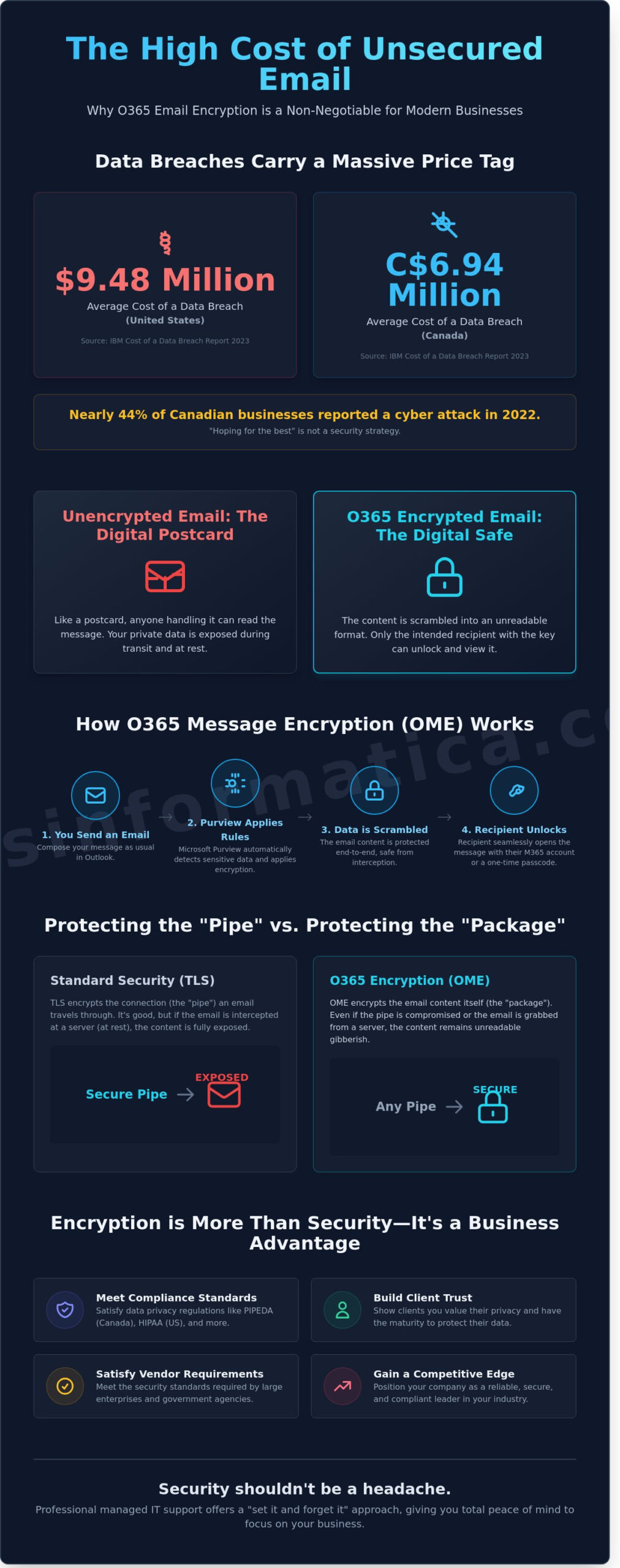
Many organizations rely solely on Transport Layer Security (TLS). While TLS is useful, it only protects the “pipe” the email travels through. If that pipe has a leak or the email is intercepted at a resting point, the data is exposed. True end-to-end encryption, provided by o365 email encryption, protects the “package” itself. Even if a bad actor manages to grab the file, they’ll see nothing but a meaningless string of characters.
Major Canadian hubs like Toronto, Ottawa, and Calgary are prime targets for these interceptions. According to the 2023 IBM Cost of a Data Breach Report, the average cost of a data breach for Canadian companies reached C$6.94 million. Hackers focus on these cities because they house the country’s financial, political, and energy sectors. If you’re operating in these regions, you’re on the radar of cybercriminals who use sophisticated phishing and “man-in-the-middle” attacks to scrape unencrypted emails for login credentials and bank details.
The High Cost of Unsecured Communication
Think of an unencrypted email as a digital postcard. Anyone handling it from the mail carrier to the person sorting the bin can read your message. For professional services in Kitchener or Waterloo, where intellectual property and legal confidentiality are the lifeblood of the business, a single leaked email can end a partnership. If a confidential contract or a client’s private health information is exposed, the reputational damage often outlasts the financial fines. In 2022, nearly 44% of Canadian businesses reported a cyber attack, proving that “hoping for the best” isn’t a viable strategy.
Encryption as a Competitive Advantage
Security isn’t just a defensive move; it’s a way to win more business. When a client in Mississauga or Milton receives an email from you with a “Secure Message” banner, it sends a powerful signal. It tells them you value their privacy and have the technical maturity to protect their interests. This builds a level of professional trust that unencrypted competitors simply can’t match. As part of a broader suite of cybersecurity services, encryption makes your firm a safer partner.
Furthermore, your business partners in Halifax or Kingston might soon force your hand. Many large enterprises and government agencies now require their vendors to prove they use encrypted communication before signing a contract. By adopting these standards now, you’re not just checking a box for IT. You’re positioning your company as a reliable, compliant leader in your local market.
How Office 365 Message Encryption (OME) Works for Non-Techies
Security often feels like a hurdle that slows down your team, but o365 email encryption is designed to be a silent partner. Think of it as a digital bodyguard that wraps your message in a protective vault the moment you hit send. You don’t need to be a coding expert to use it. Instead, Microsoft Purview acts as the central brain of the operation. This system monitors your outgoing traffic and applies security protocols based on the specific needs of your business. It ensures that sensitive information, such as a C$50,000 contract or a client’s Social Insurance Number (SIN), never falls into the wrong hands.
Microsoft provides a deep dive into how Microsoft 365 encryption handles data both while it sits in your inbox and while it travels across the internet. For your clients in London or Cambridge, Ontario, the experience is professional and seamless. They won’t see a wall of confusing code. If they’re also using Microsoft 365, the email looks like any other message. If they use a different provider, they’ll receive a secure link to view the content in a protected portal. This eliminates the friction that usually accompanies high-level security, allowing you to focus on your core operations while the technology works invisibly in the background.
The “Identity-Based” Encryption Model
Gone are the days when you had to exchange clunky digital certificates or complex passwords with your recipients. This modern system uses the recipient’s email address as the unique key. When you send a message, the system verifies the identity of the person trying to open it. This works perfectly whether your contact uses Outlook, Gmail, or a private company server. It creates a secure bridge between your office and theirs without requiring any extra software installation on their end.
Automated vs. Manual Encryption
You can choose how much control you want over your security. Manual encryption allows your staff to click a simple “Encrypt” button in the Outlook app whenever they feel a message is sensitive. However, the real power lies in automation. By leveraging modern cloud services, we can set up rules that automatically trigger encryption. For instance, if an email contains a pattern matching a credit card number or a Canadian passport ID, the system secures it instantly, even if the sender forgets to do so.
Control doesn’t stop once the email is sent. With “Do Not Forward” rules, you can prevent a recipient from sending your sensitive pricing sheets to a competitor. The “Encrypt-Only” option ensures the data is safe but allows the recipient to download attachments for their records. According to the 2023 IBM Cost of a Data Breach Report, the average cost of a breach for Canadian organizations reached C$6.94 million. Implementing these rules is a proactive way to protect your balance sheet from such devastating hits. If you’re feeling overwhelmed by these settings, our team can help you audit your current setup to ensure every loophole is closed.
This layered approach transforms your email from a vulnerable communication tool into a fortified asset. You gain the ability to track who has accessed your data and revoke that access if a business relationship ends. It’s about creating a predictable, stable environment where technology serves your goals rather than creating new risks. By using these smart features, you ensure that your business remains compliant with Canadian privacy regulations while maintaining the speed and efficiency your clients expect.
Meeting Canadian Compliance: PIPEDA and Beyond
Compliance isn’t just a checkbox for Canadian businesses; it’s a foundational element of trust. Whether you’re managing a boutique firm or a large enterprise, the Personal Information Protection and Electronic Documents Act (PIPEDA) dictates how you handle client data. In 2025, the Office of the Privacy Commissioner of Canada saw a 15% increase in reported data breaches, many of which stemmed from intercepted or misdirected emails. Implementing o365 email encryption ensures that even if an email is sent to the wrong address, the content remains unreadable to anyone without the proper authorization keys.
Regional regulations add another layer of complexity. In Ontario, healthcare providers must navigate the Personal Health Information Protection Act (PHIPA). For a clinic in downtown Toronto, sending patient records via standard email is a significant liability that could result in fines exceeding C$250,000. Microsoft 365 solves this by keeping your data residency local. By utilizing Microsoft’s data centres in Toronto and Quebec City, your sensitive information never leaves Canadian soil. This is vital for passing a compliance audit in provinces like Alberta or Nova Scotia, where public sector and private privacy laws (like PIPA or FOIPOP) are strictly enforced.
Maintaining control over your encryption keys is the final piece of the puzzle. While Microsoft manages the infrastructure, “Customer Key” options allow you to provide and control your own cryptographic keys. This level of sovereignty ensures that your business, not the service provider, has the final say in data access. It’s a proactive stance that transforms security from a technical burden into a strategic advantage for your operational continuity.
Navigating the Canadian Regulatory Landscape
PIPEDA compliance in 2026 requires that every piece of sensitive data leaving your network via email remains unreadable to unauthorized parties through end-to-end encryption. Businesses in the Waterloo tech corridor must lead in data privacy to protect the high-value intellectual property that drives our local innovation economy. For legal and financial firms in Mississauga and Milton, adopting o365 email encryption is the most effective way to guarantee client confidentiality during C$100,000+ transactions and sensitive litigation processes.
Audit Logs and Reporting
Proving to a regulator that an email was encrypted is just as important as the encryption itself. Microsoft 365 provides detailed access logs and read receipts that serve as a digital paper trail for sensitive corporate documents. Your IT strategy should leverage these reports to show exactly when a file was opened and by whom. This transparency ensures you’re always prepared for an audit, showing that your business treats data protection with the seriousness it deserves.
Implementing O365 Encryption: A 5-Step Action Plan
Setting up o365 email encryption requires more than just a single click in the admin center. It is a strategic rollout that ensures your Canadian business stays compliant with PIPEDA regulations while keeping daily workflows fast and efficient. Follow this structured five-step approach to secure your communications without disrupting your operations.
Choosing the Right Licensing
Your journey starts with a thorough license audit. Microsoft 365 Business Premium, E3, and E5 licenses all offer encryption, but they function differently. Business Premium is a solid starting point for small firms in Mississauga, costing roughly C$30.10 per user monthly as of early 2024. However, the cheapest options often lack automated classification. This leaves gaps where a tired employee might send a sensitive contract without protection. To avoid overspending on features you will not use, consult with a partner for IT services to align your budget with your actual risk profile and security needs.
Once your licensing is confirmed, you must define your data sensitivity levels. Do not treat a lunch invite the same way you treat a year-end financial audit. Categorize your information into three clear tiers to help your team understand the stakes:
- Internal: General office chatter and non-sensitive project updates.
- Confidential: Client contact details, standard business contracts, and internal memos.
- Highly Confidential: Social Insurance Numbers (SIN), health records, or proprietary trade secrets.
Automation is your best friend in this process. Create transport rules in the Exchange Admin Center to catch mistakes before they leave the building. You can set a specific rule that automatically triggers o365 email encryption if a message contains strings like “Invoice” or “Confidential,” or if it is sent to a specific external domain. This removes the burden of choice from your staff and ensures 100% compliance for your most sensitive data types by taking the human element out of the equation.
Team Training and Adoption
Even the best technology fails if people do not use it correctly. When you train your teams in Kitchener, Calgary, or Toronto, keep the language simple and relatable. Explain that the “Encrypt” button is like putting a digital wax seal on an envelope. It is not about making their jobs harder; it is about making the company unhackable. A common pitfall occurs when employees think encryption is only for attachments. They often forget the body of the email contains enough data for a sophisticated phishing attack. Data from 2023 indicates that consistent monthly micro-training sessions reduce these common errors by 40% within the first ninety days.
Building a culture of security from Halifax to Ottawa means making safety the default setting. Encourage staff to ask “Should this be encrypted?” before they hit the send button. Finally, test the recipient experience before going live across the whole company. Send test emails to external partners using different mail providers. Ensure they can open the messages easily without falling into a frustrating login loop. If your partners cannot read your mail, they will eventually ask you to send it the old way. That defeats the whole purpose of your security investment and puts your data back at risk.
Why Managed IT is the Smartest Way to Secure Your Email
Managing o365 email encryption isn’t a simple task you can just finish and ignore. It’s a living system that needs regular attention to stay effective against evolving threats. When you choose a managed IT approach, you’re opting for a “set it and forget it” benefit that lets you sleep better at night. You don’t need to be a tech expert to know your data is safe. We handle the complex backend settings and policy updates while you run your company. For business owners in London, Ontario, or Kingston, having local support makes a massive difference. You aren’t just a ticket number in a global queue; you’re a neighbor who deserves immediate, high-touch service.
Reis Informática acts as your Vigilant Partner. This means we’re always watching the horizon for new digital risks. We don’t just set up a password and walk away. Our team looks at how your staff uses email and tailors the encryption experience to fit your specific workflow. We also look at the bigger picture of your digital transformation. Modern security means integrating encryption into a total AI business solution. This ensures that as you adopt new automated tools to boost productivity, your data protection remains airtight and fully integrated.
Our team understands that IT isn’t just about computers; it’s about people and reputation. When we work with clients in Ontario, we take the time to explain the logic behind every security layer. You’ll see exactly how your investment protects your brand. Here is what that partnership looks like in practice:
- Real-time policy updates to stay compliant with Canadian privacy laws like PIPEDA.
- Automatic encryption triggers for emails containing sensitive info like SINs or financial data.
- Dedicated support teams that know your specific business infrastructure by name.
Proactive Monitoring vs. Reactive Fixes
Many IT providers wait for your phone call to tell them something is wrong. That’s a reactive model that leaves you vulnerable to expensive downtime. We focus on proactive monitoring instead. We track failed encryption attempts in real time before they turn into data breaches. If a user accidentally tries to send a sensitive file without the proper o365 email encryption settings, our system flags it instantly. This expert configuration gives you the peace of mind that your security is actually working. Businesses in Calgary and Toronto trust us with this technical heavy lifting because they know the cost of a mistake is too high. A single data breach in Canada now costs an average of C$6.94 million according to recent industry reports. We make sure you aren’t part of that statistic.
Getting Started with a Security Audit
The first step toward a secure future is understanding where your risks hide today. You can’t fix a vulnerability you don’t know exists. We start every partnership with a comprehensive security audit to find the gaps in your current setup. Whether you’re based in Milton, Mississauga, or anywhere in between, we build a customized roadmap for your specific business needs. We’ve found that 40% of small businesses have at least one major security gap they didn’t know was there. We close those gaps and provide a clear path forward. Let Reis Informática secure your business communications today so you can focus on what you do best: growing your business and serving your customers.
Take Control of Your Canadian Business Security
Protecting your firm’s data isn’t just a technical choice. It’s a legal requirement under PIPEDA and PHIPA regulations that every Canadian leader must respect. You now understand how o365 email encryption shields sensitive client details while keeping your daily operations smooth and accessible. Since 2006, our team has served as a vigilant partner for businesses in Toronto, Calgary, and Halifax. We navigate these complex security waters so you don’t have to. Our specialists handle the heavy lifting of setup and constant monitoring. This lets you focus on growing your company without worrying about a data breach costing you thousands in C$ fines or damaging your local reputation.
Managed IT experts provide the proactive defense you need to stay ahead of modern cyber threats. You don’t have to be a tech wizard to maintain a secure, compliant office. With a dedicated partner by your side, your digital infrastructure becomes a silent, efficient engine for your long-term success. Secure Your Business Email with Reis Informática today and gain the peace of mind you deserve.
Frequently Asked Questions
Is O365 email encryption difficult for my clients to open?
No, O365 email encryption is designed to be seamless for your recipients. If your client uses Outlook, the message opens just like a standard email without any extra steps. For those using other providers, they simply receive a one-time passcode via email to verify their identity. This process takes less than 30 seconds, ensuring your sensitive data stays protected without creating technical hurdles for your business partners.
Does PIPEDA require all business emails to be encrypted?
PIPEDA doesn’t mandate encryption for every single message, but it requires “comparable levels of protection” for personal data. Since the Digital Privacy Act of 2015, Canadian businesses must report data breaches that pose a real risk of significant harm. Using o365 email encryption ensures you meet these legal safeguards when handling sensitive client info. It’s a proactive step that protects your company from fines that can reach C$100,000 per violation.
What happens if I send an encrypted email to someone who doesn’t use Outlook?
Your recipients can still read your messages even if they don’t use Outlook. They’ll receive a notification email with a link to a secure Microsoft portal. From there, they can sign in using their existing Google credentials or request a one-time passcode sent to their inbox. This ensures 100 percent compatibility across different platforms while maintaining a high level of security for your outbound communications.
Which Microsoft 365 license do I need for full email encryption?
You’ll need a Microsoft 365 Business Premium, E3, or E5 license to access advanced o365 email encryption features. While Business Standard is popular, it doesn’t include the necessary Azure Information Protection (AIP) Plan 1 right out of the box. Upgrading to Business Premium provides these security tools for roughly C$30.70 per user each month. This investment covers your encryption needs and adds robust defense against modern cyber threats.
Can I retract or expire an encrypted email after it has been sent?
Yes, you can revoke access to an encrypted email at any time after it’s sent. Through the Microsoft 365 portal, you can see if a message was opened and click a button to revoke access immediately. You can also set specific expiration dates, such as 30 days, after which the content becomes unreadable. This feature is vital for maintaining control over sensitive documents that shouldn’t live in a recipient’s inbox forever.
Is Office 365 email encryption the same as a VPN?
No, these are two different security layers. A VPN creates a secure tunnel for your internet connection, but it doesn’t protect the actual data once it reaches its destination. Email encryption protects the message itself, ensuring only the intended recipient can read it. Think of a VPN as a secure armored truck and encryption as a locked safe inside that truck. You need both to ensure total infrastructure stability.
How much does it cost to implement O365 encryption for a small business in Canada?
For most Canadian small businesses, the cost is tied to the Microsoft 365 Business Premium license, which is C$30.70 per user monthly as of 2024. If you’re on a lower tier, you can add standalone encryption for about C$2.60 per user. Professional setup by a specialist usually involves a one-time configuration fee, but it prevents costly configuration errors. This small monthly spend provides peace of mind and keeps your operations compliant.