
The biggest infrastructure savings often come from managing what you already have, not simply buying less technology. Cost-effective IT infrastructure aligns hardware, software, maintenance, support and energy use with actual business needs. It also balances immediate operating savings with longer-term investment decisions.
That can be harder than it sounds. Costs are spread across equipment, licences, cloud resources and ongoing support, so a simple cut in one area can create extra work or risk elsewhere. First understand how resources are being used, then decide what to change.
This article outlines practical ways to reduce waste while protecting reliability and security. Learn how to consolidate hardware, monitor usage, review software and cloud spending, and plan short- and long-term cost reductions. Connecting each technical decision to its impact on daily operations helps you prioritize changes that support both your budget and your business.
Key Takeaways
- Spot cloud waste by comparing resource use with business needs, then focus on changes that can improve value from cloud spending.
- Assess whether consolidating servers or using virtualization can reduce unused capacity without disrupting essential workloads.
- Use asset audits and performance monitoring to identify underused equipment and make better allocation decisions.
- Build a cost plan that addresses immediate spending while considering the longer-term impact of software, maintenance and infrastructure choices.
1. What is IT infrastructure optimization?
IT infrastructure optimization aligns technology with actual workloads, business priorities and operating costs. Cloud spending shows why active management matters: estimates indicate 30% of cloud spending is wasted, and 70% of enterprises exceeded cloud budgets in 2024. A cost-effective IT infrastructure plan tracks resource use, assigns owners and adjusts capacity when demand changes. Optimization should also measure whether technology supports business results, not just whether it runs.
Comparing cloud and traditional infrastructure means looking at total cost. Physical servers require equipment, space, power, maintenance and support. Cloud services reduce the need to buy and maintain servers, but ongoing usage charges can grow. Cloud providers often use pay-as-you-go pricing, so compare Canadian providers and AWS, Azure, and Google Cloud by workload, storage, support, data location and required features, not headline price alone. Cloud hosting can scale resources with demand, while traditional web hosting commonly bundles a set hosting environment. Choose based on control, flexibility and what your site needs to do.
Both models have hidden costs. Cloud bills may include unused capacity, data movement, backups and management effort. Traditional IT can involve underused hardware, energy, repairs and replacement costs. Moving an ERP system or website to the cloud may also require upfront migration work. A gradual move lets teams test dependencies, adjust workloads and track costs before shifting more systems.
When comparing Canadian cloud options, consider applicable federal and provincial privacy requirements, sector rules and contracts. Data location, access, sensitivity and cross-border handling can affect the decision. Residency requirements depend on the organization’s obligations.
Low-cost infrastructure can create risk if it lacks reliable support, security updates, backups or sufficient capacity. Managed IT services can help oversee operations and maintenance. Canadian infrastructure grants are program-specific, with eligibility shaped by location, sector and project. Confirm the applicable criteria before including grant funding in a plan.
2. Hardware consolidation and virtualization
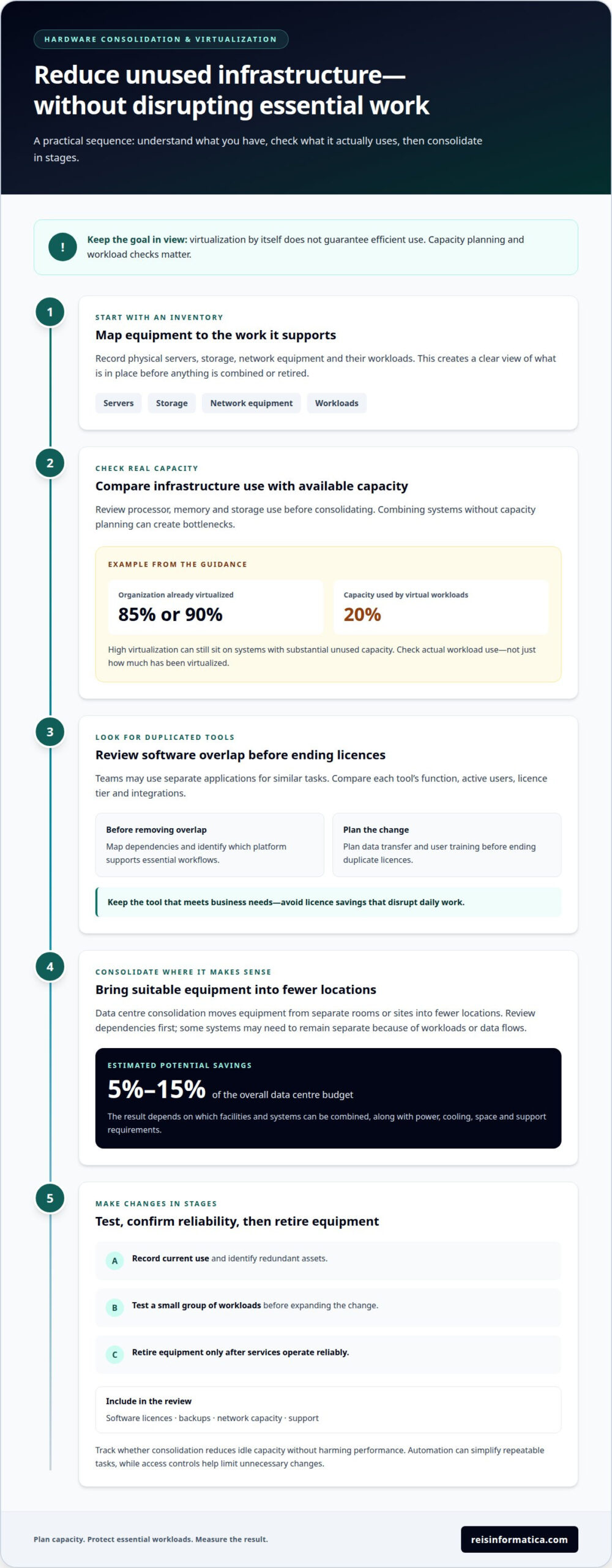
Start with an inventory of physical servers, storage, network equipment and their workloads. Virtualization lets one physical server run multiple virtual machines, so an organization can retire equipment that no longer serves a distinct purpose. Check processor, memory and storage use before consolidating; combining systems without capacity planning can create bottlenecks. One example from the infrastructure guidance describes an organization that was 85% or 90% virtualized, while its virtual workloads ran on systems using only 20% of their capacity. Virtualization alone doesn’t guarantee efficient use.
Next, look for duplicate software and overlapping tools. Two teams might use separate file-sharing applications or project platforms for similar tasks. Compare each tool’s function, active users, licence tier and integrations before removing overlap. An internal IT team or service provider can map dependencies and identify which platform supports essential workflows. Keep the tool that meets business needs, then plan data transfer and user training before ending duplicate licences. This avoids saving on licences at the cost of disrupting daily work.
Data centre consolidation brings equipment from separate rooms or sites into fewer locations. Data centre consolidation savings can range from 5% to 15% of the overall data centre budget. The result depends on which facilities and systems can be combined, plus power, cooling, space and support requirements. For example, an organization might consolidate lightly used servers while retaining separate systems where workloads or data flows require them. Review dependencies before moving equipment, and document the operational impact.
Implement changes in stages: record current use, identify redundant assets, test a small group of workloads, and retire equipment only after services operate reliably. Include software licences, backups, network capacity and support in the review. Automation can simplify repeatable tasks, such as provisioning approved virtual machines, while access controls help limit unnecessary changes. Track whether consolidation reduces idle capacity without harming performance. Use the results to guide the next hardware, software or licensing decision.
3. Infrastructure monitoring for cost and resource optimization
Track infrastructure expenses across hardware, software, maintenance, support and energy. Reviewing server capacity, storage growth and service performance monthly can reveal idle resources before renewal or expansion decisions. Pair asset records with usage data, then flag equipment that remains underused. An audit can show whether to reallocate hardware, adjust capacity or retire an asset. Track uptime and response times alongside spending so a lower bill does not conceal a service problem.
Estimated savings vary by strategy. Consolidating and virtualizing distributed IT resources is associated with estimated capital and operational cost savings of 30-50%. Optimizing resource allocation at the edge is associated with estimated bandwidth and compute usage savings of 15-30%. Monitoring and benchmarking infrastructure performance is associated with estimated capacity planning and uptime savings of 10-20%. Treat these as estimates, not guaranteed results. Workload patterns, existing equipment and implementation effort affect what an organization can achieve.
Review hardware support contracts before renewal. Third-party server, storage or network hardware maintenance is described as averaging 30%-40% less than manufacturer support contracts. Compare coverage, response terms, parts access and equipment condition, not just the fee. For older servers, weigh support costs against replacement, operational risk and the value of keeping equipment in service. Proper maintenance can extend IT asset lifespans and delay unnecessary replacement.
On-premises optimization also depends on secure, efficient facilities. Monitor server utilization, power use, cooling and storage growth, then schedule maintenance and software updates to prevent avoidable performance issues. Energy-efficient hardware can help lower IT energy costs. An asset-management system can connect equipment records with assigned teams and workloads, clarifying ownership. Review performance benchmarks regularly, document changes and compare results with operational needs. This creates a practical cycle: measure, prioritize, implement and monitor again.
4. Short- and long-term cost reduction planning
Build a cost plan around capital expenditure and operating expenses. In the short term, compare software invoices, licence counts and subscription tiers with actual use. If a team no longer needs advanced features, a lower tier may reduce spending without sacrificing required functionality. For a widely used critical service, renegotiating its price may be better than switching and retraining staff. These checks can reduce avoidable costs without cutting essential protections.
Keep security in every cost-reduction decision. Include software updates, vulnerability monitoring, firewalls and two-factor authentication in the plan rather than treating them as optional extras. Before replacing a tool or changing a deployment, map connected systems, access needs and data flows. A lower-cost option is useful only if it provides comparable capabilities and meets the organization’s security and operational needs.
For long-term planning, identify costly assets and recurring work that could be simplified. Automating routine IT operations is associated with estimated labour and maintenance savings of 20-40%. Use automation for repeatable tasks, while retaining oversight for changes that affect access, backups or business-critical workloads. Include storage, maintenance and future replacement needs in the total-cost view, not just the initial purchase or subscription.
To plan a migration, establish a baseline of current spending, system dependencies, performance needs and security controls. Group workloads by business importance, then pilot the proposed change with a lower-risk system. Review performance, user impact and ongoing expenses before expanding the deployment. Keep a rollback plan so teams can restore the previous setup if a critical function is disrupted. Compare results with the baseline and use the findings to sequence later changes. This staged approach helps manage immediate costs and longer-term infrastructure decisions without assuming the lowest upfront price offers the best value.
Reisinformatica.com
Reis Informatica helps businesses turn infrastructure cost findings into practical technology decisions. If your team is weighing cloud and on-premises workloads, reviewing ongoing IT needs or planning changes, its managed IT services and IT strategy and leadership can support the planning and operational work.
Security belongs in the plan, too. Reis Informatica’s cybersecurity services help address protection needs as infrastructure changes, while its private and public cloud services support cloud decisions. AI business solutions may also help businesses identify opportunities to improve how work gets done. The right mix depends on your workloads, existing systems, security requirements and business priorities.
For a practical discussion about reducing infrastructure waste while keeping operations aligned with business needs, contact Reis Informatica.
Make your next infrastructure decision with confidence
Infrastructure planning works best when it evolves with your business. As priorities shift, revisit whether technology still supports how your teams work and where they need more flexibility. This keeps cost-effective IT infrastructure connected to business goals instead of treating it as a one-time project.
Choose an upcoming decision, such as a renewal or planned system change, and define what a good outcome would look like for your organization. A clear goal gives your next discussion a practical starting point.
Start a conversation about your next IT priority and take a considered step toward technology that supports your business.
Frequently Asked Questions
What Makes Up IT Infrastructure Costs?
For budgeting, group infrastructure spending by purpose and timing. Separate day-to-day operating expenses from project costs, then distinguish charges tied to a specific team from shared services used across the business. Include planned equipment refreshes and the effort required to manage systems internally. This view helps leaders identify who owns each expense and whether it supports an active business requirement.
What is IT infrastructure optimization?
A disciplined approach can improve how technology supports day-to-day work. Start by setting a service goal, such as keeping a core business application responsive during busy periods. Measure performance against that goal, identify the constraint and make a targeted change. Reviewing results after each change helps teams learn what worked before applying the approach to other systems.
What is cost-effective IT infrastructure for small and medium-sized businesses?
A well-planned environment supports essential business tasks without adding complexity the team cannot manage. For example, a growing firm may standardize how employees receive devices and access shared files, making onboarding and support more consistent. A useful design can also accommodate expected growth without requiring a complete rebuild. Prioritize capabilities according to business impact, staff workflows and internal support capacity.
How much does IT infrastructure cost for a Canadian small business?
There is no single amount that fits every Canadian small business. Build a forecast from the organization’s actual requirements: users and devices, application needs, service coverage, data protection and expected growth. Separate one-time project work from recurring commitments, then model how costs change as staffing or usage changes. This gives leadership a clearer planning range without relying on an unsuitable industry average.
What are typical Canadian prices for cloud hosting, servers, networking, and storage?
Prices depend on configuration and service scope, so compare equivalent specifications rather than product labels. For cloud hosting, account for processing, storage and data transfer. For equipment, compare capacity, performance, support coverage and expected useful life. Request quotes in Canadian dollars and note whether each includes setup or ongoing support. These details make estimates more useful for budget planning.
Is cloud infrastructure cheaper than on-premises infrastructure in Canada?
The right choice depends on the workload and how the organization operates it. A seasonal business, for example, may value adjustable capacity, while a steady workload may make predictable equipment use easier to plan. Model a representative busy and quiet period, including migration and ongoing administration. Also account for existing equipment that still meets requirements, since replacing it early can change the comparison.