
A small business needs a clear response process before a cyber incident disrupts operations. Build a cyber incident response plan for your small business by assigning response roles, explaining how staff report suspicious activity, and documenting steps to contain an incident and recover systems. The Canadian Centre for Cyber Security advises organizations to test, review, and update their plans annually.
People can make sound decisions during a crisis when they already know whom to contact and what to do. This guide covers how to prepare your team, set practical response and recovery steps, test the plan, and update it regularly. Use it as a clear starting point for improving readiness without adding unnecessary complexity.
Key Takeaways
- Give response responsibilities to specific people and make sure there’s a backup contact if someone is unavailable.
- Prepare a clear way to report suspicious activity and contain affected devices before an incident spreads.
- Practise the plan with your team, then use what you learn to improve it over time.
- Identify the systems your business depends on and plan how to restore operations safely.
What is an Incident Response Plan & How to Create One?
An incident response plan gives your team practical steps to limit damage and restore operations after a cyber incident. Build it around people, separate backups, recovery actions, and applicable Canadian privacy obligations.
-
Assign Team Roles and Backup Contacts
Name a response lead, an IT contact, a senior decision-maker, and a privacy contact. The lead coordinates decisions; IT investigates affected devices, while management approves operational changes. Record each person’s work and alternate contact methods, and name a backup for every critical role. Update the list when responsibilities change, and give employees one clear contact for reporting phishing or unusual activity.
-
Isolate Backups for Business Continuity
Keep backups on infrastructure separate from the systems they protect. This helps prevent an attacker who accesses business devices from also altering recovery copies. List the essential assets to restore first, such as customer records or scheduling files, and document who can access each backup. Test the process by temporarily disconnecting main systems to see whether your team can continue critical work.
-
Restore Systems and Data from Backups
Write a recovery sequence that identifies which systems must return first and who approves each step. Before restoring data, remove malware and address the weakness that allowed access, such as compromised credentials or unpatched software. Restore from a clean backup in a controlled way, then test affected systems, verify data, and monitor devices for lingering threats before resuming normal operations.
-
Identify Applicable Breach Reporting Obligations
Include a privacy review step for PIPEDA and relevant provincial privacy laws. Reporting and notification duties depend on the organization’s jurisdiction and the information affected, so assign a privacy lead to assess the facts and determine required actions. Set a prompt assessment trigger: record when the breach was discovered, what personal information may be involved, and who could be affected. Follow the applicable law’s reporting timeline rather than assuming one deadline applies across Canada.
Is it important to Test Your Incident Response Plans?
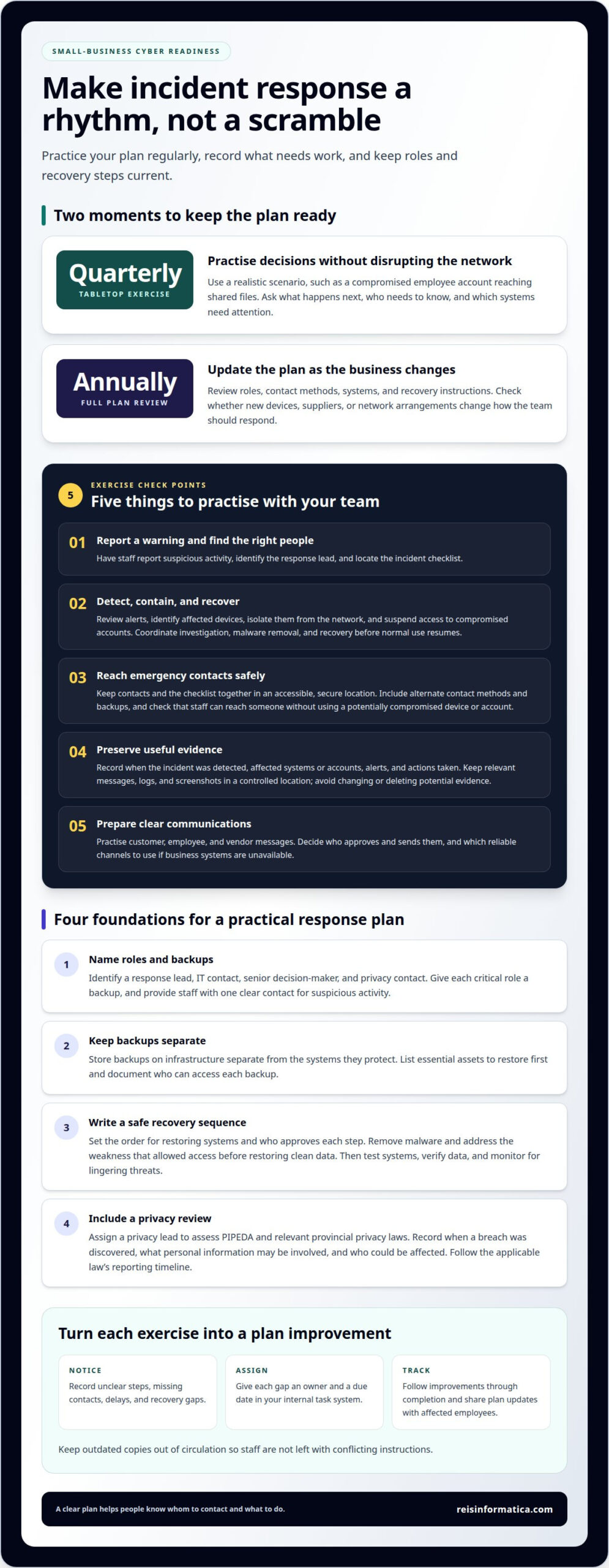
- Run a short exercise to check whether employees can follow the plan. Use a scenario such as a phishing email followed by unusual account activity. Ask staff to report the warning, identify the response lead, and find the checklist. Reviewing incident response plans regularly can help teams identify gaps and keep the plans useful. Record unclear instructions and assign someone to improve them.
- Practise detecting, containing, and recovering from ransomware or a data breach. Have the team review security alerts and reports, identify affected devices, and isolate them from the network. Suspend access to compromised accounts, especially those involved in the incident. The response lead should coordinate the investigation, malware removal, and recovery before affected systems return to normal use.
- Keep emergency contacts and an incident checklist together in an accessible, secure location. Include the response lead, IT personnel, management, and any external security support your business may need. List alternate contact methods and backups for key people. During an exercise, check that an employee can reach the right contact without using a potentially compromised account or device.
- Practise preserving evidence during an investigation. Record when the incident was detected, which systems or accounts were affected, what alerts appeared, and what actions the team took. Keep relevant messages, logs, and screenshots in a controlled location. Avoid changing or deleting potential evidence during the investigation. These records help the team understand the incident’s origin, scope, and impact.
- Prepare communication templates for customers, employees, and vendors. Identify who approves messages, who sends them, and which reliable channels to use if business systems are unavailable. Explain what happened, which services or information may be affected, what recipients should do, and where updates will appear. Keep messages factual and revise them as the investigation clarifies the impact.
Testing and annually revising the plan
Testing shows whether people can follow the response process under pressure. Use exercises and reviews of real incidents to identify what needs updating.
-
Test the Plan with Tabletop Exercises
Run a tabletop exercise using a realistic scenario, such as a compromised employee account reaching shared files. Ask participants what they would do next, whom they would notify, and which systems need attention. Quarterly tabletop exercises let teams practise decisions without disrupting the network. Check that relevant assets and systems appear in the scenario, and note unclear steps or missing contacts.
- Record what the exercise reveals. Assign an owner to each gap, such as an unclear escalation route or a recovery step that depends on unavailable information. Add each action and due date to your internal task system, then track completion. A lessons-learned document preserves decisions and gives the next exercise a practical starting point.
-
Revise and Maintain the Plan Annually
Review the full plan annually, as the Canadian Centre for Cyber Security advises organizations to test, revisit, and revise their incident response plans annually. Update roles, contact methods, systems, and recovery instructions when business operations change. Check whether new devices, suppliers, or network arrangements alter the response structure. Avoid leaving outdated copies in circulation, since staff may follow conflicting instructions.
- Schedule an annual incident response simulation to test coordination across the business. Choose a scenario that requires staff to identify an incident, make decisions, communicate, and begin recovery. Compare the team’s actions with the written plan, then record delays, unclear approvals, and missing resources. Share updates with affected employees, and track assigned improvements before the next exercise.
Preparing a small-business incident response plan
- Start with a threat and risk assessment. List the assets your business depends on, such as customer records, payment systems, and shared files. For each asset, note how ransomware, phishing, or unauthorized access could disrupt work. Rank risks by likely impact and operational importance. This gives your response team a practical basis for deciding what to protect and restore first.
- Map the response from preparation through recovery. NIST describes incident response as having five phases, giving businesses a structure for planning before an incident and acting during one. Define what counts as a suspected breach, such as an unfamiliar login or unexpected data change. Include how staff report unusual activity, who assesses alerts, and how the team decides whether to escalate.
- Set priorities before systems fail. Identify which services must keep running, which can pause, and what alternatives staff can use during an outage. For example, document how employees will communicate if company email is compromised. Decide which response activities your team can handle internally and where outside expertise may be needed. Clear decision points help reduce delays when information is incomplete.
- Write recovery instructions based on clean backups and safe restoration. Specify who can access backup copies, how the team checks them, and which systems return first. Before restoring, remove malware and address the weakness that enabled access. Then scan affected devices, verify restored information, and monitor systems before returning them to regular use. This makes recovery a controlled process rather than guesswork.
- Keep the plan usable during a ransomware event or data breach. Store an accessible copy that does not rely on systems an attacker could compromise. Give employees a simple reporting route, and tell them not to investigate suspicious activity themselves. Add escalation contacts, decision authority, and communication responsibilities. A well-structured cyber incident response plan for a small business connects detection, containment, and recovery with daily operations.
Reisinformatica.com: Managed IT aservices
reisinformatica.com can help when your team needs support aligning incident response with everyday IT operations. Its Managed IT aservices and cybersecurity services connect operational planning with protection of business systems. This can be useful when you’re identifying response gaps, strengthening security practices, or clarifying how technology supports recovery. For businesses reviewing cloud-based systems as part of continuity planning, reisinformatica.com also offers Private and Public Cloud Services and products. The right next step is to discuss how these offerings fit your business needs and response priorities. Contact reisinformatica.com to talk about your cybersecurity planning.
Make incident readiness part of everyday decisions
Turn your plan into a working business tool. Choose a practical next step, such as assigning someone to review the document or scheduling time to close a gap identified during an exercise. Keep the plan accessible to the people who need it, and make improvements part of normal operational planning.
A cyber incident response plan for a small business should evolve with the business. Changes to how your team works, the systems it relies on, or the information it handles can affect how you respond. Keep leadership involved so response decisions reflect business priorities as well as technical needs.
If you’d like support aligning cybersecurity planning with your IT environment, contact reisinformatica.com to discuss your needs. A considered next step can help your team build readiness into its ongoing work and move forward with greater clarity.
Frequently Asked Questions
How to ensure Success in Incident Response?
Make success observable by defining what the team must accomplish at each decision point. During an exercise, ask someone outside IT to find the reporting route, identify who authorizes a shutdown, and explain how staff receive updates. Record whether they can complete each task using only the plan. A clear gap, such as an unclear approval step, gives you a specific improvement to assign.
What should a small business cyber incident response plan include?
Include an incident definition, decision authority, response contacts, containment and recovery procedures, and communication responsibilities. Add a simple severity scale so the team can distinguish a suspicious email from a breach affecting essential business systems. One common classification uses four levels: critical, high, medium, and low. Explain what information helps staff choose a level, such as the systems affected and the operational impact.
What are the steps to take immediately after a cyber incident?
Report the warning through the designated channel and alert the response lead. Follow the plan’s containment instructions, such as isolating an affected device or suspending access to a compromised account. Keep a timeline of observed activity and decisions. If financial information may be affected, contact your financial institution. Change affected passwords and enable multi-factor authentication on accounts to help protect access.
Who should be on a small business incident response team, and what are their roles?
Include people who can make business decisions, investigate technology, assess privacy concerns, and communicate with staff. For example, an operations lead can decide which services pause, while an IT specialist examines affected systems. A privacy contact can assess possible exposure of personal information, and a communications lead can coordinate updates. Define each person’s authority, not just their job title, so decisions do not stall.
How can a small business prepare an incident response plan and test it with tabletop exercises?
Start with a scenario relevant to your business, such as a supplier account sending an unexpected file-sharing request. In a tabletop exercise, describe events one at a time and ask participants what they would do next, whom they would notify, and what decision they need. Do not change live systems during the discussion. Finish by assigning an owner to each improvement and recording the revised action.
Which Canadian government resources and cybersecurity supports help small businesses respond to incidents?
Add the Canadian Centre for Cyber Security, the Canadian Anti-Fraud Centre, and local police to your incident reference sheet. The Cyber Centre provides Canadian cyber security information, while the Anti-Fraud Centre is relevant when fraud is suspected. Include police when criminal activity may be involved. Record each organization’s reporting route alongside your internal contacts so staff know where to turn.