
For many IT teams, the cycle of manual software patching is a relentless drain on resources and a significant source of security risk. The constant need to update Windows, alongside critical third-party applications like Chrome, Adobe, and Zoom, can feel like an unending task that pulls your focus away from strategic initiatives. What if you could reclaim those hours and fortify your digital perimeter simultaneously? This is the core promise of a well-implemented intune patch management strategy. It transforms a reactive, time-consuming chore into a proactive, automated process that ensures every endpoint remains secure and compliant.
In this complete guide for 2026, we will demystify Intune’s powerful capabilities. We provide a clear, step-by-step roadmap to configure automated update rings for Windows and, crucially, extend that automation to the third-party applications your business relies on daily. Prepare to move beyond the confusion and limitations, achieve full visibility into your device fleet’s patch status, and empower your IT team to focus on what truly matters: driving your business forward. Let’s build a patching process that works for you, not against you.
Key Takeaways
- Learn to view intune patch management as a strategic framework, not just a single tool, to gain unified control over both Windows and application updates.
- Discover how to leverage Intune’s native capabilities to fully automate Windows 10/11 updates, ensuring your devices are always protected without manual intervention.
- Uncover the primary challenge of patching third-party applications in Intune and explore effective methods to close this critical security gap.
- Implement a patching policy that moves beyond technical settings to balance robust security with employee productivity, minimizing business disruptions.
- Evaluate the true cost of a DIY approach versus partnering with a specialist to save valuable IT hours and reduce the risk of costly configuration errors.
What Is Intune Patch Management? (And Why It’s Not a Single Feature)
Many organizations think of patch management as a single tool or a simple task. However, effective intune patch management is a comprehensive strategy, not just a feature you turn on. It is the modern process of using policies within Microsoft Intune to control how and when operating system and application updates are deployed to your endpoints. This proactive approach replaces the often-reactive scramble of manual patching, focusing instead on two primary business goals: continuously enhancing your security posture against vulnerabilities and dramatically reducing the IT workload required to keep devices compliant and secure.
The Shift from On-Premise to Cloud-Native Patching
For years, businesses relied on on-premise tools like WSUS and SCCM. While effective in their time, these legacy systems were designed for a world where devices were always connected to the corporate network. In today’s hybrid work landscape, this model presents a significant vulnerability. Devices that are primarily remote may miss critical updates, leaving them exposed. Intune’s cloud-native architecture solves this by leveraging the Windows Update for Business (WUfB) service. This means any managed device with an internet connection can receive its policies and patches directly from the cloud, ensuring consistent security without needing a VPN connection.
Key Components of an Intune Patching Strategy
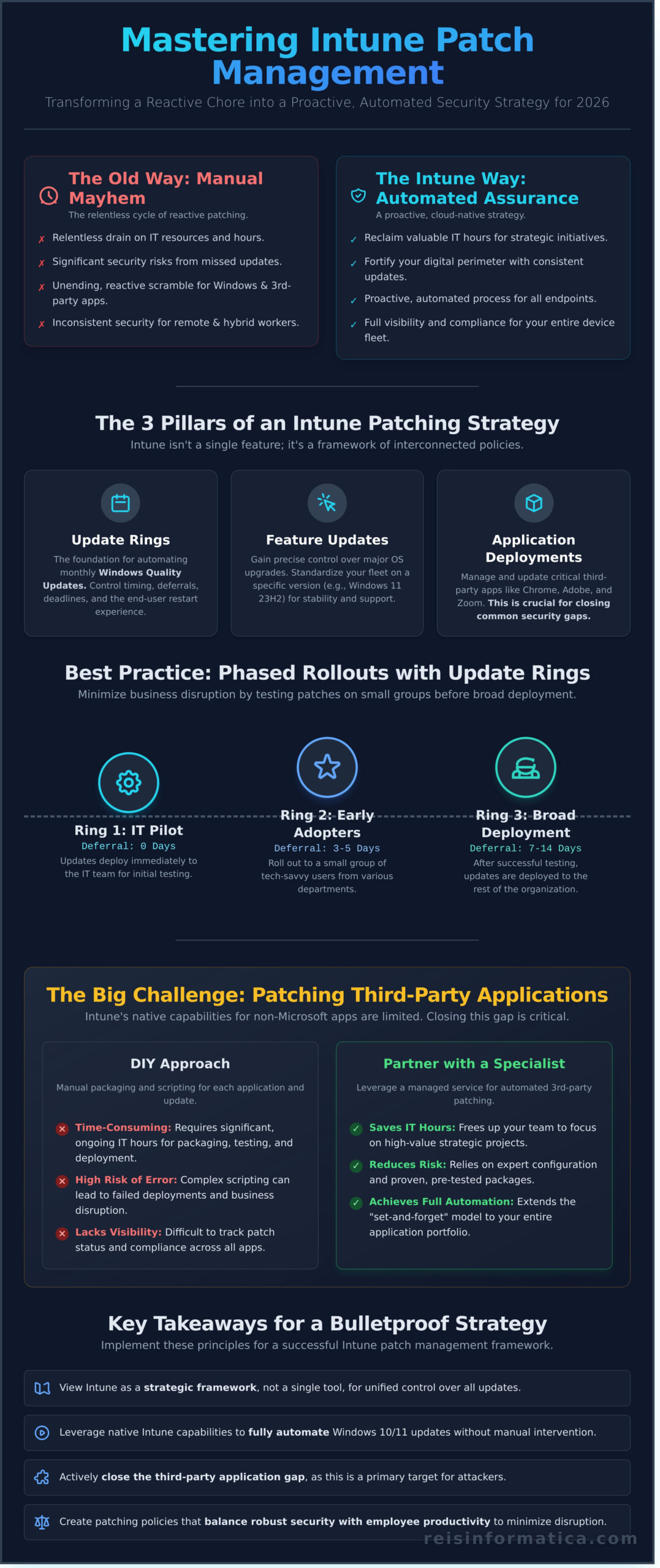
A robust patching framework in Intune is built by combining several distinct policy types, each serving a specific purpose. This allows you to create a controlled, phased rollout that minimizes business disruption while maximizing security. The core components you will orchestrate include:
- Update Rings for Windows 10 and later: These are the foundation of your strategy, controlling the timing of monthly quality and security updates and defining the end-user experience, such as deadlines and restart behavior.
- Feature Update policies: These policies give you precise control over major OS upgrades, allowing you to standardize your entire device fleet on a specific Windows version for better stability and support.
- Application Deployments: Beyond the OS, Intune also manages the deployment and updating of critical third-party applications, closing security gaps that attackers frequently exploit.
By understanding how these elements work together, you can move from a reactive update cycle to a proactive, automated system that keeps your organization protected and productive.
Core Capability: Automating Windows Updates with Intune
At the heart of Microsoft Intune is its native ability to manage and automate Windows 10 and 11 updates through Windows Update for Business (WUfB). This isn’t just a bolt-on feature; it’s a core component of a modern Unified Endpoint Management (UEM) strategy that provides centralized control directly from the cloud. The primary goal is to move away from manual, reactive patching to a reliable, automated schedule that keeps your endpoints secure without constant intervention. This approach clearly distinguishes between two critical update types:
- Quality Updates: These are the mandatory monthly security patches that protect against the latest threats. They are non-disruptive and essential for maintaining your security posture.
- Feature Updates: These are the major annual OS upgrades (e.g., moving from Windows 11 22H2 to 23H2) that introduce new functionality. These require careful planning and controlled deployment.
A successful intune patch management strategy leverages specific policies to handle each of these update types, ensuring both security and stability across your organization.
Configuring ‘Update Rings’ for Phased Rollouts
Update Rings are the foundation for automating your monthly Quality Updates. This policy allows you to create groups of devices that receive updates on different schedules. By configuring multiple rings-such as an “IT Pilot” group that gets updates immediately and a “Broad Deployment” group that receives them after a 7-day deferral-you can test patches on a small scale before they reach all users. Key settings include deferral periods, installation deadlines to enforce compliance, and user experience controls to manage restarts.
Managing ‘Feature Update’ Policies for OS Upgrades
While Update Rings manage ongoing patches, Feature Update policies give you precise control over major OS versioning. This policy allows you to lock your entire device fleet to a specific Windows version, such as Windows 11 23H2. This prevents devices from automatically upgrading to a new version before your organization has tested it for compatibility. When you are ready to upgrade, you simply update the policy to the new target version, initiating a controlled, organization-wide rollout.
Monitoring and Reporting on Windows Update Compliance
Deploying patches is only half the battle; verifying their success is critical. Intune provides built-in reports that offer clear visibility into the compliance status of your devices. These dashboards allow you to quickly identify which machines have successfully installed updates and, more importantly, which ones are failing. This data is invaluable for troubleshooting problematic endpoints, demonstrating compliance during security audits, and ensuring your protective measures are working as intended across the entire environment.
The Big Challenge: Patching Third-Party Applications
While Intune excels at managing Microsoft updates through its Update Rings and Feature Updates policies, the real challenge emerges when dealing with non-Microsoft software. Applications like Adobe Reader, Google Chrome, Zoom, and countless others are common targets for cyberattacks, and keeping them updated is a non-negotiable part of modern endpoint security.
Unlike traditional tools like WSUS, Intune does not have a native, built-in catalog for third-party patches. This means that out of the box, there is no automated way to approve and deploy an update for an application like Java. This gap is the most common pain point in any Intune patch management strategy and requires a deliberate approach. To address this critical security layer, organizations in Canada typically adopt one of three primary strategies.
Method 1: Manual Packaging and Deployment (Win32 Apps)
This foundational method involves treating every third-party update as a new application deployment. Your IT team must manually download the latest installer (e.g., an Adobe Reader update), use the Microsoft Win32 Content Prep Tool to package it into a .intunewin file, and upload it to Intune. While this approach offers granular control over the deployment, it is highly reactive, time-consuming, and does not scale effectively. It’s a viable option for initial software rollouts but is too inefficient for consistent, proactive patching.
Method 2: Intune Enterprise Application Management
As Microsoft’s direct answer to this challenge, the Enterprise Application Management feature provides a curated catalog of common third-party applications directly within the Intune console. This simplifies the process of deploying and, more importantly, automatically updating these apps. However, the catalog is still growing and may not include all the specialized software your business uses. This feature is also a premium add-on, requiring an additional license that costs approximately C$2.75 per user, per month on top of your existing Microsoft 365 plan.
Method 3: Integrating Specialized Third-Party Tools
For the most robust and automated solution, many organizations turn to specialized tools designed to bridge this exact gap. Services like Patch My PC, Scappman, or Ivanti integrate directly with your Intune environment. They maintain extensive patch catalogs, automatically package new updates, and publish them into your Intune tenant as ready-to-deploy applications. This approach provides the most comprehensive and hands-off experience for Intune patch management, though it involves the additional cost of a third-party subscription.
Best Practices for a Bulletproof Intune Patching Strategy
Moving beyond the initial setup, a successful intune patch management strategy is about creating a reliable and repeatable process. The goal is to fortify your organization against threats without disrupting the workflow of your team. A well-designed framework balances robust security with essential user productivity, ensuring technology acts as an asset, not a bottleneck.
Implement Phased Deployments with Deployment Rings
To prevent a single problematic patch from causing widespread disruption, we implement updates in controlled waves, or “rings.” This methodical approach contains risk and validates updates before they reach your entire organization. A typical structure includes:
- Ring 1 (IT Department): A small, technical group that can quickly identify and troubleshoot immediate issues.
- Ring 2 (Pilot Users): A select group of users from various departments to test patches in real-world business scenarios.
- Ring 3 (Broad Deployment): The rest of the organization, receiving the update only after it has been proven stable and non-disruptive.
This phased rollout for both Windows and third-party applications is a cornerstone of maintaining operational continuity.
Enforce Compliance with Deadlines and Grace Periods
For critical security updates, timeliness is non-negotiable. Intune allows you to enforce mandatory installation deadlines to ensure vulnerabilities are closed promptly. However, enforcement must be balanced with user experience. By configuring grace periods, you give employees a window to save their work and restart their devices at a convenient time before a mandatory reboot is initiated. This combination of firm deadlines and user flexibility is a key part of a strong cybersecurity services posture, protecting the business without frustrating your team.
Master Reporting and Alerting
Patching is not a “set-and-forget” task; it demands continuous oversight. Regularly reviewing Intune’s update compliance reports is essential to identify devices that are failing to install updates or have fallen out of compliance. We recommend configuring automated alerts for high-failure rates, enabling your IT team to proactively investigate and resolve issues before they become widespread risks. This vigilant monitoring ensures your patching strategy remains effective and your endpoints stay protected.
Automating and Scaling: When to Partner with a Managed ServiceProvider
While Intune provides a powerful framework for updating your devices, effective patch management is a continuous operational discipline, not a one-time project. For many Canadian businesses, the do-it-yourself (DIY) approach comes with significant hidden costs. These include dozens of weekly IT staff hours spent on researching, testing, and deploying patches, as well as the immense risk of a single misconfigured policy or a missed critical update leading to a security breach.
This is where a Managed Service Provider (MSP) acts as a strategic partner. An MSP takes on the complex, repetitive, and critical task of patch management, transforming it from an internal cost centre into a streamlined, expert-led security function. This frees your internal IT team from routine maintenance, allowing them to focus on strategic initiatives that drive business growth.
Signs Your Business Should Outsource Patch Management
If your organization is experiencing any of the following, it’s a strong indicator that partnering with an expert is the most efficient path forward:
- Your IT team is small and stretched thin across multiple responsibilities.
- You lack dedicated, in-house cybersecurity expertise to navigate the evolving threat landscape.
- Keeping up with third-party application vulnerabilities (like Adobe, Chrome, or Java) is a constant struggle.
- You must adhere to strict compliance standards like PIPEDA, which require demonstrable proof of security controls.
- A recent security audit or penetration test has revealed significant patching gaps.
What a Managed Patching Service Includes
A professional service for intune patch management goes far beyond simply clicking “approve.” It’s a comprehensive cycle that includes designing a tailored patching strategy, configuring and testing policies to minimize business disruption, and providing continuous monitoring and detailed reporting. Crucially, it includes expert handling of the inevitable exceptions and failed patches, ensuring no endpoint is left vulnerable. This proactive security posture is a core component of comprehensive managed IT services.
The ROI of a Managed Patching Strategy
Viewing managed patching as a cost is a mistake; it’s an investment in risk reduction and operational stability. Consider this: the average cost of a data breach in Canada has surpassed C$7 million. When you compare that catastrophic potential expense to a predictable monthly service fee, the return on investment becomes clear. The ultimate ROI isn’t just financial-it’s the peace of mind that comes from knowing your endpoints are consistently secured by a vigilant partner, allowing you to focus on your core business. For a consultation on how we can secure your environment, contact Reis Informatica today.
Transform Your Patching Strategy from a Challenge to a Strength
Mastering endpoint security in 2026 requires moving beyond the basics. While Intune provides a robust foundation for automating Windows updates, we’ve established that the most significant vulnerabilities often hide in unpatched third-party applications. A comprehensive intune patch management strategy is not just a technical task-it’s a critical business function that directly protects your data, productivity, and operational continuity in the Canadian market.
Implementing and maintaining this level of security requires constant vigilance and deep expertise. Instead of diverting your internal resources, you can achieve a superior security posture by partnering with a team dedicated to proactive cybersecurity. As Certified Microsoft solutions experts, we provide the 24/7 monitoring and support needed to transform your patch management from a reactive chore into a seamless, automated defense.
Let us handle the complexity so you can focus on your core business. Secure Your Endpoints with Expert Managed IT Services and gain the peace of mind that comes from a truly resilient IT infrastructure.
Frequently Asked Questions About Intune Patch Management
Is Microsoft Intune a complete replacement for WSUS or SCCM?
For many modern, cloud-first organizations, Intune can fully replace WSUS and handle the core functions of SCCM for endpoint management. However, it’s not a direct one-to-one replacement. SCCM still offers more granular control for complex on-premise server environments and intricate software deployments. Many Canadian businesses adopt a co-management strategy, using Intune for cloud-attached devices and SCCM for traditional infrastructure, ensuring comprehensive coverage and a smooth transition to modern management.
How does Intune handle hardware driver and firmware updates?
Intune manages driver and firmware updates through the Windows Update for Business (WUfB) deployment service. This allows your IT team to create specific policies to review, approve, and schedule driver updates published by major manufacturers like Dell, HP, and Lenovo. This centralized control ensures that only certified updates are deployed, which protects device stability and security across your entire fleet, eliminating the need for manual installations and reducing compatibility risks.
What are the licensing requirements for Intune patch management?
Access to Intune patch management capabilities is included in most Microsoft 365 plans designed for business. In Canada, this typically means subscriptions like Microsoft 365 Business Premium, E3, or E5, as well as Enterprise Mobility + Security (EMS) E3 or E5 plans. If you are not using a bundled suite, a standalone Intune license can also be purchased per user. We can help you review your current licensing to ensure you have the most cost-effective solution.
How can I handle patching for macOS or Linux devices with Intune?
Intune provides robust native controls for macOS patching by enforcing the use of Apple’s built-in software update service, ensuring devices automatically download and install critical updates. For Linux endpoints, Intune’s native capabilities are still evolving. Management typically relies on custom scripts deployed via Intune or integration with specialized third-party tools designed for Linux patch management. This ensures all operating systems in your environment adhere to your security policies.
What’s the best way to handle emergency, zero-day vulnerability patches?
For zero-day threats, the most effective tool within Intune is the “Expedite” update feature. This powerful option overrides your standard deferral policies to deploy a critical security patch immediately. Once activated, devices will begin downloading and installing the update as soon as they connect to the internet, significantly reducing your window of vulnerability. This proactive approach is essential for protecting your business from emerging cyber threats and ensuring operational continuity.
How much does it cost to add third-party patching tools to Intune?
Integrating a third-party tool for applications like Adobe or Chrome typically involves a subscription fee. In Canada, costs vary by provider (such as Patch My PC or Scappman) and the scale of your deployment. You can generally expect to budget between C$1 and C$4 per endpoint, per month. This investment automates a critical security task, closes common vulnerability gaps, and frees up significant time for your IT team, delivering a strong return on investment.