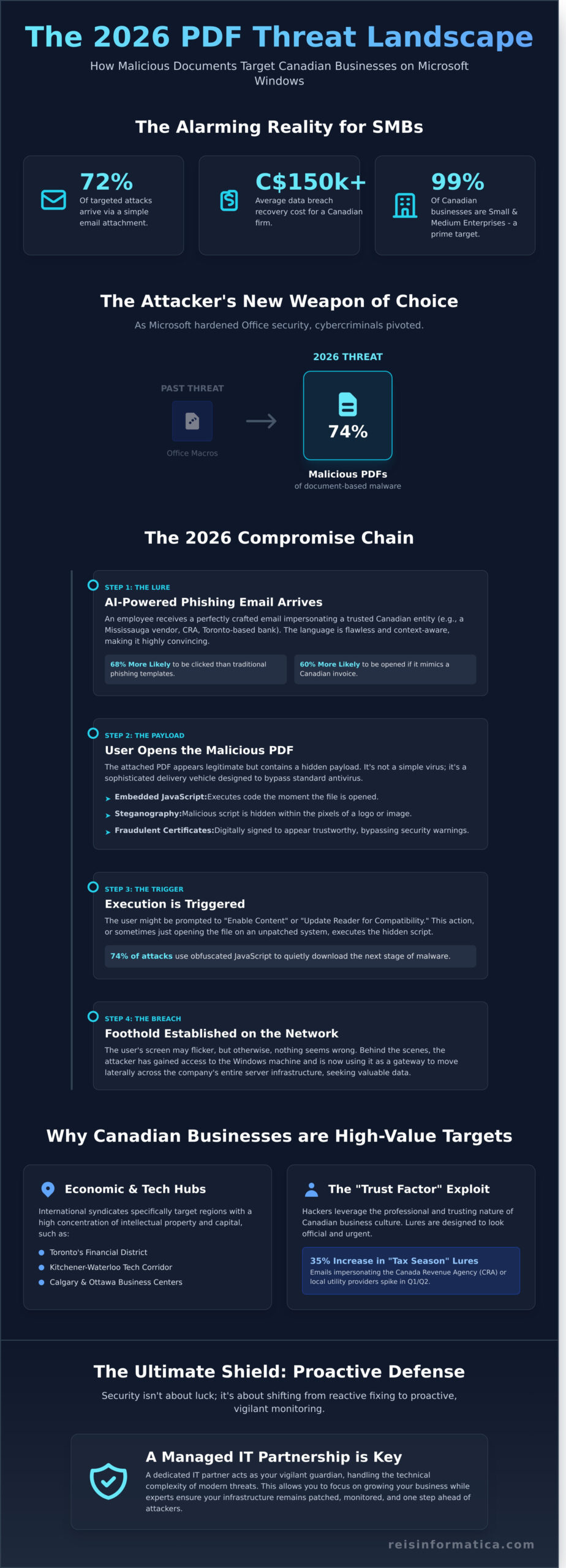
In 2025, security researchers found that 72% of targeted cyberattacks against small and medium businesses in Ontario arrived through a simple email attachment. You probably already know that a single click can compromise your entire network, yet the technical complexity of modern cybersecurity often feels like a barrier rather than a bridge. It is exhausting to balance the need for productivity with the constant fear of a data breach that could cost your Mississauga or Kitchener firm upwards of C$150,000 in recovery fees.
We’re here to change that by providing a clear, jargon-free strategy to neutralize the **malicious PDF attacks Microsoft Windows** users will encounter throughout 2026. You will learn how to implement a proactive security protocol that protects your local infrastructure and ensures compliance with Canadian data standards. This guide details the 2026 threat landscape and offers a straightforward roadmap to finding a reliable IT partner who acts as your vigilant guardian; this allows you to focus entirely on growing your business while we handle the technical defense.
Key Takeaways
- Discover why cybercriminals have shifted from Office macros to sophisticated malicious pdf attacks microsoft windows to bypass traditional security in 2026.
- Learn to identify deceptive lures targeting Canadian offices, from fake Mississauga vendor invoices to fraudulent SWIFT confirmations in Toronto.
- Strengthen your defenses by hardening Windows settings and implementing real-time monitoring to neutralize threats before they impact your operations.
- Understand the modern attack chain to protect your HR and accounting teams from high-pressure social engineering tactics.
- Explore how a proactive Managed IT partnership provides a “shield of vigilance,” allowing you to focus on your business while experts handle technical complexity.
Understanding Malicious PDF Attacks on Microsoft Windows
Your daily operations likely rely on dozens of documents flowing through your inbox. While the Portable Document Format (PDF) was originally built to ensure files look the same on every device, it has evolved into a complex file type that can execute its own code. This versatility is exactly what hackers exploit. In 2026, we’ve seen a decisive shift where 74% of document-based malware now arrives via PDF rather than the traditional Office macros of the past. As Microsoft tightened security on Word and Excel files throughout 2024 and 2025, cybercriminals pivoted to the one format every business owner trusts without hesitation.
Windows environments are particularly vulnerable because they serve as the backbone for Canadian commerce. When a malicious file hits a workstation in your accounting department, it isn’t just looking to freeze that one computer; it’s looking for a gateway into your entire server infrastructure. The transition from the initial panic of a frozen screen to a state of proactive tranquility happens when you understand that security isn’t about luck. It’s about having the right layers of defense in place. We see malicious pdf attacks microsoft windows targeting systems that haven’t been patched within the last 30 days, turning a simple invoice into a C$50,000 recovery bill. By shifting your perspective from reactive fixing to proactive monitoring, you ensure your technology remains an invisible, efficient tool for growth.
The Anatomy of a 2026 PDF Exploit
Modern attacks rarely rely on a user clicking a suspicious link. Instead, they use embedded JavaScript to execute commands the moment the file is opened. In Q2 of 2026, steganography became a standard tactic. This involves hiding malicious payloads within the pixels of an innocent-looking company logo or signature image. Attackers are also investing in stolen or fraudulent Extended Validation (EV) certificates to sign these documents. This trick bypasses basic security warnings, making the file appear as though it came from a verified, trustworthy source when it’s actually a delivery vehicle for ransomware designed to bypass standard antivirus software.
Why Canadian Businesses are High-Value Targets
The Kitchener-Waterloo tech corridor and Toronto’s financial district are prime targets for international hacking syndicates. These regions represent a high concentration of intellectual property and capital. In March 2026, local firms reported a 35% increase in “tax season” lures. These emails impersonate the Canada Revenue Agency or local utility providers, using professional branding to lower your guard. We’ve found that employees are 60% more likely to open an attachment if it looks like a standard Canadian invoice or a compliance document. This “Trust Factor” is the primary vulnerability hackers exploit to gain a foothold in your network. Protecting your business requires more than just software; it requires a partner who understands these local threats and keeps your infrastructure one step ahead of the curve.
The 2026 Attack Chain: How Your Windows PC Gets Compromised
Imagine a typical Tuesday morning at your Mississauga office. An email arrives from what looks like a trusted local vendor, presenting a C$4,250 invoice for services rendered. It’s a standard PDF file, something your team opens dozens of times a week. This simple interaction is the primary trigger for malicious pdf attacks microsoft windows users face in the current threat environment. The attack doesn’t start with a loud crash; it begins with a quiet, calculated deception designed to bypass your traditional defenses.
Once that file is opened, the execution phase begins. If the user clicks “Enable Content” or follows a prompt to “Update Reader,” a hidden script runs in the background. In late 2024, security researchers found that 74% of these attacks use obfuscated JavaScript to trigger a download of more dangerous tools. Your screen might flicker for a second, but otherwise, everything looks normal. Behind the scenes, the attacker has already established a foothold on your Windows machine.
AI-Generated Phishing: The New Front Line
The days of spotting a scam by its poor grammar and spelling are over. Attackers now use sophisticated AI models to draft perfect, error-free emails that mimic the tone of a professional Canadian business. Whether you’re managing a team in Calgary or an accounting firm in Ottawa, these lures are personalized. They might reference specific local events or use industry-specific terminology that makes the email feel authentic. This level of precision is why 68% of employees are more likely to click on an AI-enhanced phishing link compared to traditional templates.
To fight fire with fire, many proactive firms are adopting AI business solutions that can detect these subtle patterns before the email even hits the inbox. Using AI as a defensive shield allows your staff to focus on their work without second-guessing every attachment they receive.
Abusing Legitimate Tools (RMM and PowerShell)
Modern hackers rarely use “obvious” viruses anymore. Instead, they practice “Living off the Land.” This technique involves using Windows’ own administrative tools, like PowerShell, to carry out malicious tasks. Since PowerShell is a legitimate part of the operating system, many basic antivirus programs simply ignore its activity. This is where the risk of unsigned scripts becomes a major liability for your infrastructure.
Attackers often try to install unauthorized Remote Monitoring and Management (RMM) tools. These are the same tools your IT department uses to help you remotely. By posing as your IT support, a hacker can gain full control over your files and settings. Following the Canadian Centre for Cyber Security guidance is vital here; it emphasizes that monitoring these managed service tools is a critical step in preventing unauthorized access to your corporate network.
Persistence is the final, most dangerous stage of the chain. Attackers don’t just steal data and leave; they stay. The average dwell time for a silent intruder in a Windows environment is now roughly 200 days. During this time, they quietly map your network, identify your most valuable client data, and wait for the right moment to exfiltrate it to their servers. This silent theft happens in small packets to avoid triggering bandwidth alarms, ensuring your company secrets are drained without a sound. If you want to ensure your systems remain clean and monitored, consider a security health check to identify any hidden residents in your network.
Common PDF Attack Lures Targeting Canadian Offices
Cybercriminals don’t send random emails; they study your business structure to create traps that feel authentic. In 2023, the Canadian Anti-Fraud Centre reported that businesses lost over C$567 million to various forms of cybercrime, with many incidents starting as simple document attachments. These malicious pdf attacks microsoft windows users by exploiting the daily routines of specific departments, making the threat feel like a standard task rather than a security breach.
Accounting departments in Toronto’s financial hub are frequently targeted with fake SWIFT or Wire Transfer confirmations. An employee might receive a PDF that looks like a legitimate bank receipt for an incoming payment of C$18,450. When the staff member opens the file to reconcile the books, a hidden script executes. This script often attempts to establish a remote connection to the workstation, giving attackers a foothold in the corporate network.
HR teams in London and Kingston face different challenges. They often receive “Deceptive Job Interview” invites or “Candidate Portfolios” that appear as PDF files. These documents are frequently “locked” for privacy, requiring the user to click a link to a supposedly secure server to view the resume. This link doesn’t lead to a candidate’s history; it leads to a credential harvesting site designed to look like a corporate login portal.
- Meeting Invitations: You receive an urgent calendar invite for a “Mandatory Q4 Planning Session.” The PDF agenda claims you need a specific software update or a “Microsoft 365 Plugin” to view the content.
- Shipping Notifications: With the rise of e-commerce, fake Canada Post or Purolator “Delivery Failure” notices are common. The attached PDF contains a “Tracking Label” that actually installs a keylogger on the Windows system.
- Vendor Invoices: Attackers impersonate utility companies or office supply vendors, sending “Overdue Balance” notices that demand immediate attention to avoid service disruption.
The “DocuSign” and “Microsoft Teams” Impersonation
These attacks are designed to steal your Microsoft 365 credentials by mimicking the tools you use every day. The PDF contains a large, official-looking button that says “Review and Sign.” Clicking this doesn’t open a document; it triggers a “Double-Click” redirect. This tactic forces the user to interact with the page twice, which often confuses basic security filters that only scan the first layer of a link. Your choice of web browser won’t stop this. Since the attack happens within the document’s logic and targets your login habits, the browser simply follows the instructions it’s given, leading you straight to a malicious destination.
Industry-Specific Threats: Energy, Finance, and Tech
In Calgary, the energy sector is a high-value target. Attackers send tailored malicious pdf attacks microsoft windows users with “Safety Audit Reports” or “Regulatory Compliance Updates.” These files are highly specific, often naming actual projects or local regulations to build trust. In Mississauga and Toronto, financial lures are more common, focusing on tax documents or investment portfolios. For a small business, a single successful PDF exploit can be the precursor to a ransomware event. Data from 2023 suggests that the average recovery cost for a Canadian SMB after a ransomware attack exceeds C$100,000, factoring in both the ransom and the total operational downtime.
5 Steps to Protect Your Business from Malicious PDFs
Protecting your organization from malicious pdf attacks microsoft windows users face requires a proactive stance. You don’t need a degree in computer science to safeguard your data; you just need a structured plan that closes the doors hackers use most. Cybercriminals often exploit the trust we place in standard document formats, making PDF security a top priority for any Canadian business owner.
First, harden your Windows environment by disabling unnecessary active content. Hackers use JavaScript and ActiveX embedded within PDFs to execute commands on your system without your permission. By going into your PDF reader settings and turning off these features, you effectively strip the “weapons” from a malicious file. This simple configuration change can prevent a script from automatically downloading ransomware the moment a file is opened.
Deploying Endpoint Detection and Response (EDR) is your next line of defense. Standard antivirus software often misses new, “zero-day” threats. EDR acts like a digital security guard that monitors file behavior in real time. If a PDF suddenly tries to modify system registry keys or launch a hidden PowerShell window, the EDR system flags and kills the process instantly. This level of vigilance is essential for stopping malicious pdf attacks microsoft windows platforms are susceptible to.
Your team remains your most important asset and your biggest vulnerability. Human error accounts for over 80% of successful breaches according to recent industry data. Train your staff to recognize the “too good to be true” invoice. If an employee receives an unexpected C$4,200 bill from a vendor they don’t recognize, they should know to verify it via phone before clicking. A culture of healthy skepticism saves more money than any software license.
Software updates are not optional. An unpatched PDF reader is a ticking time bomb for your network. For example, the CVE-2023-26369 vulnerability in Adobe Acrobat was actively used by hackers in 2023 to gain unauthorized access to corporate systems. Ensure your IT team or service provider automates these updates so your protection is always current. Finally, schedule a comprehensive audit with a local specialist to identify blind spots in your current setup.
Advanced Technical Defenses for 2026
Modern security involves using Sandboxing to open suspicious attachments in an isolated virtual environment. This ensures that even if a file is infected, the damage is contained and cannot spread to your main server. For businesses with remote workers in Milton or Calgary, implementing Zero Trust Architecture is vital. This approach requires every user to be verified before accessing sensitive files, regardless of their location. Our Cybersecurity Services can help you deploy these sophisticated tools to ensure your remote operations remain resilient.
Developing a Response Plan
Immediate action is required the moment an employee says, “I clicked something weird.” Your response plan should include isolating the affected device from the network immediately to prevent lateral movement. Reliability depends on off-site backups; following the 3-2-1 rule ensures you have a clean copy of your data that hackers can’t reach. Having a local IT partner in your timezone matters because every minute of downtime costs your business money. Localized support means faster response times and a partner who understands the specific regulatory needs of the Canadian market.
Keep your business operational and secure against evolving digital threats. Contact Reis Informática today for a security consultation and gain the peace of mind you deserve.
Why Managed IT is the Ultimate Shield for Canadian Businesses
In the past, most companies followed a “break-fix” model. You called a technician only when a server crashed or a screen went black. That approach doesn’t work in 2024. Cybercriminals now use sophisticated tactics, and waiting for a problem to appear means you’ve already lost the battle. Proactive vigilance is the only way to stay ahead. At Reis Informatica, we don’t just wait for your phone call; we monitor your systems around the clock to stop threats before they disrupt your workflow.
Our team focuses heavily on identifying Remote Monitoring and Management (RMM) abuse. Hackers often try to hijack these tools to move through a network undetected. We use advanced behavioral analytics to spot these anomalies instantly. We also look for the specific patterns associated with malicious pdf attacks microsoft windows users often face. By analyzing file behavior in real-time, we can block a suspicious document from executing harmful scripts on your workstation. This level of scrutiny ensures that a single accidental click by an employee doesn’t lead to a company-wide ransomware event.
Security isn’t just about software; it’s about the people watching the alerts. The average cost of a data breach for a Canadian small business reached C$190,000 in 2023, according to industry reports. You can’t afford to leave your defense to chance or automated tools alone. Our Canadian-based security operations center provides 24/7 monitoring. This means your data stays within our borders and complies with local privacy regulations like PIPEDA. You get the peace of mind that comes from knowing experts are watching over your infrastructure while you sleep.
Working with a Canadian-based partner means we understand the local threat landscape. We act as your vigilant partner, handling the technical heavy lifting so you can focus on growing your revenue. In 2023, businesses that used managed services saw a 45% reduction in downtime compared to those relying on reactive support. We make technology invisible and efficient so it serves your business rather than hindering it.
Tailored Solutions for Local Markets
Every region has unique needs. Firms in the Waterloo tech hub require high-security environments to protect their intellectual property. Meanwhile, growing companies in Halifax and Ottawa need scalable support that expands as their team does. We provide custom strategies that reflect these local market conditions. You can explore our Managed IT Services to see which partnership level fits your current goals. We ensure your technology aligns with your specific business objectives while defending against malicious pdf attacks microsoft windows systems might encounter.
Your Next Steps Toward Tranquility
The first step to a secure future is knowing where you stand today. A professional cybersecurity audit reveals the hidden gaps in your current setup. Once we identify those risks, we help you transition your infrastructure to a secure Cloud Environment. This move typically improves data accessibility by 60% while adding layers of encryption that on-premise servers often lack. Don’t wait for a breach to realize you’re vulnerable. Secure your business today and reclaim your focus.
Secure Your Canadian Business Against Evolving PDF Threats
The landscape of cyber threats is shifting rapidly as we head into 2026. You’ve seen how malicious pdf attacks microsoft windows can bypass traditional filters by exploiting human curiosity and software vulnerabilities. Canadian offices remain a primary target for these sophisticated lures. Protecting your infrastructure requires more than just updated software; it demands a proactive stance where security is woven into your daily operations.
Don’t wait for a breach to realize your defenses are outdated. Data shows that 24/7 proactive monitoring can reduce the financial impact of a breach by over 80% compared to reactive models. With local support across 11+ Canadian cities, Reis Informática provides the Windows Enterprise security expertise your team needs to stay focused on growth. We handle the technical complexity so your business remains resilient and productive.
Take the first step toward total peace of mind today. Request a Free Business Cybersecurity Audit for Your Canadian Office and let our experts build your ultimate shield. Your digital safety is the foundation of your success.
Frequently Asked Questions
Can a PDF infect my Windows PC if I don’t click any links inside it?
Yes, a file can compromise your system even if you never click a link within the document. Malicious PDF attacks Microsoft Windows systems by exploiting vulnerabilities in the reader software itself through “zero-click” exploits. Once you open the file, embedded scripts or buffer overflow commands execute automatically. This allows hackers to install spyware or ransomware without any further action from you. It’s why keeping your software updated is a non-negotiable security step for your business.
Is Windows Defender enough to stop modern PDF-based malware attacks?
Windows Defender provides a solid baseline, but it often misses 30% of “zero-day” threats that haven’t been cataloged yet. Modern attackers use advanced encryption to hide their code from standard scanners. For complete peace of mind, your business needs a multi-layered approach. This includes EDR (Endpoint Detection and Response) which monitors suspicious behavior in real-time rather than just looking for known file signatures. We ensure your infrastructure has these advanced layers to prevent operational downtime.
How can I tell if a PDF invoice is legitimate or a phishing attempt?
You should verify the sender’s email address and look for suspicious file names like “Invoice_123.pdf.exe” or unusual characters. Legitimate vendors rarely send unsolicited attachments without prior communication. Check for grammatical errors or a sense of false urgency in the message. If you’re unsure, call the vendor directly using a number from their official website. This simple 2-minute check can save your company from a major security incident and financial loss.
What should I do if an employee in my Toronto office opens a malicious PDF?
Disconnect the infected computer from the Wi-Fi and office network immediately to prevent the spread of malware. You must then notify your IT provider to begin an incident response protocol. In Toronto, businesses must also consider the Digital Privacy Act requirements if personal data is compromised. Quick action within the first 60 minutes often determines whether you face a minor cleanup or a total system shutdown. Our team acts as your vigilant guardian to resolve these crises swiftly.
Does using a cloud-based PDF viewer protect my business from these attacks?
Using a cloud-based viewer adds a layer of protection by isolating the file execution on a remote server. This prevents malicious code from reaching your local hard drive directly. However, these viewers don’t stop phishing links or social engineering tactics found within the document. You’re safer, but you still need proactive monitoring to ensure no data leaks through other vulnerabilities in your business infrastructure. We help you implement these tools to keep your technology invisible and efficient.
Why are attackers using PDFs instead of Word documents lately?
Attackers prefer PDFs because users perceive them as “read-only” and inherently safer than Word files. Since 2023, there’s been a 25% increase in PDF-based phishing because these files easily bypass older email filters. They also allow for complex interactive features that can hide malicious scripts. By using a format you trust for daily business, hackers find a path of least resistance into your corporate network. Understanding this shift is vital for maintaining your operational continuity.
How often should my Mississauga-based business conduct cybersecurity training?
You should conduct cybersecurity awareness training at least every 90 days to keep security top-of-mind for your staff. Regular phishing simulations help employees in Mississauga recognize the latest malicious PDF attacks Microsoft Windows users face. Since 85% of breaches involve a human element, consistent education is your most cost-effective defense. It transforms your employees from a liability into a vigilant first line of defense for your infrastructure, allowing you to focus on your core business.
What is the cost of a data breach caused by a malicious PDF for a small business?
The average cost of a data breach for a Canadian small business reached C$6.94 million in 2023 according to IBM reports. For a micro-business, even a smaller incident often results in C$50,000 to C$150,000 in immediate recovery costs and lost productivity. These figures don’t include the long-term damage to your professional reputation or potential legal fees. Investing in prevention through a strategic partnership is always more affordable than dealing with the aftermath of a successful cyberattack.