
What if the most expensive part of your office move isn’t the lease agreement, but the three days of silence from your servers while your team sits idle? With Kitchener’s office vacancy rate reaching 39.1% recently, many local leaders are seizing the chance to upgrade to more modern, high-quality spaces. However, a physical move is only half the battle. Securing the right IT support for office relocation Kitchener businesses trust is the difference between a seamless transition and a week of lost revenue.
We know you’re likely worried about damaged hardware, cabling confusion in the new suite, or the nightmare of your internet not being ready on day one. It’s a lot to manage when you’re also trying to keep your daily operations running. This guide provides a clear, step-by-step technical checklist to ensure your team is fully operational by Monday morning with zero data loss or technical headaches. We’ll walk you through everything from auditing your hardware for Ontario’s 2026 e-waste standards to designing a secure network that meets the latest federal privacy laws and protects your business from massive new non-compliance fines.
Key Takeaways
- Understand why an office move is actually a complex technical migration and how to pass the critical “Monday Morning Test” without downtime.
- Learn how specialized IT support for office relocation Kitchener experts provide helps identify cabling needs and connectivity dead zones before you move in.
- Discover why your relocation is the perfect time to modernize your infrastructure through strategic hardware audits and cloud migration.
- Protect your sensitive data and maintain compliance with 2026 privacy laws by using a formal “Chain of Custody” for all physical hardware.
- Get a step-by-step “Go-Live” protocol to ensure every workstation, printer, and phone line is fully functional before your staff arrives.
Why IT Relocation in Kitchener Requires a Specialized Strategy
Moving an office in Kitchener is a major milestone, but it’s often more complex than just hiring a moving truck. While standard business relocation processes focus on furniture and boxes, a technical relocation involves the delicate migration of data, hardware, and connectivity. It’s the difference between moving a desk and moving the digital nervous system of your company. If your systems aren’t ready when the first employee walks in, the move isn’t finished.
In 2026, Kitchener businesses are facing unique challenges. With office vacancy rates in the core reaching 39.1% in late 2025, many organizations are relocating to more modern, “quality” spaces. These new offices are often IoT-heavy and designed for hybrid work, requiring a sophisticated network setup that standard movers simply can’t handle. This is where specialized IT support for office relocation Kitchener leaders trust becomes vital. A local partner doesn’t just move gear; they coordinate with local service providers to ensure your fibre or cable internet is live before you even unlock the new door.
IT Relocation vs. Standard Moving
Standard movers are great for chairs, but they aren’t trained to handle server racks that require specific climate controls or switches that need precise handling. Before unplugging a single cable, it’s essential to document your entire network map. This ensures that every port and connection is replicated or improved in the new space, preventing the “where does this go?” chaos that usually happens on move day. We treat your technology as a strategic asset, not just more cargo for a pallet.
The Cost of Downtime for Kitchener Businesses
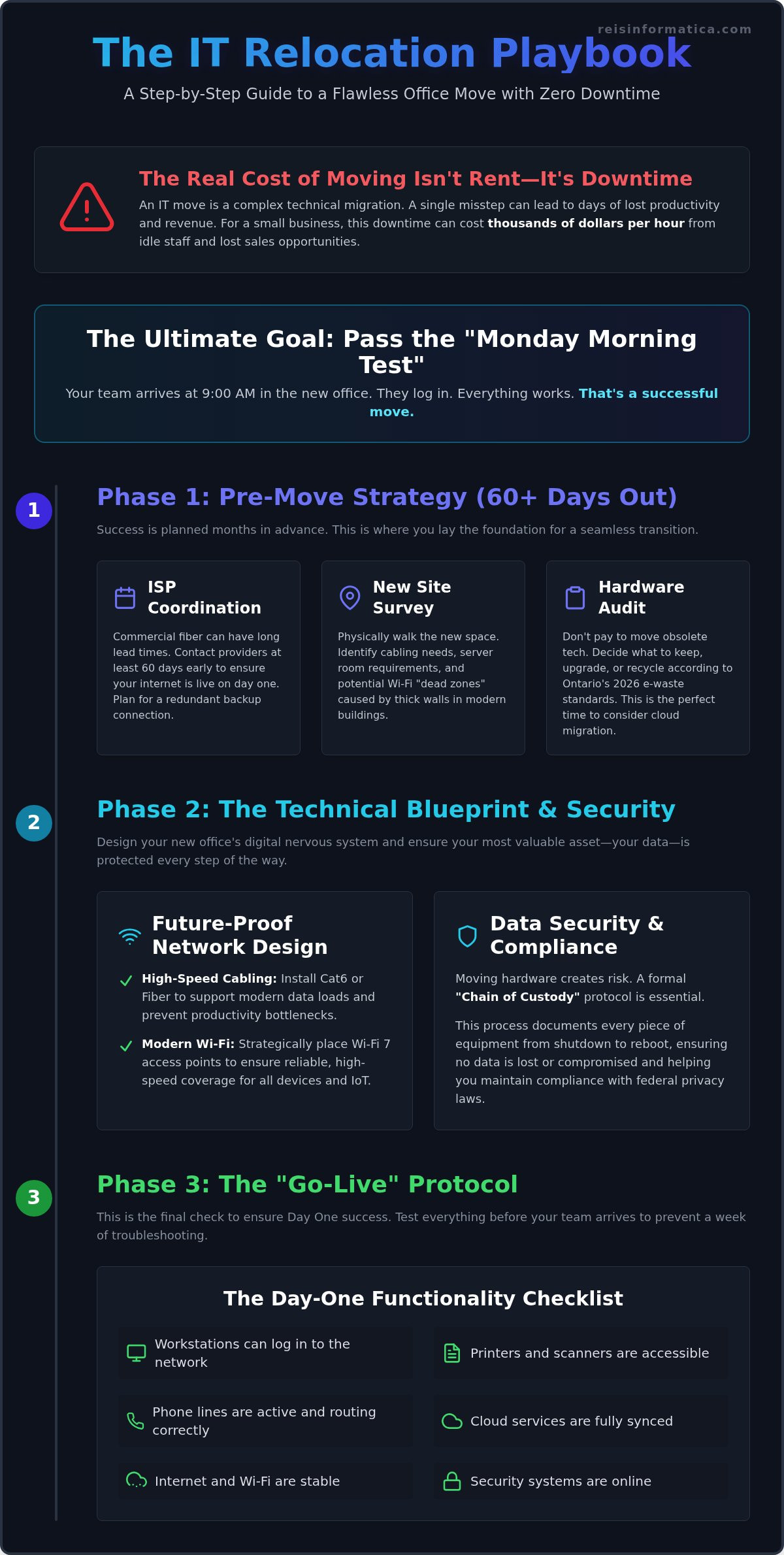
Downtime cost is the total financial loss a business suffers when its systems are offline, calculated by adding the hourly wages of idle employees to the value of lost sales opportunities. For a typical small business, this can quickly escalate into thousands of dollars for every hour your team sits waiting for a connection. A proactive managed IT approach prevents the common cycle where one weekend of physical moving leads to an entire week of technical troubleshooting. Our goal is to pass the “Monday Morning Test,” ensuring every staff member can log in and start working at 9:00 AM without a hitch.
The Pre-Move Checklist: Infrastructure and Connectivity
Success starts long before the moving truck arrives. It begins with a thorough audit of what you have and a clear vision of what your new space needs. This is the perfect moment to build a resilient infrastructure foundation that supports your growth for the next decade.
We recommend a physical site survey of the new Kitchener office early on. You need to identify potential “dead zones” where WiFi signals might struggle and map out exactly where your cabling needs to go. Many of Kitchener’s refurbished tech hubs have thick walls that can wreak havoc on modern wireless signals. Securing professional IT support for office relocation Kitchener businesses can rely on ensures these surveys are done right and your layout is optimized for performance.
Don’t pay to move junk. Audit your existing hardware to decide what’s worth keeping. With Ontario’s e-waste program fully transitioned to the producer responsibility model as of January 1, 2026, you must ensure old equipment is recycled through approved channels. Upgrading now to AI-ready hardware or cloud-based solutions often costs less than maintaining aging physical equipment in a new environment.
Structured Cabling and Network Design
Speed is everything. If you’re still using old cabling, you’re throttling your team’s productivity. Cat6 or Fiber cabling is now essential to handle the high data loads of modern business tools. We also plan for WiFi 7, placing high-density access points strategically throughout your new layout. This ensures every laptop and IoT device stays connected without lag, regardless of how many people are in the office.
The ISP Coordination Timeline
Don’t wait until moving week to call your internet provider. In Kitchener-Waterloo, lead times for commercial fiber can be long. You should start coordinating with ISPs at least 60 days out. This buffer ensures your connection is live before you move in. We also suggest setting up a redundant connection. This second line acts as a safety net, keeping your business online even if the primary fiber line fails. If you need help managing these moving parts, our team provides the IT support for office relocation Kitchener leaders trust to stay operational.
Security and Strategy: Protecting Data During the Move
A physical move is one of the most vulnerable times for your company’s data. Between the old office and the new one, your hardware is at risk of theft, damage, or loss. This is why we implement a strict “Chain of Custody” for every physical server and storage device. We track who handles the gear at every step. Before the first cable is even unplugged, we ensure a verified, off-site backup exists. This Backup and Disaster Recovery (BDR) plan is your ultimate safety net. If a server is damaged or a truck is delayed, your business doesn’t stop.
Many leaders view a move as a chore, but it’s actually a strategic reset. It’s the perfect time to evaluate your overall cybersecurity posture before you plug back in. Instead of just re-establishing an old, potentially vulnerable network, you can build a more secure foundation from day one. Choosing expert IT support for office relocation Kitchener businesses trust allows you to turn a logistical headache into a security upgrade.
Physical Security vs. Digital Safety
Chaos is a thief’s best friend. During a move, people you don’t know are often walking in and out of your office. We help you prevent data theft by securing hardware and requiring full-disk encryption for any devices in transit. If a drive goes missing, the data remains unreadable and useless to anyone else. This is especially critical in 2026, as new federal privacy penalties can reach up to C$25 million for businesses that fail to protect sensitive data.
Strategic Upgrades: Cloud and AI
In 2026, 98% of Canadian IT departments are planning major transformation initiatives according to Robert Half. Why move heavy, expensive legacy servers when you can use cloud migration services instead? Moving to a secure private cloud reduces your physical footprint and makes your business more agile. It also prepares your new space for AI business solutions and smart automation that require modern, scalable infrastructure. If you’re ready to modernize your network while you move, contact us to discuss your relocation strategy.
Post-Move Stabilization: Ensuring Day-One Success
The physical move is finished, but your success depends on what happens next. The goal of any expert IT support for office relocation Kitchener provider is to make sure your team feels like they never left. We use a rigorous “Go-Live” testing protocol to verify every single workstation, printer, and phone line before the first employee walks in. If a printer isn’t mapped or a phone line is fuzzy, we find it before your staff does.
Having on-site support for that first Monday morning is non-negotiable. Small issues, like an employee forgetting how to connect to the new WiFi, can quickly derail a productive morning. Our team stays on the ground to handle these “how-to” questions immediately. This allows your staff to focus on their actual work instead of troubleshooting their desks. It’s about maintaining that sense of calm and competence we’ve built throughout the process.
Once the new office is stable, we turn our attention back to the old one. Decommissioning involves more than just turning off the lights. It requires secure hardware disposal and thorough cable removal to meet lease requirements. This is also the time to finalize your new managed IT services roadmap, ensuring your technology continues to support your business goals in your new Kitchener home.
The First 24 Hours: A Testing Framework
We follow a strict checklist during the first 24 hours to ensure your digital environment is healthy. This includes testing VoIP connectivity for clear calls, verifying VPN access for your remote team members, and checking cloud application speeds. We also double-check that firewall rules are correctly updated for your new IP address. This keeps your network secure from the moment it goes live.
Updating Your IT Documentation
A move is a fresh start for your records. We record new serial numbers, updated port maps, and local vendor contact info to keep your documentation current. This isn’t just busy work; it’s essential for future troubleshooting and security audits. We close the loop on the relocation project with a vCIO review. This strategic meeting helps you evaluate the move’s success and sets the stage for your next phase of growth.
Modernize Your Business Foundation with a Seamless Move
Your office move is more than just a change of address; it’s a strategic opportunity to modernize how your business operates. By focusing on a “Go-Live” testing framework and prioritizing your infrastructure early, you can avoid the costly downtime that often plagues standard relocations. Using this transition as a catalyst for cloud migration or a cybersecurity refresh ensures your new space is fully prepared for the technological demands of 2026.
We provide the specialized IT support for office relocation Kitchener leaders trust to keep their operations running smoothly. Our local Kitchener-Waterloo expertise means we understand the regional ISP landscape, while our strategic vCIO leadership ensures your technology aligns with your long-term goals. We take full responsibility for the technical complexity and proactive security so you can focus on leading your team into their new workspace with confidence.
Plan your stress-free Kitchener office move with Reis Informatica today.
We’re ready to make sure your first Monday morning in the new office is quiet, productive, and perfectly connected. Let’s build a more secure and efficient future for your business together.
Frequently Asked Questions
How far in advance should I contact an IT provider for an office move in Kitchener?
You should contact a provider for IT support for office relocation Kitchener at least 60 to 90 days before your move date. This window is necessary because commercial fiber internet installations in the Waterloo Region often have long lead times. Starting early allows your team to conduct thorough site surveys and secure your connectivity well before the moving trucks arrive at your new front door.
What is the biggest mistake businesses make during an IT relocation?
The biggest mistake is treating technology like standard furniture. Many leaders assume that general movers can safely transport server racks and networking gear, but these systems require specialized handling and climate control. Failing to document the network map before unplugging cables often leads to a week of technical problems. Professional IT support for office relocation Kitchener experts provide ensures you pass the “Monday Morning Test” with every system ready for work.
Will my current internet provider work at my new Kitchener location?
It isn’t guaranteed that your current provider or plan will be available at the new address. While Kitchener has excellent connectivity, specific buildings may lack the fiber infrastructure you currently rely on. You should verify service availability at least two months in advance. If your current provider can’t service the new space, you’ll need that time to vet new vendors and schedule an installation to avoid starting your first week offline.
How do I protect my business data during the physical move?
You protect your data by creating a verified, off-site backup before any hardware is touched. We also recommend using full-disk encryption for all devices in transit to keep information safe if a drive is lost or stolen. Implementing a strict “Chain of Custody” ensures that only authorized personnel handle your servers. This is critical in 2026, as new federal privacy penalties for data breaches can reach up to C$25 million.
Should I upgrade my IT hardware while moving to a new office?
Yes, moving is the perfect time for a strategic hardware audit. It’s often more efficient to upgrade to AI-ready hardware or transition to cloud-based solutions than to pay for moving and re-installing legacy equipment. With 98% of Canadian IT departments planning major transformations in 2026, upgrading during a move simplifies your logistics. It reduces the amount of physical gear you need to transport while ensuring your new office is built for future growth.