
One hour of IT downtime can cost a Canadian small business thousands of dollars. An IT downtime cost calculator estimates the cost of IT downtime by adding lost revenue, reduced productivity and recovery expenses, then accounting for how long the outage lasts.
It’s easy to focus on the repair bill, but an outage can disrupt far more than the technical fix. Staff may be unable to work, customer orders may stall and recovery may bring additional expenses. A practical estimate makes these impacts easier to discuss and plan for.
This guide explains how to build a business downtime calculator around your operations, estimate losses for a Canadian small business and use the result to assess technology investments. You’ll also learn how downtime prevention can help you evaluate managed IT ROI, grounding decisions in business impact rather than guesswork.
Key Takeaways
- Estimate the impact of an outage by accounting for lost sales, interrupted work and recovery expenses, not just the repair bill.
- Use your business’s own revenue, staffing and recovery needs to build a more useful downtime estimate than a generic industry figure.
- Compare the estimated losses with infrastructure investments to help prioritize improvements and assess their potential business value.
- Track outage causes and recovery time over time to identify where prevention and faster response could reduce disruption.
What does an hour of downtime cost you?
Your estimate depends on interrupted revenue, affected employees, recovery work and any penalties for missed commitments.
Revenue and Employee Productivity Losses
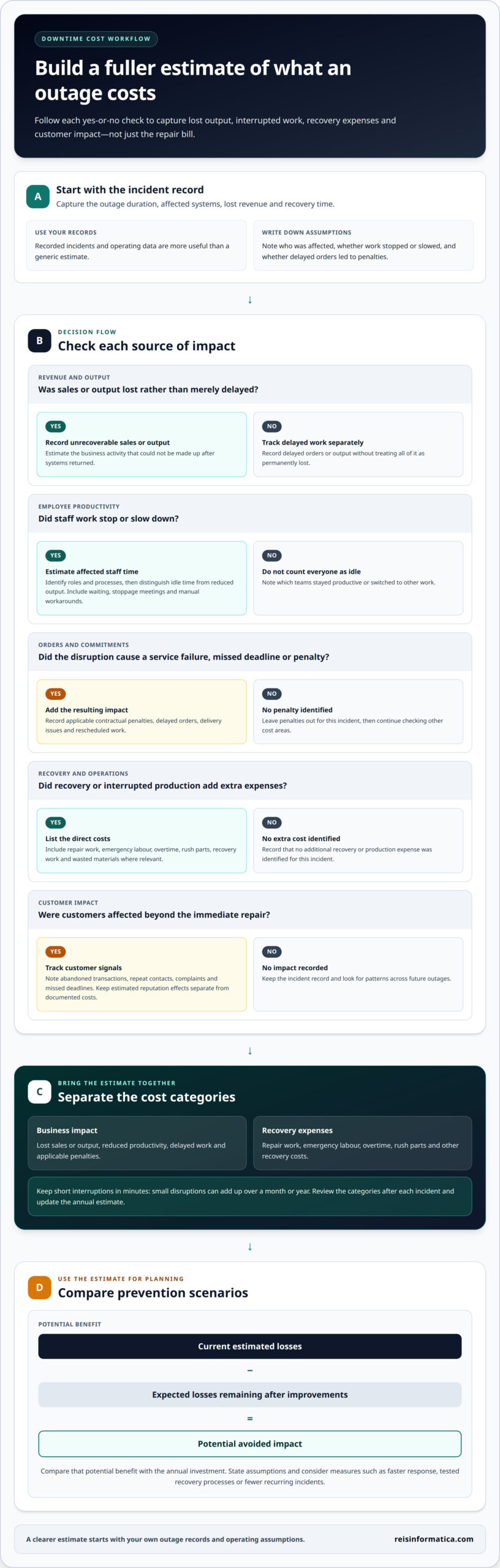
Separate sales or output that cannot be recovered from work that is simply delayed until systems return. Then account for employee time spent waiting, attending stoppage meetings or using manual workarounds. Staff may remain on payroll while producing less, adding lost productivity to missed revenue. Include delivery delays or service failures when they trigger contractual penalties.
Productivity Reduction During Outages
An outage doesn’t always stop every task. Employees may keep working, but slow access to files or business systems can reduce output and create a backlog. Record the roles and processes affected, how long the disruption lasts, and whether staff can switch to productive tasks. This is more realistic than counting every employee as fully idle.
A Worked Production-Line Example
This example shows why revenue alone understates the impact.
For a useful estimate, calculate lost output and idle or reduced labour separately, then add direct recovery costs. Track short interruptions in minutes, since small disruptions can add up over a month or year. If you arrange a tailored assessment, its cost will depend on your operations and recovery needs, with the specific amount set out in a quote.
Using downtime estimates to justify infrastructure investment
A useful estimate turns outages into a business case for investment. Compare potential annual losses with the cost and expected impact of prevention measures.
Estimate Sources and Assumptions
Start with recorded outages, including their duration, affected systems, lost revenue and recovery time. Use your own operating records where possible, and treat broad estimates as comparison points rather than precise forecasts.
Document the assumptions behind each estimate. Note whether employees were idle or working more slowly, and whether delayed orders led to penalties. A clear record shows which inputs drive the result and makes it easier to update as business conditions change.
Costs by Business Size and Industry
Company size matters because more employees, transactions or production may be affected at once.
Start with the closest industry comparison, then adjust for your operations. A service firm may focus on delayed work and client commitments; a manufacturer may prioritize lost output and restart issues. A business downtime calculator is more useful when its assumptions reflect these differences.
Managed IT and Prevention ROI
To estimate the return on managed IT or downtime prevention, compare the annual investment with the losses it could help avoid. An IT downtime cost calculator can organize outage frequency, duration and business impact. Subtract expected remaining losses after improvements from current estimated losses, then compare the potential benefit with the investment.
Build the case around specific measures, such as faster response, tested recovery processes or fewer recurring incidents. Compare scenarios and state your assumptions. This gives leadership a practical basis for prioritizing infrastructure improvements and tracking changes in outage frequency, recovery time and lost revenue.
Downtime costs for Canadian small and medium-sized businesses
For each Canadian incident, separate immediate expenses from losses that continue after systems return. This can show where monitoring or faster recovery could reduce disruption.
Direct IT Downtime Costs
Record the incident’s duration, affected services, repair work and recovery expenses. Include emergency labour, rush parts, overtime and rescheduled work. Compare these expenses with lost output and staff time for a fuller estimate of direct costs.
When comparing service-level agreements, review response targets, restoration objectives, support coverage, escalation steps and priority definitions. Response and restoration are distinct aspects of incident handling, so compare both when reviewing service commitments.
Customer Trust and Reputation Impacts
A payment outage can prevent customers from completing orders, while a service interruption can delay support. Track abandoned transactions, repeat contacts, missed deadlines and complaints linked to each incident. These indicators reveal impacts that a repair invoice won’t capture.
Reputation effects may continue after systems are back online. Customers who experience repeated order delays, for example, may hesitate to buy again. Record the disruption’s duration and customer impact alongside direct expenses, then look for patterns across incidents.
Factors That Affect Downtime Costs
Costs depend on which systems fail, how many teams rely on them and how quickly recovery begins. Common causes include server failures, security incidents and power disruptions. A server failure can halt shared work; a security incident may also require investigation and recovery. The cost of either depends on its scope and duration.
Use monitoring records to identify recurring causes and response delays. Compare incidents by affected process, recovery effort and resulting losses. This makes your estimate more specific to your operations than a single generic rate.
Calculator Costs Beyond Lost Revenue
Beyond missed sales, include idle or less productive staff, emergency repairs, recovery work, overtime, rush parts and contractual penalties. Add wasted materials or rescheduling costs when production disruptions affect those activities.
To capture customer impact, record delayed orders, service failures and follow-up work. Keep direct expenses separate from estimated reputation effects so decision-makers can distinguish documented costs from longer-term risks. Review the categories after each incident and update your annual estimate.
Downtime cost calculator formula
Estimate outage impact by combining operational losses with the outage’s duration. A practical calculation separates lost revenue, reduced employee output and recovery expenses, allowing you to review and update each input.
Calculating Business Downtime Costs
Calculate the cost of IT downtime by adding revenue and productivity losses per minute, then multiplying by the outage’s duration in minutes. Add one-time recovery expenses separately, rather than treating them as costs that continue throughout the outage.
For example, a system failure could interrupt orders while employees wait or switch to manual tasks. Estimate each impact based on the affected operations, then use the recorded outage duration. This gives you a consistent basis for comparing incidents without treating every disruption as identical.
Calculator Inputs
Gather the outage’s start and end times, affected systems and impacted business processes. Include normal revenue during the affected period, employee time lost or reduced, and direct recovery expenses. Keep units consistent: convert hourly rates to per-minute rates before multiplying by outage minutes.
For a monthly or annual view, total the incident estimates for that period. Separate measured costs from assumptions, such as work employees might complete later. Consistent inputs make comparisons between periods easier and show leaders which factors shape the result.
Record each incident in a worksheet with its cause, duration, affected teams, revenue impact, productivity change and recovery expenses. Use the same categories every time. If operations slow rather than stop, estimate the work completed during the disruption and count only the shortfall. This avoids assuming that every employee is completely idle.
Use the result to assess investments by comparing estimated losses with proposed improvements. For an IT downtime prevention plan, track whether incident frequency, recovery time or lost work changes after implementation. Keep assumptions visible and revisit them when workflows or recovery processes change. These measures help assess managed IT ROI without treating an estimated benefit as guaranteed.
Reisinformatica.com: Managed IT services
Reis Informatica provides managed IT services to help businesses manage technology risks and plan for reliable operations. Consider this support when recurring issues, slow recovery or aging infrastructure disrupt essential work.
Managed IT can connect day-to-day technology management with business priorities. If your assessment identifies security risks or infrastructure needs, Reis Informatica also offers cybersecurity services and private and public cloud services and products.
Use incident records to guide a practical discussion about priorities and next steps. Contact Reis Informatica to discuss your IT needs.
Turn downtime tracking into your next decision
Make continuity planning part of regular business reviews, not just a response to outages. Assign someone to keep incident records current, note changes to critical workflows and raise unresolved technology risks with leadership. An outage-cost estimate can help guide priorities as your business changes.
Choose a practical next step: identify the systems whose failure would interrupt essential work, then decide who will lead the follow-up. Use that review to set IT downtime prevention priorities and assess managed IT ROI against your business needs. Reis Informatica offers managed IT services, cybersecurity services, and private and public cloud services and products.
Contact reisinformatica.com about IT downtime to discuss your priorities. A clear plan can help your team make technology decisions with greater confidence.
Frequently Asked Questions
Want Help Reducing Downtime in the Real World?
Reis Informatica helps businesses plan for technology risks and reduce the operational impact of outages. Its managed IT services support organizations in Kitchener, Waterloo, Cambridge, Mississauga, Milton, Calgary, Halifax and London. Bring a recent incident or recurring issue to the conversation, such as interrupted access to business systems or delayed recovery. This context helps connect technology priorities with the work your team needs to keep moving.
What is the average cost of IT downtime per hour for Canadian businesses?
Treat this as a broad planning range, not a fixed rate for every company. A retailer, professional-services firm and manufacturer can face very different losses, depending on the work disrupted and how quickly operations recover.
How does downtime cost vary by business size and industry in Canada?
Costs generally rise when an outage affects more employees, transactions or production, but headcount alone doesn’t determine the loss. Industry matters too: a manufacturer may lose output when equipment or systems stop, while a service business may face delayed client work. Use sector estimates as context, then account for your own workflows, customer commitments and recovery process.
How do outage duration and employee count affect downtime costs?
Longer outages generally increase losses as interrupted work and recovery needs continue. Employee count matters most when people depend on the unavailable system. For example, a system used by one team may disrupt fewer operations than a shared platform used across departments. Estimate affected work and staff time rather than assuming everyone is equally impacted.
What IT downtime prevention measures reduce outages most effectively?
Focus on measures that address your recorded causes of disruption: identify issues early, improve response processes, and maintain tested backups and disaster-recovery plans. Testing helps establish whether data and systems can be restored. Prioritize actions based on which failures disrupt essential work, not on technology changes alone.
What risks and indirect costs should businesses consider when estimating IT downtime?
Include delayed deliveries, missed deadlines, contractual penalties, overtime, rescheduling and emergency repair work. Also consider less visible effects, such as customer complaints, additional support requests and work that remains backlogged after systems return. Record these consequences by incident and review them alongside direct expenses. This helps reveal whether an outage’s business impact continues after systems are available again.