
A backup that has never been restored is an assumption, not a recovery plan. For critical systems, test recovery at least quarterly; for non-critical systems, test at least annually, following University of Toronto backup best practices. That’s a practical starting point for how to test business backups. Your plan should also reflect how quickly the business needs to get back to work.
A successful backup notice does not prove your data is ready to recover. A restore test checks whether the data is usable, access permissions work and essential applications function. It also shows how long recovery may take.
Cloud and immutable backups still need testing. Protection against changes or deletion does not prove a restore will work. This guide explains how to plan backup recovery testing around business priorities, protect backup credentials and prepare for ransomware recovery. You’ll also learn what to test, how to record results and when professional support can help align recovery plans with the systems your organization relies on.
Key Takeaways
- Set recovery targets around how much data the business can afford to lose and how quickly essential systems must be available.
- Test cloud and immutable backups by restoring data and systems in a controlled environment, then record the results and any issues.
- Reduce the risk of attackers reaching backup systems with separate administrator accounts, strong multi-factor authentication and protected backup copies.
- Rank systems by business impact so recovery testing focuses first on the applications and data your operations rely on most.
1. Q: How often should backup restore testing happen?
Test critical systems monthly or quarterly, based on business requirements. The University of Toronto recommends recovery testing at least quarterly for critical systems and annually for non-critical systems. A regular schedule can reveal failed restores before an outage makes recovery urgent.
Set recovery point objectives (RPOs) and recovery time objectives (RTOs) according to business needs. The RPO defines how much recent data the organization can afford to lose; the RTO defines how long a system can remain unavailable. During a restore test, record the age of the recovered data and how long it takes for the application to become usable.
For example, an organization might aim to restore its accounting system within one business day, with no more than one day of lost entries. A test checks both targets: whether recovered records meet the RPO and whether staff can use the application within the RTO. If either target is missed, adjust the recovery plan.
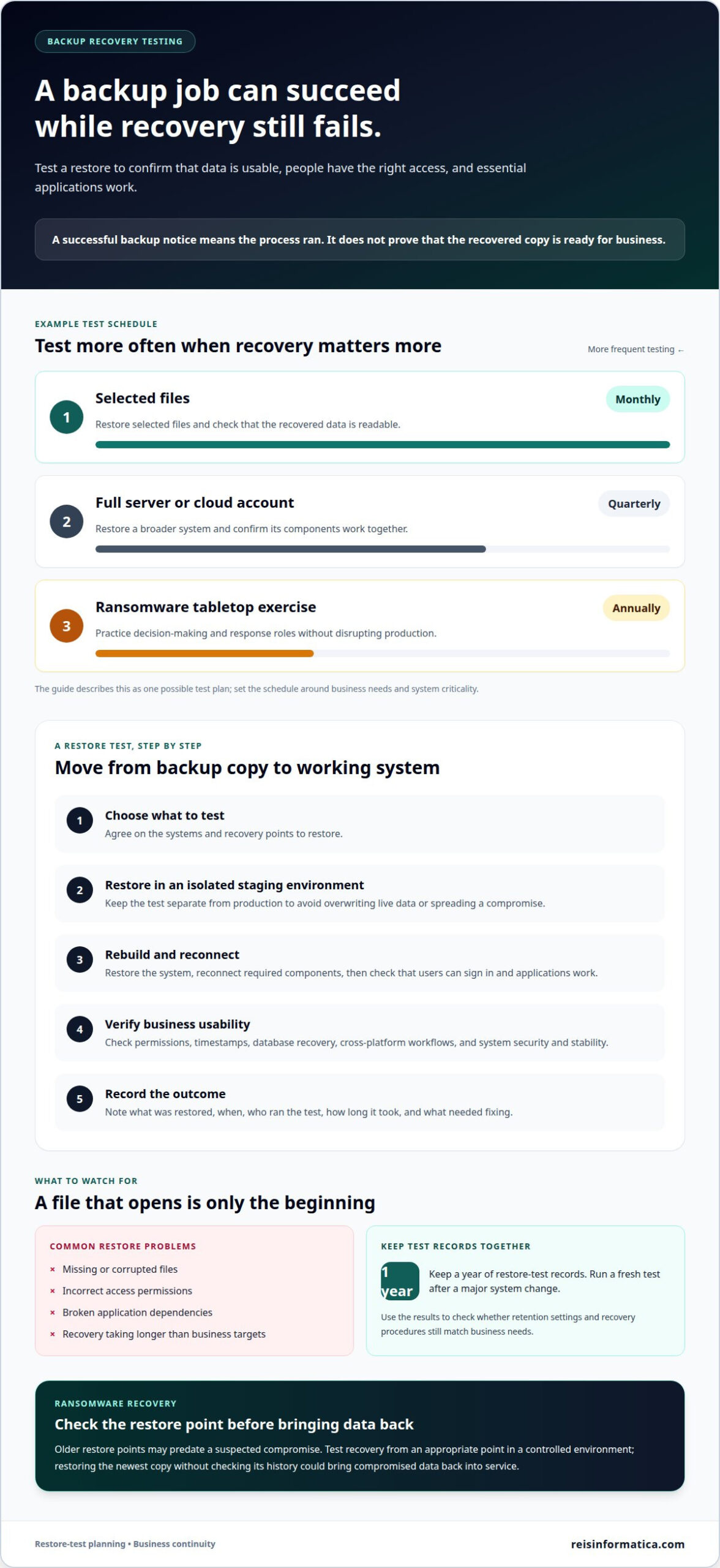
Ransomware can go undetected while attackers encrypt files or compromise connected backups. Check whether older restore points predate the suspected compromise, then test recovery from an appropriate point in a controlled environment. Restoring the newest copy without checking its history could bring encrypted or compromised data back into service.
Continuous data protection captures changes more often than scheduled backups, supporting more precise point-in-time recovery and potentially reducing the RPO. It does not replace restore testing. Confirm that a selected recovery point restores usable data and a functioning application.
In Canada, privacy and data-residency obligations depend on the applicable federal or provincial rules and the information involved. Under PIPEDA, organizations must protect personal information against loss, theft or unauthorized access and regularly review safeguards through security audits or testing.
Set the test schedule according to system criticality, acceptable data loss and downtime. Changes to infrastructure or applications can also affect recovery, so run a fresh restore test after a significant change.
2. Q: Do immutable or cloud backups still need testing?
Yes. Immutable storage can prevent changes or deletion during its retention period, but it cannot prove files will restore correctly. A cloud backup may also contain missing data, broken permissions or applications that fail after restoration. Backup-job monitoring confirms that a process ran, not that the recovered copies are usable.
Verification checks whether backup data is intact and readable. Disaster recovery testing goes further: it restores systems and checks whether they can support business operations. A test plan might include monthly restores of selected files and quarterly tests of a full server or cloud account. An annual ransomware tabletop exercise can test decision-making and response roles without disrupting production.
A recovery test starts by agreeing which systems and recovery points to test. Restore copies into a staging environment isolated from production to avoid overwriting live data or spreading a compromise. Then rebuild the system, reconnect required components and check that users can sign in and applications work.
Test more than whether a file opens. Validate permissions, timestamps, database recovery and cross-platform workflows. Check restored systems for security and stability before considering recovery complete. Common failures include missing or corrupted files, incorrect access, broken application dependencies and restore times that exceed business targets.
After each test, record what was restored, when the test happened, who ran it, how long recovery took and what needed fixing. Keep a year of restore-test records together, and run a fresh test after a major system change. These results show whether retention settings and recovery procedures still match business needs.
For Canadian businesses, cloud, off-site and immutable backup costs depend on data volume, retention period, storage location, security controls and recovery requirements. A quote reflects the specific service and these cost factors, rather than a single standard rate.
According to CISA ransomware guidance, backups should be protected from deletion or tampering, kept offline or otherwise out of reach, and tested. NIST Cybersecurity Framework 2.0 also states that backups should be created, protected, maintained and tested.
3. Immutable backups and protected credentials
Immutable storage prevents backup data from being modified, deleted or encrypted during a defined retention period. It can limit damage if ransomware reaches production, but it cannot prevent every disaster or prove that recovery will work. Keep at least one backup copy immutable or air-gapped, meaning physically or logically isolated from the production network.
Before setting protection rules, map the business data, systems and dependencies that need recovery. Identify which applications support essential operations and where their backup copies are stored. This inventory helps set retention and access controls around real recovery priorities, so critical data is not left outside the plan.
For immutable storage, the provider configures a retention lock that limits deletion during the chosen period. Guidance recommends vault lock periods of 180 days or longer; one example uses a 365-day retention lock that prevents deletion, including by administrators. A separate ransomware defence example includes 90 days of soft delete. These settings serve different purposes, so validation should confirm what each protects.
Use layered protection. Encrypt backup data both in transit and at rest, and separate backup administration accounts from everyday IT administrator accounts. Protect backup accounts with access controls and strong multi-factor authentication. This limits the ways a compromised everyday account could alter backup copies or extend downtime.
During ransomware recovery, assess the backup environment for tampering or encryption attempts before restoring data. Select a recovery point that predates the compromise, restore it in isolation and test system security before reconnecting it to production. Regular validation can expose gaps while the business has time to address them, without the pressure of active data loss.
For cloud backups, apply the same protections: immutability, encryption, multi-factor authentication and controlled access. The Canadian Centre for Cyber Security recommends the 3-2-1 rule: keep three information copies on two media types, with one copy off site. This layered approach gives the recovery plan alternatives if one copy or location is affected.
4. Aligning recovery plans with business priorities
A successful disaster recovery plan restores the work that keeps the business operating, not simply the largest server first. Rank critical systems by their effect on revenue, customer service, compliance and staff productivity. Then map dependencies: an order-processing application may rely on a database, identity service and network infrastructure. If one dependency stays offline, the main application may remain unusable.
Set a recovery time objective and recovery point objective for each priority tier. Some systems can tolerate 24 hours of data loss, while others need more frequent recovery points. The decision depends on the work each system supports, the cost of downtime and how much information teams can recreate. Document these targets so technical teams can test against business expectations.
Match the test to the system’s importance. The guidance recommends full system recovery testing for Tier 1 applications, database recovery testing for Tier 2 applications and file-level recovery testing for Tier 3 resources. For example, a Tier 1 test should verify that the restored server, database and connected application work together, not just that backup files are stored.
During each exercise, compare actual recovery time and recovered data with the agreed targets. Verify that the right people can access restored systems and complete essential tasks. If a critical application misses its target, identify the cause, assign an owner to the corrective action and set a date for retesting.
This approach directs testing toward the greatest operational risks. A file restore may be enough for a low-priority shared folder, while a critical service needs a broader recovery exercise. Record which business functions remain unavailable during each test, then use the results to refine priorities and reduce avoidable downtime.
Plan recovery priorities around your critical systems before an outage forces rushed decisions.
Reisinformatica.com: AI Business Solutions
Reis Informatica helps businesses connect technology decisions with operational priorities through IT Strategy and Leadership and cybersecurity services. Turn to the team when backup tests reveal unclear recovery responsibilities, protection gaps or uncertainty about which systems must return first.
If AI Business Solutions support important business processes, include their data and dependencies in recovery planning. A clear view of critical systems helps align protection and recovery decisions with how the organization works, rather than treating each technology as a separate concern.
For support with backup resilience and technology priorities, contact Reis Informatica.
Make recovery part of business planning
A recovery plan should evolve alongside the business. New applications, changing workflows and shifting priorities can affect which systems need protection and how teams restore them. Treat your business data backup strategy as an operational decision, with clear ownership for keeping recovery plans aligned with the way your organization works.
Reis Informatica offers Managed IT services, cybersecurity services, and private and public cloud services and products to help businesses address backup protection and recovery as part of their broader IT environment.
Contact reisinformatica.com to discuss your recovery needs. A thoughtful next step today can help your team approach future disruptions with greater clarity.
Frequently Asked Questions
What is ransomware recovery?
Ransomware recovery is the process of safely restoring business operations after ransomware disrupts or encrypts systems. The response may include isolating affected devices from wired and wireless networks, removing them from VPN access and assessing whether backups were affected. Avoid copying compromised data into clean backups. Then restore suitable data and systems, check security and resume operations in a controlled order.
Do immutable or cloud backups still need testing?
Yes. Immutable storage and cloud hosting do not demonstrate that a business can retrieve and use its data during an outage. A useful test checks whether authorized recovery staff can access the backup account, locate the intended copy and restore important information into a separate environment. Testing these access and retrieval steps can reveal account or process obstacles before an urgent recovery depends on them.
How often should backup restore testing happen?
Use quarterly recovery tests for critical systems and at least annual tests for non-critical systems, following University of Toronto backup best practices. The right schedule also reflects how quickly information changes and how long each function can tolerate disruption. Run another test after a major application or infrastructure change, since updates can alter recovery dependencies and access requirements.
Is a successful backup job the same as a tested backup?
No. A successful job report shows that a backup process completed; a restore test checks whether the saved information is usable. For example, restore a representative file and verify that its contents, timestamps and access permissions are intact. Testing a database or application also helps identify whether related components work together, rather than treating a completed backup as proof of recovery readiness.
Will backups protect us if data was stolen?
Backups help restore information, but they cannot undo the exposure of data an attacker has already stolen. Treat possible theft as a separate security incident: investigate what information was accessed, secure affected accounts and systems, and involve the appropriate internal decision-makers. Encryption, restricted backup access and incident-response planning can help reduce risks, but restoration alone does not resolve confidentiality concerns.
How often should Canadian businesses test backup recovery?
For businesses in Kitchener, Waterloo, Cambridge, Mississauga, Milton, Calgary, Halifax and London, set testing frequency by system criticality: quarterly for critical systems and annually for non-critical ones. A fuller schedule can also include monthly file restores, quarterly full-server or cloud-account tests, and an annual ransomware tabletop exercise. Repeat testing after major system changes to account for new dependencies.