
Keeping IT in-house doesn’t mean your team has to handle every technology need alone. In the managed IT vs. co-managed IT decision, co-managed IT services add an external provider’s support and expertise to your existing team, while fully managed IT shifts most or all IT responsibility to an outside provider. The right model depends on your team’s capacity, the expertise you need, and how much control you want to retain.
It’s reasonable to weigh the familiarity of internal IT against the broader support of outsourcing. The choice isn’t all or nothing: co-managed IT can let your staff manage day-to-day priorities while a provider helps fill specific gaps. This guide explains how responsibilities are shared, compares co-managed and fully managed IT, and helps you decide whether outsourced IT vs. internal IT suits your business. You’ll also learn what to consider when choosing a co-managed IT provider in Canada.
Key Takeaways
- Use a co-managed arrangement to add outside expertise or capacity while keeping selected IT responsibilities in-house.
- Define who handles support, security, monitoring, approvals, and escalations so shared work has clear ownership.
- Choose between shared and fully outsourced support based on your team’s capacity, the expertise you need, and how much control you want to retain.
- Match the support model to your business’s needs across Canada, including specialist coverage for areas such as cybersecurity or cloud services.
What Are Co-Managed IT Services and Why They May Be a Fit for Your Business?
Canadian businesses should define who can access sensitive data, approve changes, and respond to incidents. Unclear ownership can create security, privacy, and compliance gaps. The Canadian Centre for Cyber Security says system owners remain responsible for all risks related to the cybersecurity of their IT systems.
Internal Staff and MSP Support
Co-managed IT pairs internal staff, who understand business priorities and systems, with an MSP that brings specialist expertise and additional capacity. For example, staff can manage user requests while the provider supports a security review, plans a cloud migration, or assists with a major upgrade. This division lets internal teams retain context while specialists focus on technical work. Agree on owners and escalation paths before work begins.
Supplemental Versus Replacement Support
Supplemental support adds capability without automatically replacing an internal IT employee. That distinction matters when an employee knows the organization’s systems, users, and workflows but lacks the time or expertise for a complex upgrade or cybersecurity review. A provider can handle defined specialist work while internal staff retain business-specific knowledge. Replacing an internal arrangement can mean losing institutional knowledge and day-to-day context.
Support as the Business Grows
As a business grows, its support model can shift from internal-only IT to co-managed support, then to fully managed services if external support better fits its needs. Co-managed IT is often suited to Canadian firms with 30 to 150 employees and one to three internal IT staff. Growth, new systems, and added security demands can increase the expertise and capacity required.
| Option | Internal ownership | External support | Typical fit |
|---|---|---|---|
| Internal IT | Most responsibilities | None or limited | Needs fit team capacity |
| Co-managed IT | Selected priorities | Defined specialist support | Existing team has gaps |
| Fully managed IT | Less day-to-day ownership | Most or all IT responsibilities | Business wants external management |
Choose the model that matches your team’s capacity, required expertise, and desired level of ownership.
How internal IT teams and managed providers divide responsibilities
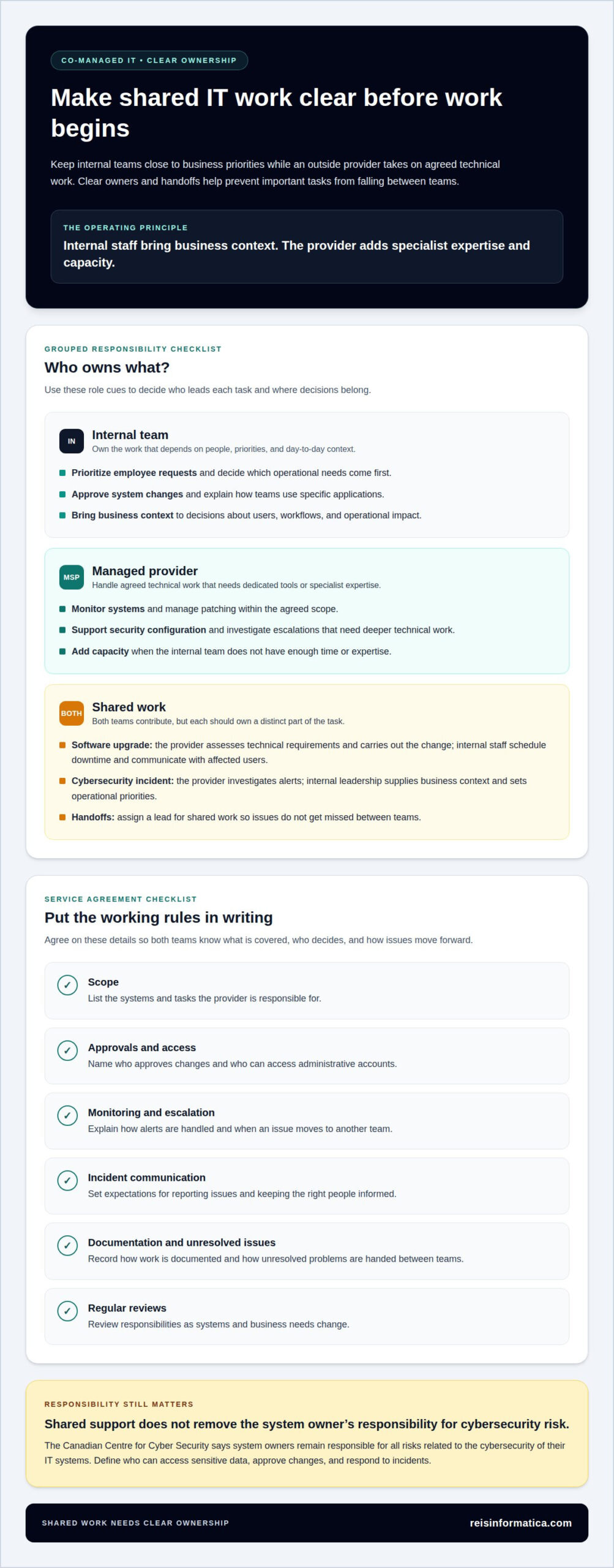
A clear division gives internal staff ownership of business priorities while the provider handles agreed technical work. A co-managed service agreement should identify each task’s owner, access level, escalation path, and reporting process.
Internal Team Responsibilities
The internal team usually handles work that depends on close knowledge of people and business processes. For example, staff can prioritize employee requests, approve system changes, and explain how a department uses a specific application. They also decide which operational needs come first. Unlike a specialized provider, internal staff bring day-to-day context, so their role centres on business relationships and decisions.
Managed Provider Responsibilities
A managed provider commonly handles specialized work that requires dedicated tools or technical expertise. This can include system monitoring, patching, security configuration, and escalations that need deeper investigation. The provider can also add coverage when internal capacity is limited. Its responsibilities should remain within the agreed scope, with clear routes for reporting issues and handing decisions back to internal staff.
Shared IT Responsibilities
Some tasks require both teams, but each should own a distinct part. For a software upgrade, the provider might assess technical requirements and carry out the change, while internal staff schedule downtime and communicate with affected users. During cybersecurity incidents, the provider can investigate alerts; internal leadership supplies business context and sets operational priorities. Assign a lead for shared work to prevent missed handoffs.
Service Agreement Responsibilities
Define the systems and tasks covered, who approves changes, and who can access administrative accounts. The agreement should also explain monitoring and alert escalation, incident communication, documentation, and how unresolved issues move between teams. For example, specify whether internal staff or the provider handles a user ticket that reveals a network fault. Schedule reviews so responsibilities can adapt as systems change.
When monitoring or cybersecurity work exceeds internal capacity, managed IT services can provide a defined layer of support alongside staff.
Co-managed IT compared with fully managed IT
The key difference is ownership: co-managed IT supplements an internal team, while fully managed IT assigns most or all IT responsibilities to an external provider. Your choice depends on who should lead daily support, maintenance, and strategic planning.
Co-Managed IT
Co-managed IT keeps internal staff involved in decisions and selected tasks, while an outside provider fills specific expertise or capacity gaps. Your team might manage business applications and user priorities while a provider supports network monitoring or a major infrastructure project. This model suits organizations that want to retain internal knowledge and control rather than replace their team.
It can also support hiring decisions: a business can add specialist help for defined needs instead of assigning every technical responsibility to a new employee. Canadian firms with 20 to 250 employees may benefit from this blended approach, particularly when projects or security needs outpace internal capacity.
Fully Managed IT
Fully managed IT shifts most or all IT responsibility to an external provider, which becomes the primary point of accountability. A service arrangement may include help desk support, device management, security oversight, vendor coordination, and planning. The provider can also monitor device health, application performance, backups, and storage, then handle patching and configuration.
This model can suit a business without an internal IT team or one that prefers external ownership of daily IT operations. Unlike co-managed support, it doesn’t depend on internal staff to lead routine maintenance or coordinate each technical task. The provider takes a broader role across the IT environment.
| Decision factor | Co-managed IT | Fully managed IT |
|---|---|---|
| Internal IT team | Retains selected responsibilities | May not be needed for daily operations |
| Provider’s role | Fills defined gaps | Handles most or all IT responsibilities |
| Best fit | Existing team needs added capacity | Business wants external accountability |
Choose co-managed support if internal staff should retain ownership of priorities or business-specific systems. Choose fully managed support if your business wants one external provider to coordinate the help desk, infrastructure, security, and planning. If your internal team is facing a major network project, specialist support can preserve internal knowledge without handing over the entire environment.
Co-managed IT services across Canada
Assess a provider by matching its proposed scope to your internal team’s needs, then defining ownership, escalation, security, and reporting processes. Whether your business operates in a single province or has multiple locations nationwide, a suitable co-managed IT provider in Canada should fill specific gaps while allowing your organization to retain the knowledge and responsibilities it wants to keep.
Co-managed IT services are common in Canadian businesses with 10 to 150 employees, but headcount alone doesn’t determine fit. A distributed organization spanning multiple provinces, for example, may need stronger monitoring and escalation support, while a business with an active internal IT team may mainly need expertise for a cloud project or security review. The right arrangement follows actual workload and priorities.
Use these criteria to assess how a partnership will work:
- Scope: Identify which systems and tasks the provider handles, such as cybersecurity or cloud support across your Canadian locations.
- Ownership: Assign a named owner for each responsibility, including approvals and incident decisions.
- Communication: Set escalation routes, reporting expectations, and regular check-ins between internal staff and the provider.
- Access: Define which accounts and systems the provider can access, and how access is managed.
- Flexibility: Confirm how support can change as projects, infrastructure, or internal capacity shift.
These details matter because the provider works within your existing environment, not in isolation. During a cloud migration, for example, internal staff can preserve knowledge of business workflows while the provider contributes technical expertise and coordinates defined project tasks. A clear agreement also helps prevent duplicated work, missed handoffs, and confusion about who responds when an issue affects users.
Choose a partner based on practical fit, relevant expertise, a defined scope, and a workable collaboration process. If your team is mapping those needs, plan your co-managed IT support around the responsibilities and gaps that matter most.
Reisinformatica.com: Managed IT aservices
Reis Informatica provides managed IT services for businesses that need structured support for their technology environment. If your internal team needs additional expertise or your organization wants external help with day-to-day IT, managed support can be a practical next step.
For more focused needs, Reis Informatica also provides cybersecurity services and private and public cloud services and products. These offerings can support businesses addressing security priorities or planning how cloud services fit their operations. The right starting point depends on the responsibilities you want to retain and where additional support would help.
Contact reisinformatica.com to discuss your business’s IT support needs.
Make your IT support model work for what’s next
Keep your support model connected to your business plan rather than treating it as a permanent label. As priorities shift, revisit the choice between managed IT and co-managed IT. Consider which approach can support upcoming projects and provide the level of oversight your team wants. Businesses in Canada can use this review to identify the next capability they need instead of assuming their current arrangement must stay unchanged.
For teams considering co-managed IT services, connect the support model to a specific business goal. That might mean making technology changes easier to coordinate or giving leaders a clearer view of IT priorities. A focused conversation with Reis Informatica can help turn those goals into a practical direction.
Discuss your IT support priorities with reisinformatica.com, and take the next step toward technology that supports your business goals.
Frequently Asked Questions
How is co-managed IT different from fully managed IT?
Co-managed IT keeps an internal team involved in selected decisions and tasks; fully managed IT places most or all IT operations with an external provider. For example, a business might keep employee onboarding and software approvals in-house while assigning infrastructure maintenance externally. The key distinction is who directs routine work and owns decisions, not simply which organization supplies the technical tools.
Which SMBs tend to fit each model best?
Co-managed IT often suits Canadian firms with 30 to 150 employees and one to three internal IT staff who need added expertise or capacity. Fully managed IT may fit a business without an internal IT team, or one that wants an external provider to take primary responsibility for IT operations. For SMBs in Kitchener, Waterloo, Cambridge, Mississauga, Milton, Calgary, Halifax, and London, team capacity and desired ownership help guide the choice.
Does a co-managed provider cover nights and weekends?
Some co-managed agreements include after-hours or weekend incident coverage, but the hours and tasks need clear definition. For example, an agreement might specify which critical alerts trigger escalation outside regular business hours, who receives them, and what response the provider handles. Distinguish urgent incidents from routine user requests so internal staff and the provider share clear expectations.
How long does co-managed onboarding take?
For a Canadian firm with 50 to 150 seats, co-managed IT onboarding is estimated to take 30 to 60 days from signing to steady state. A phased plan may use the first two weeks for discovery and documentation, followed by two weeks for tooling and monitoring. Existing system records, access arrangements, and the agreed scope shape the transition work.
How much does co-managed IT cost in Canada?
In Canada, pricing depends on the scope, systems covered, specialist support, and project needs, and is provided after a quote request. A defined cybersecurity review, for example, differs from ongoing support across several systems. The clearest estimate comes from identifying which responsibilities stay internal and which work the provider will take on.
How quickly can co-managed support be put in place?
Monitoring and support can begin after the business and provider agree on a plan. The start depends on practical setup needs, such as system access, documentation, and the priorities assigned to the provider. A focused first phase, such as monitoring selected systems, can establish working processes before the arrangement expands to additional responsibilities.