
A vague IT agreement can leave a crucial question unanswered: who takes responsibility when systems fail or data needs restoring? An IT service agreement checklist helps clarify service scope, support expectations, and security and recovery responsibilities.
Clear terms help your team understand how support works and what each party is responsible for. A managed IT SLA turns expectations into defined commitments, while a practical checklist keeps the agreement focused on your business needs.
This guide explains how MSPs use SLAs to measure service and gather feedback. It also explores how an IT service agreement checklist can address reporting, user responsibilities, and recovery planning, so you can shape a managed IT SLA around the way your business operates.
Key Takeaways
- Separate the time it takes to acknowledge an issue from the time it takes to fix it, and tie both expectations to incident priority.
- Use regular service reports and feedback to spot recurring problems and understand whether support commitments are being met.
- Make covered systems, exclusions, reporting channels, escalation steps, and each party’s responsibilities clear.
- Spell out who handles security, backups, recovery, and customer data throughout the agreement and when it ends.
WHAT IS AN IT SERVICE LEVEL AGREEMENT (SLA)?
A service level agreement (SLA) formally describes the service a customer can expect from a provider. A managed IT SLA should define first-response, resolution, service-restoration, and uptime measures, along with support hours.
Priority-Based Response and Resolution Targets
Priority-based targets set different response and resolution expectations according to an incident’s business impact. This helps a managed service provider focus on outages affecting more people or critical work, rather than treating every ticket alike.
- Priority 1, critical: A typical resolution target is 4-8 hours.
- Priority 2, high: First response is 30-60 minutes; resolution is 8-12 business hours.
- Priority 3, medium: First response is 2-4 business hours; resolution is 1-3 business days.
- Priority 4, low: First response is 4-8 business hours; resolution is 3-5 business days.
Set priorities by considering the outage, the number of affected users, and available workarounds. For example, an email outage affecting the whole team may rank above a single-user issue with a temporary workaround.
Support Hours and Service Metrics
Support hours define when the provider accepts and responds to requests, while service metrics show how performance is measured. The SLA should distinguish contracted coverage from support outside working hours, so a ticket submitted at 2 am has a clear expectation.
Response time measures the wait for the provider’s first reply; resolution time measures the wait until the issue is fixed. Service restoration can be tracked separately, since access may return through a workaround before the underlying problem is fully resolved. An illustrative uptime target of 99.9% allows approximately 43.2 minutes of downtime during a 30-day month. Define how scheduled maintenance and outages affect that measure.
SLA compliance reporting and customer feedback
A useful SLA defines how users report problems and how the provider records performance. Monthly or quarterly reporting can show whether commitments are met and highlight recurring issues that need attention.
Tracking and Performance Reporting
Performance reports bring ticket records and service measures together, giving both parties a clear view of how the agreement is working. Consistent records matter: without them, it is difficult to assess when an issue was reported, acknowledged, escalated, and addressed against the agreed response target.
A ticketing system can capture each incident’s priority, timestamps, status changes, and communications. The provider can compare those records with the agreed targets and report results monthly or quarterly. A report, for example, might show whether response commitments were met and flag repeat outages affecting the same system.
Useful reports also explain exceptions. A third-party delay or missing customer information can affect progress, so the report should identify the dependency and its impact on the ticket. A Quarterly Business Review can turn the records into a discussion about trends, service performance, and customer feedback.
Escalation and Service Reviews
Escalation procedures define who handles an issue when its impact is urgent or progress stalls. Clear steps are especially important during network outages or cybersecurity incidents, when users need to know how to report the problem and who will coordinate updates.
The agreement should identify reporting channels, the information users should provide, and the conditions that trigger escalation. For example, a business-wide outage may require immediate escalation to a designated technical lead, while a routine request follows the standard ticket process. Explain how affected users will receive status updates, too.
Regular service reviews connect reports with customer feedback. During a quarterly review, the provider and business can discuss recurring incidents, missed commitments, whether escalation worked, and changes in business needs. Recording decisions and assigning follow-up actions helps turn the review into measurable improvements, rather than another report that goes unread.
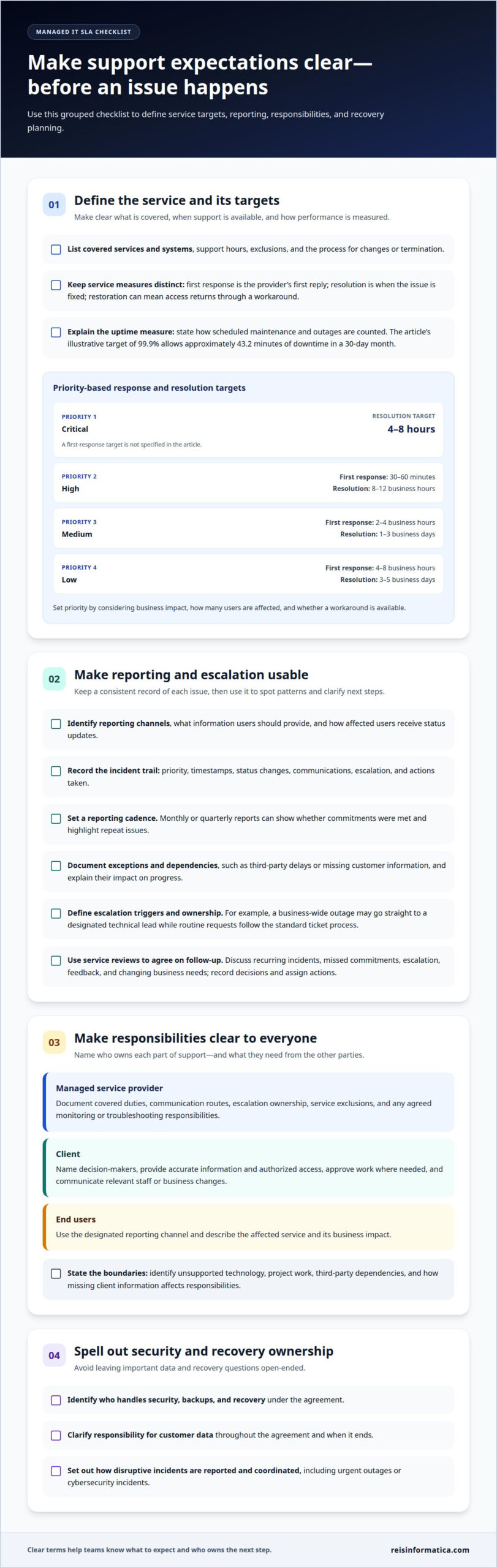
Communicating support expectations to clients and users
In Canada, an IT services agreement with a managed service provider should define covered services and systems, responsibilities, support channels, exclusions, and how changes or termination work. It should also explain how both parties communicate during routine support and disruptive incidents, so users know what to report and who owns the next step.
A clear agreement establishes how the managed service provider, client, and end users work together. Users might submit routine requests through a ticketing channel, while a designated client contact approves access changes or communicates business impact. The agreement should identify who can authorize work and where updates are sent.
Responsibilities should be practical and specific. The provider’s duties may include monitoring covered systems, troubleshooting reported issues, and maintaining agreed services. Client obligations can include providing accurate information, arranging authorized access to premises or systems, and notifying the provider when staff or business needs change. End users should know how to report an issue and what details explain its impact.
- MSP: Document covered duties, communication routes, escalation ownership, and service exclusions.
- Client: Name decision-makers, provide access and information, and communicate relevant changes.
- End users: Use the designated reporting channel and describe the affected service and business impact.
Define the boundaries, too. State which systems or tasks fall outside the agreement, such as unsupported technology or project work, and explain how third-party delays or missing client information affect responsibilities. For example, if a software vendor must fix a product defect, the agreement can clarify what the managed service provider will handle while the vendor investigates.
Finally, describe how the parties approve agreement changes, resolve disagreements, and manage termination. Include the notice process, responsibilities during the transition, and how access, records, and data are handled when service ends. Clear terms help both sides understand what happens if the business changes systems or moves to a different support arrangement.
Security, backup, and recovery responsibilities
A Canadian managed services contract should identify who owns business data and define how privacy, confidentiality, and breach notifications are handled. It should also document how records are protected, how long they are retained, how they are disposed of, and who receives notice when a security incident occurs.
Security responsibilities should name the systems and tasks covered by the agreement. For example, specify whether the provider manages security monitoring, access controls, and incident response for each system. Clarify which duties remain with the business, such as approving user access or reporting suspected phishing messages.
Backup terms should describe which data and systems are included, how backups are managed, and how restoration requests are handled. The right approach depends on how quickly the business needs information restored and how much recent work it can afford to lose. A shared file system, for example, may have different recovery priorities from an archived record.
- Coverage: Name protected systems, data sources, and any exclusions.
- Recovery: Define restoration priorities, responsibilities, and how recovery is tested.
- Security incidents: Set out the notification channel, responsible contacts, and information shared.
- Data lifecycle: Document ownership, permitted access, retention, return, and secure disposal when service ends.
Recovery plans should explain what happens if a backup fails or a system cannot be restored as expected. Define who coordinates the response, how business priorities guide restoration, and how users receive updates. For cloud-hosted systems, clarify which recovery tasks belong to the provider and which depend on the cloud service or the business.
These details turn security and recovery from broad promises into assigned responsibilities. Explore private and public cloud services as part of a plan that aligns data protection and recovery with business priorities.
Reisinformatica.com: Managed IT aservices
Reis Informatica provides managed IT services for businesses in Kitchener, Waterloo, Cambridge, Mississauga, Milton, Calgary, Halifax, and London. If your agreement needs to connect day-to-day IT support with security or recovery planning, managed services can help coordinate those needs.
Cybersecurity services can support business security priorities, while private and public cloud services can align with your cloud environment. The right mix depends on the systems your business uses and the responsibilities set out in its agreement.
If you’re reviewing support expectations or planning a managed IT arrangement, contact Reis Informatica to discuss your business’s needs.
Make your agreement work as your business evolves
Treat your managed services contract as a working framework, not a document to file away. Revisit it as business priorities, risks, and technology needs change, so the agreement continues to support the way your team works.
Reis Informatica provides managed IT, cybersecurity, and private and public cloud services. These services can connect technology management with your security and cloud needs. Use the agreement as a starting point for a focused discussion about an MSP service level agreement that fits your business.
Contact reisinformatica.com today to discuss your IT needs and plan a clear next step.
Frequently Asked Questions
How are SLAs used by managed service providers?
Managed service providers use SLAs to turn support expectations into measurable commitments. An SLA can document how performance is tracked, what happens when a commitment is missed, and how customers provide feedback. For example, it can connect a recurring service issue to a review and corrective action. This gives both parties a shared record for discussing service quality and whether expectations still fit.
How long does a managed IT services contract last?
A managed IT services contract can have an initial term of 12, 24, or 36 months. The right duration depends on the services covered, the technology involved, and how much time the relationship needs to deliver value. The agreement should also explain renewal timing and what happens at the end of the term, so the business can plan for continuation, changes, or transition.
Can an IT SLA Be Customized for Your Business?
Yes. An IT SLA can be tailored to the systems, business priorities, support coverage, and responsibilities involved. A company that relies on a particular application for daily operations may assign related incidents higher priority than requests affecting optional tools. Custom terms can also clarify third-party dependencies and customer obligations, making the agreement more relevant than generic service commitments.
How Often Should a Managed IT SLA Be Reviewed?
Review a managed IT SLA every 18 to 24 months, and sooner when a meaningful business change affects support needs. Opening another office, adding systems, or changing how employees work can alter the assumptions behind the agreement. A scheduled review lets both parties reassess targets, recurring issues, dependencies, and escalation paths, then document any approved changes so the terms remain practical.
Liability: Who Is Liable for What?
Liability depends on the responsibilities and limits set out in the agreement, so the contract should clearly allocate each party’s duties. It can address the provider’s service obligations, the business’s access and information responsibilities, and how third-party claims or indemnification are handled. For example, clarify who manages a vendor dispute when an outside software service contributes to an incident. Legal review can help identify ambiguous wording.
Rules of Termination: What Does the Process of Termination Look Like?
Termination should follow the conditions and procedures set out in the agreement. The terms can define when either party may end the relationship, how notice is delivered, and what transition support involves. They should also address access changes, the return or transfer of business data, and outstanding responsibilities. A defined handover helps the business maintain continuity while moving services or records to a new arrangement.