
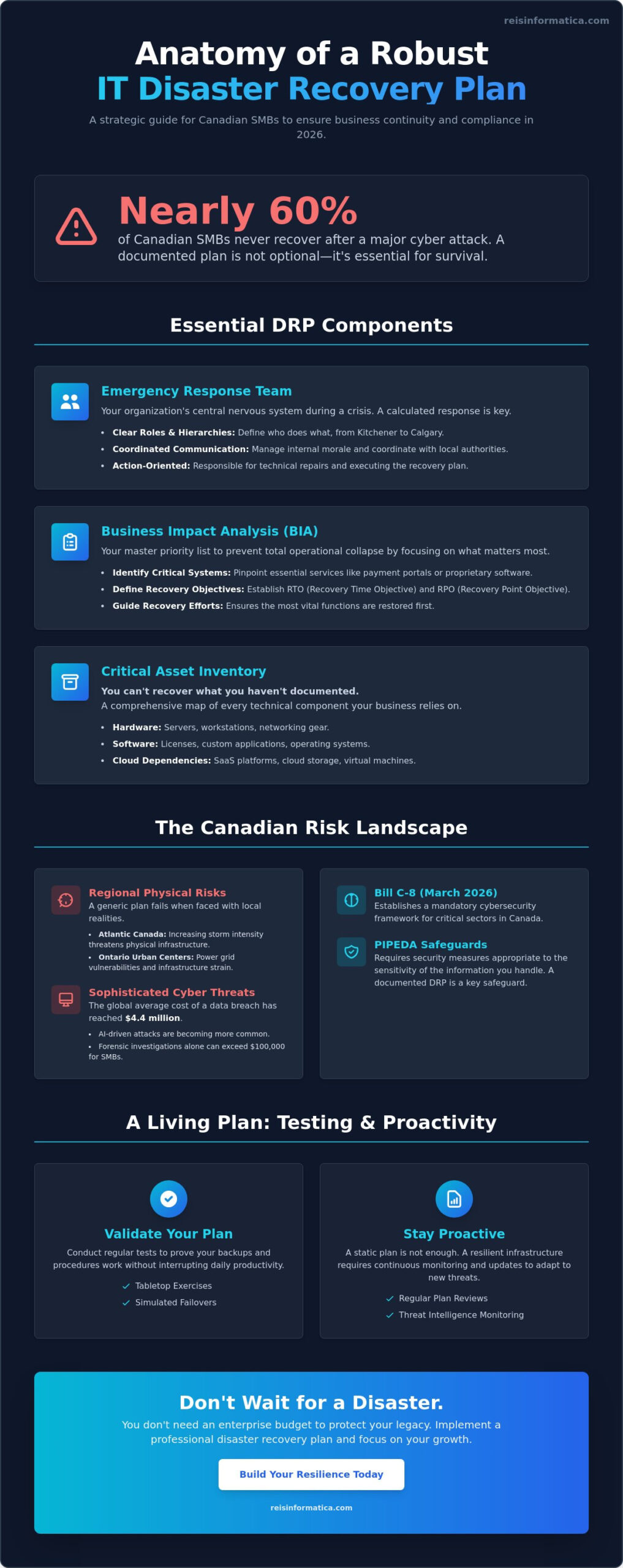
Did you know that nearly 60% of small and medium sized companies in Canada never recover after a major cyber attack? For business owners in Kitchener, Waterloo, and Calgary, this isn’t just a number; it’s a constant source of anxiety that lingers in the background of every growth milestone. You likely want your technology to be invisible and efficient, yet the fear of prolonged downtime or the confusion of technical jargon like RTO and RPO can feel like an insurmountable wall. It’s difficult to prioritize security when you’re balancing a limited budget against the strict requirements of Bill C-8, which moved to the Senate in March 2026.
We believe you shouldn’t need an enterprise level budget to protect your legacy. That’s why we’ve developed a professional IT disaster recovery plan template tailored specifically for the Canadian regulatory landscape. By implementing this framework, you’ll gain a clear, actionable path to ensure compliance with PIPEDA safeguards and significantly reduce the risk of data loss. This guide previews the essential sections your plan needs to survive a local outage or a sophisticated AI driven threat, allowing you to stay focused on your business results while we help guard your operational continuity.
Key Takeaways
- Learn how regional risks like Ontario’s infrastructure strain or Atlantic storms impact your business continuity so you’re never caught off guard.
- Implement a professional IT disaster recovery plan template that maps your critical cloud dependencies and hardware to clear, local contact hierarchies.
- Compare cloud-first strategies against local redundancy to find the most cost-effective way to maintain high availability for your specific industry.
- Discover how to conduct tabletop exercises and simulated failovers that prove your backups work without interrupting your team’s daily productivity.
- Understand why a static plan isn’t enough and how proactive monitoring creates a resilient infrastructure that lets you focus on growth.
Why Your Business in Waterloo or Halifax Needs an IT Disaster Recovery Plan in 2026
In May 2026, the conversation for Canadian business owners has shifted from whether a technical failure will occur to how quickly they can recover. The global average cost of a data breach has climbed to $4.4 million, but even minor incidents hit hard. For small businesses, first-party costs like forensic investigations often exceed $100,000. Whether you operate in the Waterloo tech corridor or the Calgary energy sector, downtime is a silent profit killer. Using a professional IT disaster recovery plan template isn’t just a technical chore; it’s a strategic move to protect your cash flow and local reputation.
Risk profiles vary significantly across Canada, and your plan must reflect that reality. In Halifax and Atlantic Canada, businesses face increasing storm intensity that threatens physical infrastructure and connectivity. Meanwhile, Ontario urban centers often deal with infrastructure strain and power grid vulnerabilities. These regional nuances mean a generic, one size fits all approach won’t work. You need to understand IT disaster recovery through the lens of your specific geography to ensure true resilience.
Compliance is another major driver for readiness. Bill C-8 passed the House of Commons in March 2026, establishing a mandatory cybersecurity framework for critical sectors. Even for those outside these specific industries, the “Safeguards” principle of PIPEDA requires security measures appropriate to the sensitivity of the information you handle. A documented recovery strategy is no longer optional; it’s a requirement for modern Canadian business operations.
Defining the Impact on Local Operations
A 24-hour outage looks different depending on your industry and location. For a Kitchener manufacturing firm, a day of downtime means halted production lines and missed shipping deadlines. For a Mississauga logistics hub, it results in a massive backlog that can take weeks to clear. We’ve detailed how to strengthen these foundations in our Infrastructure Services Guide. Lost productivity is only half the story. In tight-knit local markets, the reputational damage from being “offline” can be permanent, driving customers to more reliable competitors.
The Role of a DRP in Modern Business Continuity
Many decision makers confuse simple backups with a complete IT disaster recovery plan template. Backups are just the data; a DRP is the instruction manual for how to use that data to get back to work. In 2026, having a documented DRP is a significant competitive advantage when bidding for Canadian government contracts. It proves you have a “culture of readiness” and that your team knows exactly what to do when a crisis hits. This proactive stance transforms technology from a vulnerability into a pillar of your business stability.
Essential Components of a Robust IT Disaster Recovery Plan Template
A Disaster Recovery Plan (DRP) is a documented, structured approach that provides specific actions for IT recovery after a disruption. While many business owners think a DRP is just a list of emergency phone numbers, a truly effective IT disaster recovery plan template serves as your organization’s central nervous system during a crisis. It ensures that when a failure occurs, your response is calculated rather than chaotic.
The foundation of this plan is your Emergency Response Team. You need clear roles and local contact hierarchies that account for team members across different time zones, from Kitchener to Calgary. This team isn’t just responsible for technical repairs. They manage internal morale, coordinate with local authorities, and ensure that your Business Impact Analysis (BIA) is followed. The BIA is your priority list; it identifies which systems, like your customer payment portal or proprietary design software, must come back online first to prevent a total operational collapse. You can’t recover what you haven’t documented, so a Critical Asset Inventory that maps every hardware piece, software license, and cloud dependency is vital. Citing a foundational IT Disaster Recovery Plan resource can help you understand the international standards for these inventories.
Setting Your Recovery Objectives (RTO and RPO)
Recovery Time Objective (RTO) is the “deadline” for how fast you need to be back up and running. Recovery Point Objective (RPO) is the “limit” on how much data you can afford to lose, measured in time. For example, an RPO of four hours means you might lose four hours of work if a crash happens. Balancing these objectives with your budget is a common challenge for firms in cities like Milton or Cambridge. High speed recovery costs more, so we help you find the “sweet spot” where your business stays safe without overspending on unnecessary enterprise features.
Communication and Escalation Procedures
When systems go down, communication often breaks first. You need internal protocols for remote teams in London, Ontario, that don’t rely on your primary email server. External communication is equally critical. You must have templates ready to notify clients, vendors, and Canadian regulatory bodies to maintain trust and legal compliance. Integrating proactive Cybersecurity Services into your plan acts as a safeguard, ensuring that your recovery doesn’t accidentally spread a virus that caused the initial outage.
Data Backup and Protection Strategies
In 2026, simple backups aren’t enough because modern threats often target the backups themselves. Your data must be immutable, meaning it cannot be changed or deleted by ransomware, and stored off-site. We recommend geographic separation; if your main office is in Calgary, your backups should be in Halifax or a secure cloud zone. This strategy protects sensitive Canadian customer data during the restore process. If you’re unsure where your current inventory stands, our team can help you audit your IT services to build a stronger foundation for your IT disaster recovery plan template.
Choosing the Right Recovery Strategy: Cloud-First vs. Local Redundancy
Once you’ve identified your critical assets, the next step in your IT disaster recovery plan template is deciding where your data will actually go when things go wrong. In 2026, Canadian mid-market firms typically choose between three levels of readiness: Cold, Warm, and Hot recovery sites. A Cold site is essentially empty space with power; it’s the most affordable but can take days to become operational. A Warm site has hardware pre-configured but requires a data restore, while a Hot site offers near-instantaneous synchronization. While Hot sites provide the most peace of mind, they also require the highest investment, which is why many businesses are now pivoting toward more flexible models.
The biggest shift we’ve seen this year is the massive adoption of Disaster Recovery as a Service (DRaaS). For a Canadian small business with 100 to 500 employees, typical DRaaS costs in 2026 range from $30,000 to $75,000 annually. This subscription-based model is replacing the old method of maintaining expensive physical servers in local hubs like Mississauga. AI-integrated recovery tools are a major reason for this shift. These tools now automate the failover process, meaning your systems can detect a crash and begin restoration before your team even realizes there’s a problem. For a deeper look at official standards, the Canadian Centre for Cyber Security guide provides an excellent framework for choosing between these strategies.
The Benefits of Cloud-Based Disaster Recovery
Cloud-based recovery offers incredible scalability for growing firms in Waterloo and Kitchener. You don’t have to guess how much server space you’ll need three years from now; you simply pay for what you use today. By leveraging our Cloud Services, you significantly reduce the physical footprint and high maintenance costs of on-premise hardware. This allows your IT budget to go further while ensuring your infrastructure remains resilient against local hardware failures or site-specific disasters.
When Local Redundancy Still Makes Sense
Even with the cloud’s dominance, local redundancy still has its place, especially for industries with strict Canadian data residency requirements. If you’re handling highly sensitive information that must stay on physical hardware within a specific jurisdiction, a local backup is essential. We also see this in rural Ontario, where limited bandwidth can make transferring terabytes of data to the cloud painfully slow. For many Calgary-based enterprises, a hybrid approach is the best of both worlds. They keep their most critical data on a local “hot” server for instant access while using the cloud as a secondary, geographically separated safety net. This ensures that your IT disaster recovery plan template stays practical and fast, regardless of your internet connection speed.
How to Implement and Test Your DRP Without Disrupting Operations
A static document is just a piece of paper until it is put to the test. In 2026, where cyber threats evolve on a weekly basis, your IT disaster recovery plan template must be a living document that grows with your business. Testing your plan doesn’t have to mean shutting down your office for a day or losing a weekend of productivity. Instead, it is about incremental verification that builds confidence and ensures your team is ready when it counts.
We recommend starting with “Tabletop Exercises.” These are low-stress meetings where your leadership team in Kitchener sits down to discuss a hypothetical scenario, such as a ransomware attack or a local power grid failure. If a server fails at 3:00 AM on a Tuesday, who gets the first call? By talking through the steps, you identify gaps in your logic before they become expensive mistakes. After these sessions, use simulated failover testing to verify your cloud backups. You aren’t just checking if the files exist; you’re ensuring they can actually run your business applications. Documenting “Lessons Learned” after every test is vital. If a restore took six hours instead of the planned two, you need to know why now, not during a real emergency.
Your business changes fast. New hires join, and old software is replaced. You should update your template at least every 90 days to keep contact lists and asset inventories accurate. This proactive maintenance ensures that the instructions your team follows are always relevant to your current infrastructure.
Step-by-Step Testing Framework
A structured approach to testing prevents overwhelm. We suggest a three-phase model to keep your operations running smoothly:
- Phase 1: The walkthrough. Every quarter, verify that every phone number and vendor contact in your plan is still correct.
- Phase 2: The simulation. Pick one critical application, like your CRM or accounting software, and try to restore it in a safe “sandbox” environment.
- Phase 3: Full failover. Once a year, perform a total system recovery after-hours. This confirms your entire digital environment can migrate to the cloud and back without data loss.
Training Your Team for Resilience
Technology is only half the battle; your people are the other half. Every staff member should know their specific role during a regional outage. Clear, accessible documentation reduces panic and keeps everyone focused on their tasks. Many businesses in Southern Ontario use Managed IT Services to facilitate these regular drills, ensuring technical experts are guiding the process. This partnership turns a complex technical requirement into a routine part of your business operations. If you want to ensure your team is truly prepared for the next disruption, schedule a resilience consultation with our experts today.
Beyond the Template: Partnering with Reis Informatica for Local IT Resilience
An IT disaster recovery plan template is a powerful tool, but it is ultimately a static document. In the heat of a real world crisis, a piece of paper cannot monitor your servers or reroute traffic when a local data center fails. For businesses in Kitchener, Waterloo, and across Canada, the true value of a recovery strategy lies in its execution. With over 20 years of experience, Reis Informatica acts as your local guardian, ensuring that the framework you’ve built on paper translates into immediate, effective action when your operations are threatened.
One of the most significant advantages of this partnership is the guidance of a vCIO (Virtual CIO). Instead of just reacting to technical glitches, a vCIO acts as your strategic architect. They ensure your recovery goals align with your 2026 growth plans and help you navigate complex underwriting requirements for cyber insurance. Since premiums in Alberta have seen a compound annual growth rate of nearly 25% between 2023 and 2026, having an expert who can prove your resilience to insurers is a major financial benefit. We also integrate AI Business Solutions to provide predictive threat detection. These tools identify anomalies in your network behavior before they escalate into a system wide crash, stopping disasters before they even start.
Managed IT: The Engine Behind Your Recovery Plan
Managed IT services provide the 24/7 monitoring necessary to make your recovery plan functional. We act as your “Parceiro Especialista e Vigilante,” a vigilant partner that assumes full responsibility for your technical complexity. This allows you to transition from a reactive posture, where you only fix things after they break, to a proactive one. In the 2024-2025 fiscal year, the Office of the Privacy Commissioner of Canada received 686 data breach reports. Our goal is to ensure your business isn’t part of that statistic by identifying vulnerabilities long before a breach occurs.
Get Your Custom Disaster Recovery Assessment
Every city has its own unique challenges. A logistics hub in Mississauga requires a different recovery cadence than an energy firm in Calgary or a retail operation in Halifax. We don’t just hand you a generic IT disaster recovery plan template and walk away. We tailor every section to your specific industry regulations and local infrastructure risks. This customized approach ensures that your business stays productive and your data remains secure, regardless of what happens in the local landscape. If you’re ready to move beyond a basic template and build a truly resilient organization, schedule your IT Strategy consultation with Reis Informatica today.
Take Control of Your Digital Resilience Today
Implementing a professional IT disaster recovery plan template is the first step toward securing your legacy. We’ve explored how regional risks in Ontario and Atlantic Canada require more than just a generic checklist. You now understand that meeting the “Safeguards” principle of PIPEDA and the new requirements of Bill C-8, which reached the Senate in March 2026, is essential for any modern firm. A documented plan is your shield against the high costs of downtime and reputational damage.
True peace of mind comes from knowing that your strategy is backed by proactive 24/7 monitoring and expert vCIO leadership. Whether you’re operating in Kitchener, Waterloo, or Calgary, our local team is ready to ensure your technology remains invisible and efficient. Don’t wait for a disruption to test your readiness. Secure Your Business Continuity with Reis Informatica and focus on what you do best while we act as your vigilant technical partner. We’re here to help you build a future where downtime is a thing of the past.
Frequently Asked Questions
What is the difference between a Business Continuity Plan and an IT Disaster Recovery Plan?
A Business Continuity Plan (BCP) is a broad strategy for keeping your entire organization running, while an IT Disaster Recovery Plan focuses specifically on restoring your technology infrastructure. Think of the BCP as the plan for where your employees work and how they communicate. The DRP is the technical manual for getting your servers and data back online. Both are essential for holistic resilience.
How often should a Canadian small business update its IT DRP?
You should update your IT disaster recovery plan template at least every 90 days to account for new hires, software updates, and hardware changes. Technology environments in 2026 move too fast for annual reviews. If you wait 12 months to update your contact lists or asset inventories, your recovery will likely fail during a real crisis because the instructions are outdated.
Does my business need a DRP if we use cloud services like Microsoft 365?
Yes, you still need a DRP because cloud providers operate under a shared responsibility model. While they ensure the platform is available, you’re responsible for the security and recovery of your own data. If a user accidentally deletes a critical folder or an AI driven ransomware attack encrypts your cloud files, you need a documented plan to restore that information quickly.
How much does it cost to implement a professional IT disaster recovery plan in Ontario?
Implementing a professional plan in Ontario typically involves managed IT costs ranging from $130 to $250 per user per month in 2026. For a small business with 100 to 500 employees, dedicated Disaster Recovery as a Service (DRaaS) can cost between $30,000 and $75,000 annually. These verified figures represent a proactive investment that protects you from the $4.4 million average global cost of a data breach.
What are the most common causes of IT disasters for Canadian businesses in 2026?
The most frequent causes in 2026 include sophisticated AI driven phishing attacks and regional infrastructure failures. In Atlantic Canada, storm intensity is a primary threat, while Ontario businesses often face power grid strain. Additionally, the 686 data breach reports received by the Privacy Commissioner in the 2024 to 2025 fiscal year highlight that human error and ransomware remain constant threats to Canadian operations.
Can I use a generic IT DRP template for PIPEDA compliance?
A generic template is usually insufficient for PIPEDA compliance because it lacks the specific safeguards required for sensitive Canadian data. Your IT disaster recovery plan template must be tailored to the sensitivity of the information you handle. Using a one size fits all document often leaves gaps in reporting protocols and data residency requirements, which can lead to significant legal and financial penalties.
What is the first thing we should do if we experience a total data center failure?
The first step is to immediately activate your Emergency Response Team and the communication tree outlined in your plan. You must notify your IT partner to begin the failover process and alert key stakeholders before rumors spread. Speed is critical; the 60% of small businesses that fail after a disaster often do so because they lacked a clear, practiced first response to stop the initial damage.