
Trying to budget for your company’s IT support can feel like navigating a maze. One month the bill is predictable; the next, unexpected costs can disrupt your cash flow and leave you questioning the value you’re receiving. This financial uncertainty often stems from a lack of clarity in how services are structured. Gaining control begins with a clear understanding of the two dominant models: per-user vs per-device IT support pricing.
This guide is designed to eliminate that confusion. We will demystify both pricing structures, breaking down the critical pros and cons for Canadian businesses like yours. Whether your team works remotely with multiple gadgets or shares workstations in a central office, we’ll help you see which model offers better value and predictability for your specific operational needs.
Our goal is to equip you with the confidence to choose a scalable support plan that transforms your IT from a source of unpredictable expenses into a stable, strategic asset. You’ll learn how to secure a predictable monthly cost, allowing you to focus your energy and resources where they matter most: driving your business forward.
Key Takeaways
- Understand the fundamental difference between billing per employee versus per piece of equipment to secure a predictable and transparent IT budget.
- Discover why the per-user model simplifies costs and is ideal for modern teams where each person uses multiple devices like a laptop, tablet, and smartphone.
- Evaluate the per-user vs per-device IT support pricing models to see how the per-device option can offer savings in environments with shared workstations or specialized equipment.
- Learn how a strategic IT partner moves beyond rigid plans, offering hybrid or tiered solutions that align technology costs directly with your business operations and growth.
The Foundation of MSP Pricing: Aligning Cost with Value
Choosing an IT support partner is about more than just fixing problems; it’s about forging a strategic alliance. The foundation of this partnership is a pricing model that aligns the provider’s goals with your business outcomes. A modern Managed Service Provider (MSP) succeeds when your technology runs so smoothly that you rarely need to call. This creates a powerful incentive for proactive maintenance, a stark contrast to the old “break-fix” model, which profits from your downtime.
The pricing model-whether per-user or per-device-is simply the framework for how you are billed, not a limitation on what is included. A comprehensive managed services plan typically covers the critical functions that keep your business secure and productive:
- Unlimited Helpdesk Support: Immediate assistance for your team when they need it.
- Proactive Monitoring: 24/7 network and device oversight to prevent issues before they start.
- Cybersecurity Services: Advanced threat protection, endpoint security, and firewall management.
- System & Software Updates: Consistent patch management to secure your infrastructure.
Ultimately, a flat-fee, predictable model is designed to give you peace of mind and a clear financial path, making your technology a reliable asset rather than a source of unpredictable costs.
Why Predictable IT Budgeting is a Strategic Advantage
A fixed monthly fee transforms your IT costs from a volatile capital expense (CapEx) into a stable operating expense (OpEx). This strategic shift eliminates the anxiety of surprise bills for emergency support, like an unexpected $5,000 server failure. With a predictable IT budget, businesses can allocate resources more effectively, confidently planning for growth and innovation instead of bracing for the next technological crisis.
The Two Core Philosophies: People vs. Hardware
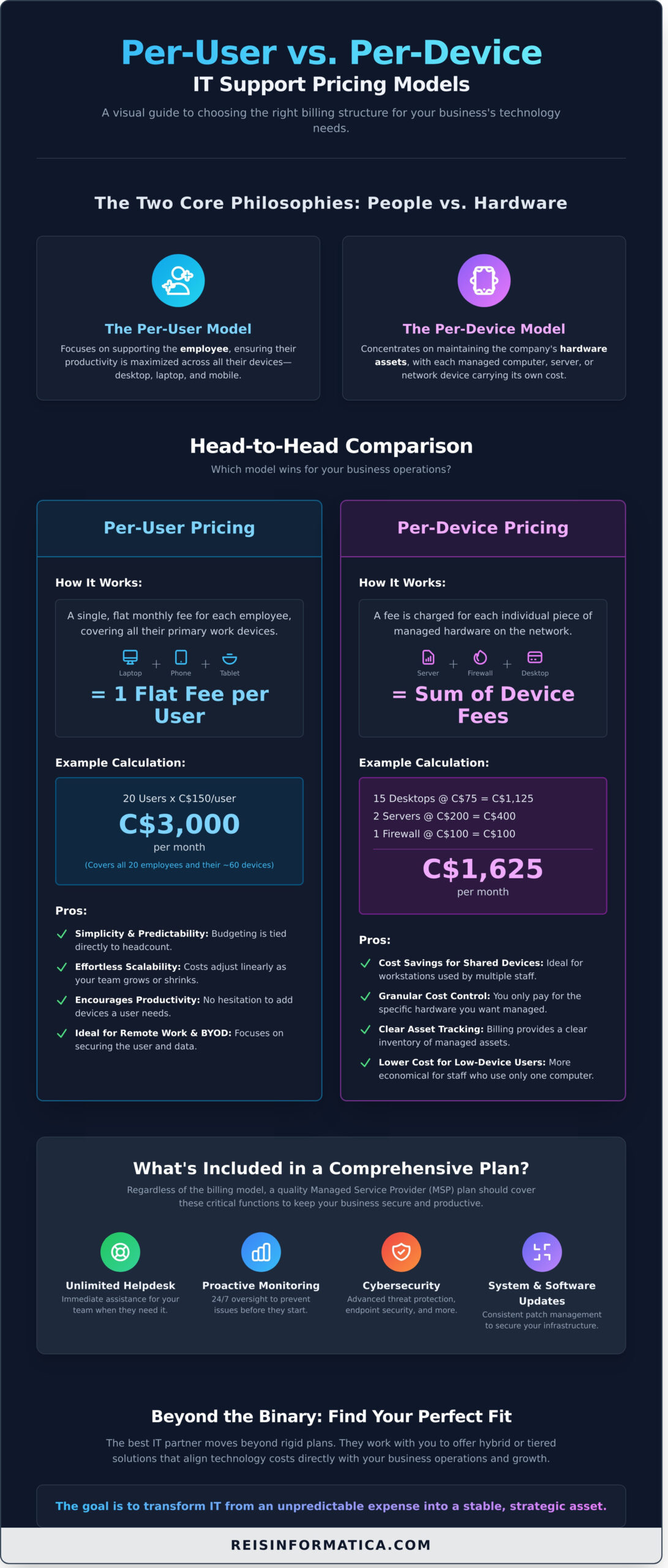
The central debate in per-user vs per-device IT support pricing comes down to two distinct philosophies. The per-user model focuses on supporting the employee, ensuring their productivity is maximized across all their devices-desktop, laptop, and mobile. In contrast, the per-device model concentrates on maintaining the company’s hardware assets, with each managed computer, server, or network device carrying its own cost. The right choice depends on your unique operational structure, which we will explore in the following sections.
Deep Dive: The Per-User Pricing Model
In the ongoing discussion of per-user vs per-device IT support pricing, the per-user model has emerged as the standard for modern, people-centric businesses. This model simplifies IT management by charging a single, flat monthly fee for each employee, which covers comprehensive support for all their primary work devices-be it a laptop, desktop, smartphone, or tablet. Think of it as an all-inclusive technology pass for each member of your team, designed to support their productivity wherever they work.
A ‘user’ is typically defined as any full-time or part-time employee who requires access to your company’s network and resources. This focus on the individual, rather than the hardware, aligns perfectly with today’s flexible and multi-device work environments.
How Per-User Pricing Works (With Example)
The calculation is transparent and designed for predictable budgeting. Imagine a 20-person marketing agency in Canada, where each team member uses a laptop, a desktop at the office, and a company smartphone. Instead of tracking 60 individual devices, the cost is based solely on the number of employees.
- Calculation: 20 Users x C$150/user/month = C$3,000 per month
This C$3,000 fee provides complete IT support for all 20 employees and their associated devices. If a designer needs a new tablet to do their job better, it can be added to their technology toolkit without incurring additional monthly support costs, fostering efficiency and removing administrative friction.
Pros of the Per-User Model
- Simplicity & Predictability: Budgeting becomes straightforward. Your monthly IT support cost is directly tied to your headcount, eliminating surprise fees for new hardware.
- Effortless Scalability: As your team grows or shrinks, your IT costs adjust in a simple, linear fashion. Onboarding and offboarding employees is seamless from a billing perspective.
- Encourages Productivity: Since all of an employee’s devices are covered, there’s no hesitation to provide them with the tools they need to be effective, whether that’s a second monitor or a business tablet.
- Ideal for Remote Work & BYOD: This model focuses on securing the user and their data, which is critical for businesses with remote teams or Bring Your Own Device (BYOD) policies. Support follows the employee, not just the office.
Cons of the Per-User Model
- Higher Cost for Shared Workstations: For environments like manufacturing floors or call centres where multiple employees use a single computer in shifts, this model can be less cost-effective.
- Requires Clear Definitions: Your service agreement must clearly define what constitutes a ‘user’ (e.g., full-time vs. contractor) to prevent billing misunderstandings.
- Can Seem Pricier Initially: If every employee currently uses only one device, the per-user fee might appear higher at first glance compared to a per-device quote. However, this initial view often overlooks the long-term value and flexibility.
Best Fit For: Businesses Focused on Employee Enablement
The per-user model delivers the most strategic value to organizations where employee productivity is the primary driver of revenue. It is the superior choice for professional services firms (lawyers, accountants, consultants), companies with established remote or hybrid workforces, and any business where employees rely on multiple devices to perform their duties effectively. When weighing per-user vs per-device IT support pricing, this model is fundamentally an investment in your people.
Deep Dive: The Per-Device Pricing Model
The per-device IT support model is a traditional, asset-centric approach to managed services. In this structure, your business pays a predetermined monthly fee for each piece of hardware under management. This includes everything from servers and desktops to network switches and firewalls. While support for the employees using these devices is typically included, the monthly invoice is calculated based on the quantity and type of your physical and virtual equipment, not your headcount.
This method provides a direct link between your IT support costs and your hardware inventory, offering a clear, tangible billing structure.
How Per-Device Pricing Works (With Example)
The calculation is straightforward multiplication. Each category of device is assigned a specific support cost based on its complexity and criticality. For instance, a server requires more intensive monitoring and maintenance than a desktop, and thus has a higher monthly fee.
Scenario: Imagine a manufacturing plant in Ontario with the following assets:
- 10 office desktops (e.g., C$75/each)
- 2 production servers (e.g., C$250/each)
- 1 network firewall (e.g., C$100/each)
The monthly cost would be calculated as: (10 x C$75) + (2 x C$250) + (1 x C$100) = C$1,350 per month. If the plant manager needs to add a tablet for inventory tracking, that device would be added to the count, increasing the monthly fee.
Pros of the Per-Device Model
This model excels in specific environments by offering:
- Granular Cost Control: You know the exact support cost associated with every single piece of hardware, making it simple to budget for your existing infrastructure.
- Clear Asset Tracking: Your monthly bill serves as a functional inventory of all supported devices, simplifying asset management and lifecycle planning.
- Cost-Effectiveness for Shared Devices: If your business has many employees sharing a few workstations-like a call centre or a clinic-you only pay for the machines, not every single user.
Cons of the Per-Device Model
However, this model’s rigidity can be a significant drawback in modern work environments. The core challenge in the per-user vs per-device IT support pricing decision often comes down to scalability.
- Penalizes Growth: Costs escalate quickly as employees adopt more devices like laptops, tablets, and smartphones. Each new piece of technology adds a new line item to your bill.
- Discourages Modernization: The direct cost implication can create hesitation to adopt new, productivity-enhancing technology.
- Unpredictable Budgeting: A planned server upgrade or a refresh of 20 laptops creates a sudden and significant jump in your monthly operational expense.
Best Fit For: Businesses Focused on Asset Management
The per-device model remains a viable and transparent option for organizations where the technology environment is static and predictable. It is ideally suited for:
- Manufacturing facilities with shared shop-floor terminals.
- Healthcare clinics or dental offices using shared computer kiosks in exam rooms.
- Any business where the number of devices is fixed and the primary concern is managing the lifecycle and uptime of specific hardware assets.
Head-to-Head Comparison: Which Model Wins for Your Business?
The debate over per-user vs per-device IT support pricing isn’t about finding a universally superior model; it’s about identifying the one that aligns perfectly with your company’s operational DNA. The right choice simplifies management, secures your data, and supports your growth strategy. To help you decide, here is a direct comparison of the core factors.
Per-User Model Assessment:
- Simplicity: High. A single, predictable fee covers each employee and all their associated work devices (laptop, desktop, mobile).
- Scalability: Seamless. Your IT support costs scale directly and predictably with your headcount.
- Budgeting: Stable. Costs are tied to your team size, making forecasting for new hires straightforward.
- Remote Work Friendliness: Excellent. This model is built for the modern, hybrid workforce where employees use multiple devices from any location.
Per-Device Model Assessment:
- Simplicity: Moderate. Requires diligent tracking of every managed endpoint, from servers to scanners.
- Scalability: Asset-based. Costs increase only when you procure new hardware.
- Budgeting: Variable. Can fluctuate with new hardware purchases or the addition of shared devices.
- Remote Work Friendliness: Less effective. Can become complex and costly when a single remote user needs support for a laptop, tablet, and smartphone.
Scenario Analysis: A Law Firm vs. a Warehouse
To make the choice tangible, consider two common Canadian business scenarios. A downtown Toronto law firm with 15 lawyers, each using a desktop, laptop, and smartphone, finds the per-user model to be the clear winner. It provides comprehensive support for each professional for a single fee. Conversely, a Mississauga distribution centre with 5 office staff but 30 shared barcode scanners finds the per-device model more logical, as the number of devices far exceeds the number of primary users.
Impact on Security and Productivity
In today’s distributed workforce, security is non-negotiable. Per-user models inherently foster a more robust security posture by focusing on protecting the employee’s entire digital identity, not just a single machine. This holistic approach ensures every access point is secured under a unified strategy, boosting both data safety and employee efficiency. To see how we protect users wherever they work, explore our comprehensive cybersecurity services.
Planning for Growth: Scalability Compared
Your pricing model choice should reflect your growth strategy. A per-user model scales with your most valuable asset: your people. As you hire, your IT support grows with you. A per-device model scales with your capital expenditures on hardware. The critical question is which metric-headcount or asset count-is more central to your business plan. The best model ensures your Managed Services Provider’s incentives are perfectly aligned with your business goals, creating a true partnership for success.
Beyond the Binary: The Reality of Hybrid and Custom IT Plans
The discussion around per-user vs per-device IT support pricing often presents a false choice. A mature IT partner understands that Canadian businesses are not one-size-fits-all, and their support plans shouldn’t be either. The most effective solutions move beyond rigid models to offer a tailored plan that aligns directly with your operational needs, budget, and strategic goals. This flexibility is the hallmark of a true technology partner, not just a service provider.
Understanding Tiered Service Levels
A sophisticated approach often involves layering a tiered model onto a per-user plan. This means not every user costs the same because not every user has the same needs. For example:
- Basic Tier: A warehouse employee might receive remote helpdesk support and core security protections.
- Premium Tier: An executive might receive all Basic services plus onsite support, mobile device management, and strategic vCIO (Virtual Chief Information Officer) consultations.
This tiered structure provides granular cost control, ensuring you only pay for the level of support each team member actually requires.
Crafting a Hybrid Model That Works
Another powerful strategy is the hybrid model. A common and highly effective hybrid combines a per-user fee for your employees with a separate, fixed fee for managing core infrastructure like servers, network switches, and firewalls. This approach delivers the best of both worlds: the scalability of per-user pricing for your team and the budget predictability of a flat rate for your essential hardware. This level of customization is a key indicator of mature managed IT services.
The Importance of a Custom Quote
Ultimately, no off-the-shelf price list can accurately capture your company’s unique IT environment. A dedicated IT partner will invest the time to conduct a thorough discovery process, understanding your workflow, compliance requirements, and growth trajectory before providing a quote. This initial consultation isn’t a sales pitch; it is the foundational step in building a successful, long-term partnership that ensures your technology drives your business forward with clarity and confidence.
Your Strategic Decision: The Final Verdict on IT Support Pricing
Choosing the right IT support model comes down to aligning technology costs with your unique operational needs. While per-user plans offer predictable budgeting for modern teams with multiple devices, per-device models can provide cost-control for environments with shared assets. Ultimately, the debate over per-user vs per-device IT support pricing isn’t about a universal winner, but about finding the strategic fit for your Canadian business.
The best answer often lies beyond a simple choice. A true technology partner works with you to build a tailored plan that delivers value, not just a fixed cost. At Reis Informática, we combine our proactive cybersecurity focus and strategic IT leadership (vCIO) to design a support structure that truly serves you. With the reliability of our 24/7 US-Based Helpdesk, you gain more than a service-you gain a vigilant partner dedicated to your operational tranquility and success.
Ready to move beyond the pricing debate and find a solution that just works? Request a Transparent Pricing Quote Tailored to Your Business and let’s build an IT strategy that empowers your growth.
Frequently Asked Questions About IT Support Pricing
What is a ‘fair’ price per user per month for managed IT in Canada?
In Canada, a fair price for comprehensive managed IT support typically ranges from C$100 to C$250 per user, per month. This variation depends on the service level agreement (SLA), the complexity of your infrastructure, and the security solutions included, such as advanced threat protection. Lower-tier plans may cover basic helpdesk support, while premium plans provide the proactive strategic guidance and robust cybersecurity needed to ensure your technology drives business growth securely.
How are servers and network equipment (firewalls, switches) priced in a per-user model?
In a per-user model, core infrastructure like servers and network equipment is typically priced separately. This is often a flat monthly fee per device, which covers proactive monitoring, maintenance, patching, and management. This hybrid approach ensures these critical assets receive specialized attention beyond standard user support. It provides cost clarity while guaranteeing the backbone of your network is stable, secure, and optimized for maximum uptime and efficiency.
Does ‘unlimited support’ truly mean unlimited in these pricing models?
“Unlimited support” generally covers all day-to-day technical issues and helpdesk requests required to keep your team productive and your operations running smoothly. However, it is crucial to review the service agreement for specific exclusions. Large-scale projects, such as an office move, a major cloud migration, or new equipment rollouts, are typically scoped and billed separately. This ensures your monthly fee remains predictable for operational support while strategic projects receive dedicated planning.
How does a Bring-Your-Own-Device (BYOD) policy affect the per-user vs. per-device decision?
A BYOD policy strongly favors the per-user pricing model. Since employees use personal devices for work, you are supporting the user and their secure access to company data, not managing the specific hardware itself. The choice in the per-user vs per-device IT support pricing debate becomes clear, as this model simplifies billing and ensures every employee is covered, regardless of how many devices they connect. It aligns your IT costs directly with your headcount.
Can I switch between pricing models if my business needs change?
Absolutely. A true IT partner understands that business needs evolve. Most managed service providers (MSPs) are flexible and will work with you to adjust your support plan as your company grows or your operational model changes. We recommend an annual review of your agreement to ensure the pricing structure continuously aligns with your business reality and strategic goals, guaranteeing you always have the most cost-effective and appropriate coverage for your team.
Are there other managed IT pricing models besides per-user and per-device?
While the per-user vs per-device IT support pricing structures are the most common, other options exist. A-la-carte pricing allows you to select specific services, such as only backup and disaster recovery. Tiered packages offer different levels of service (e.g., Gold, Silver, Bronze) with varying features. For businesses with minimal needs, a block-hour model provides a pre-purchased bank of support hours. The best model depends entirely on your unique requirements.