
On June 12, 2025, a Toronto-based logistics firm discovered their proprietary bidding strategy had been leaked to a competitor weeks before a major contract was signed. The source of the breach wasn’t a hacked server or a physical file theft, but sophisticated spyware on phone devices carried by two senior directors. You likely agree that while your smartphone is your most essential business tool, it’s also why 60% of Canadian organizations now cite mobile vulnerabilities as their primary security concern. It’s unsettling to manage a mobile workforce when you lack the technical background to verify if your company’s private conversations are truly private.
This guide will show you exactly how to identify, remove, and prevent mobile threats to protect your team’s data and your firm’s reputation. We’ll provide a proactive security plan tailored for the Toronto and Waterloo markets, allowing you to maintain business continuity through 2026 without the constant tech headaches. You’ll learn the specific steps to audit employee devices and implement a defense strategy that keeps your infrastructure secure and your focus on growth.
Key Takeaways
- Learn why mobile threats have evolved from personal risks into serious tools for corporate espionage targeting businesses across Canada.
- Identify the subtle warning signs of spyware on phone devices, such as unusual battery drain and data spikes, to stop breaches before they escalate.
- Discover how common infection vectors like phishing and unsecured public Wi-Fi in cities like Toronto and Halifax can compromise your team’s security.
- Master a proactive 5-step response plan to isolate suspected threats and restore your mobile infrastructure using professional-grade tools.
- Gain the peace of mind that comes from a strategic security partnership, allowing you to focus on your business while experts guard your data.
What is Spyware on a Phone and Why Should Canadian Businesses Care?
Think of What is Spyware? as a silent digital ghost. It is stealthy software designed to infiltrate a device, monitor every keystroke, and export private data without the user ever knowing. By 2026, the threat of spyware on phone devices has evolved from a tool for personal stalking into a sophisticated weapon for corporate espionage. Professional data harvesters now target the smartphones of executives in Toronto and Ottawa, seeking high-value intellectual property and sensitive negotiation details. For a business leader, mobile security isn’t just a technical checkbox; it’s the foundation of operational tranquility. When your team’s communications are secure, you can focus on growth instead of damage control.
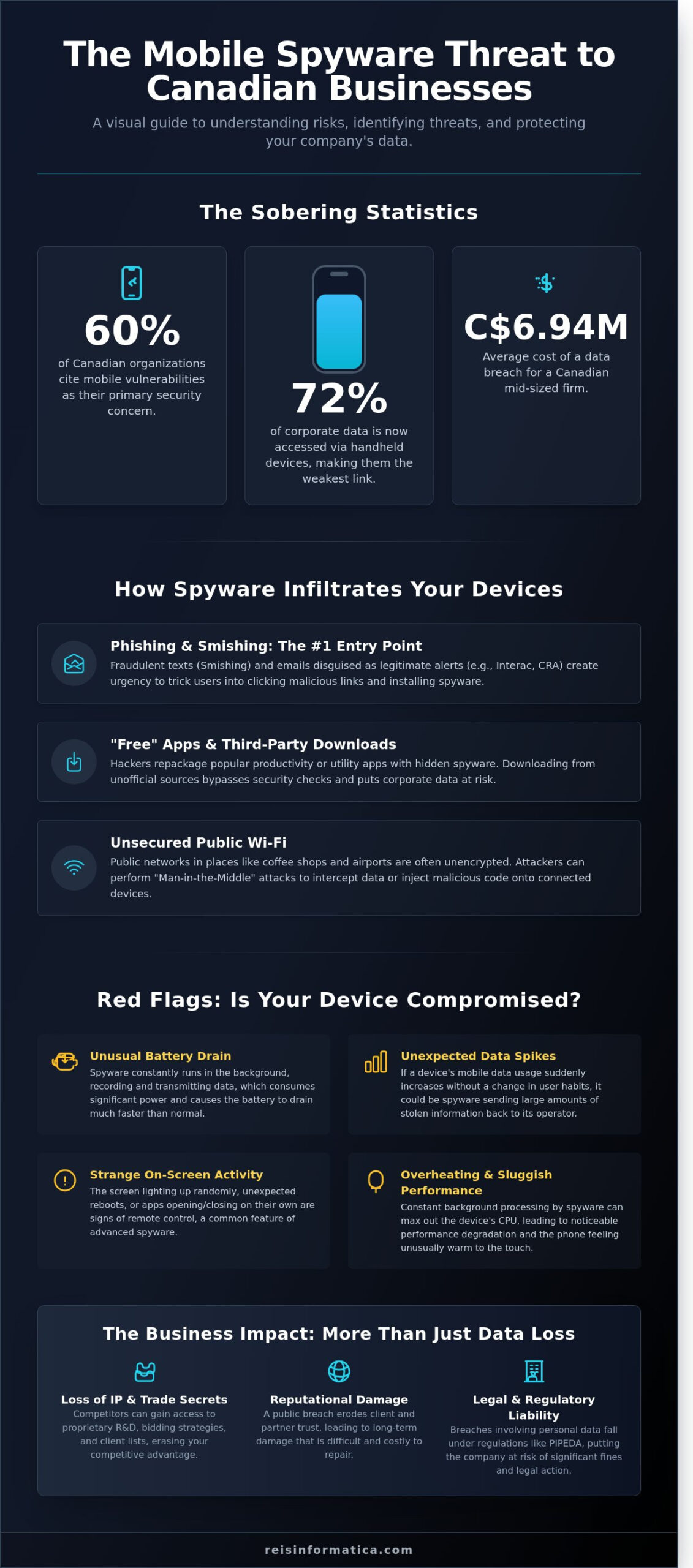
The shift toward mobile-first work environments means that 72% of corporate data is now accessed via handheld devices. This makes the smartphone the weakest link in your perimeter. In the competitive markets of Ontario, a single compromised device can lead to the loss of trade secrets or the exposure of future expansion plans. Our goal is to ensure your technology remains an invisible, efficient asset that supports your business continuity rather than a liability that keeps you awake at night.
The Real Cost of a Mobile Breach in Kitchener-Waterloo
In the tech-heavy corridors of Kitchener-Waterloo, a single breach can be devastating. A 2025 cybersecurity report indicated that the average cost of a data breach for a Canadian mid-sized firm reached C$6.94 million. Beyond the immediate financial loss from stolen client lists, local firms face long-term reputational damage. If a competitor gains access to your proprietary R&D via an employee’s phone, that advantage is gone forever. Small businesses often feel they’re under the radar; however, they’re frequently targeted because they lack the robust cybersecurity services found in larger enterprises. Hackers view these firms as the path of least resistance into larger supply chains.
Canadian Privacy Standards and Your Liability
Operating in Mississauga or Milton means adhering to strict Canadian privacy standards like PIPEDA. These regulations don’t distinguish between a laptop and a personal smartphone if company data is present. Under Bring Your Own Device (BYOD) policies, employers are responsible for ensuring that any device accessing corporate networks is secure. If spyware on phone hardware leads to a leak of customer information, the legal burden falls on the company. Corporate liability is defined as the legal responsibility a business holds for financial and legal damages resulting from the unauthorized disclosure of sensitive data due to inadequate security protocols.
How Mobile Spyware Infiltrates Devices in Calgary, Halifax, and Beyond
Modern spyware doesn’t always require a high-tech breach to succeed. It usually relies on simple mistakes made during a busy workday. Whether your team is working from a home office in Calgary or a high-rise in Halifax, the entry points remain remarkably consistent. Hackers target the easiest path into your network: the individual user. Understanding these vectors is the first step toward securing your corporate data.
Phishing and Social Engineering: The #1 Entry Point
A single text message can lead to someone installing spyware on phone hardware without even realizing it. This often happens through “Smishing,” or SMS phishing. In 2024, many Canadian professionals reported receiving fraudulent alerts disguised as Interac e-Transfer notifications or CRA tax refund updates. These messages create a sense of urgency that bypasses logical thinking. Building a strong cybersecurity awareness culture is your best defense against these psychological traps. You can learn more about How to Detect Spyware on Employee Phones to help your team spot these red flags before they click a malicious link.
The Danger of ‘Free’ Apps and Third-Party Downloads
Employees often look for tools to boost productivity, but “free” utilities often come with a hidden price. Repackaged apps are a major threat to Canadian businesses. A hacker might take a popular PDF scanner or weather app, add malicious code, and host it on a third-party site. Once downloaded, the spyware on phone gains access to microphones, cameras, and contact lists. We recommend a managed IT infrastructure that restricts downloads to official stores where security vetting is more rigorous. This control ensures that “shadow IT” doesn’t become a gateway for data exfiltration.
Physical security and network environment also play critical roles. Unsecured public Wi-Fi at Union Station in Toronto or a coffee shop in Halifax acts as a digital vacuum for data. If a connection isn’t encrypted, spyware can be injected into a device during a simple browsing session. Additionally, physical access is a risk in shared office spaces or on public transit. Leaving a phone unattended for just three minutes provides enough time for a malicious actor to install monitoring software via a physical port.
Finally, outdated operating systems are essentially open doors for modern spyware families. In 2025, security reports indicated that 15% of mobile breaches were traced back to devices running software versions more than two years old. These older systems lack the patches required to block contemporary exploits. Consistent updates are not just about new features; they are essential security barriers that protect your business from evolving threats. If you’re concerned about your company’s mobile fleet, our team can help you implement proactive security monitoring to keep your data safe.
Red Flags: How to Detect Spyware on Employee Phones
Detecting spyware on phone devices isn’t always about catching a hacker in the act. Often, the signs are subtle physical changes that your team might ignore as “just an old battery.” For business leaders in London and Kingston, recognizing these patterns early can prevent a 15% loss in annual revenue associated with data breaches. If an employee’s phone suddenly drains from 100% to 20% by noon without heavy use, it’s a major red flag. This happens because malicious software runs 24/7 in the background. You might also notice devices running unusually hot or performing slowly during simple tasks like checking email.
“Ghost” activity is another clear warning sign. If a phone screen lights up on a desk for no reason or the camera shutter clicks when no one is using it, someone else might have control. To understand the history and mechanics of these threats, it’s helpful to review What is Spyware? to see how these tools have evolved. Digital anomalies, such as strange pop-ups appearing during client meetings or unexpected reboot cycles, suggest that unauthorized processes are interfering with the operating system.
Technical Anomalies You Can’t Ignore
Checking data usage settings is a fast way to find hidden uploaders. A typical office worker uses about 2GB to 5GB of mobile data per month; a sudden spike to 15GB without a clear reason suggests the device is “calling home” to a remote server. You should also look for “Device Management” certificates or “Admin” profiles in the settings that your IT team didn’t install. Constant background activity forces the processor to work overtime, which directly causes the device temperature to rise.
Behavioral Warning Signs for Your Team
Your team is your first line of defense. Train employees in Mississauga and Milton to report weird behavior, like a phone that asks for a passcode three times in a row even when the correct one was entered. This is often a tactic used by spyware on phone hardware to “sniff” credentials. Encouraging a culture of transparency ensures that a 10-minute reporting delay doesn’t turn into a week-long security crisis. Integrating these reports into your overall network security strategy keeps the whole network safe. When employees feel safe coming forward about “glitches,” you can neutralize threats before they reach your central servers.
Removing and Preventing Mobile Threats: A 5-Step Security Plan
If you suspect there is spyware on phone devices within your organization, you need to act quickly. This isn’t just about a single device; it’s about protecting your entire corporate network. Toronto and Waterloo leaders often find that a structured response prevents a minor infection from becoming a million dollar breach. Follow this five step plan to regain control.
- Step 1: Isolation. Immediately disconnect the device from all Wi-Fi and Bluetooth connections. Put the phone in airplane mode to stop the spyware from transmitting data to external servers.
- Step 2: Professional Audit. Don’t rely on consumer grade antivirus apps. A professional forensic audit identifies the specific strain of malware and ensures every trace is removed without compromising legal evidence.
- Step 3: Multi-Factor Authentication (MFA). Once the device is isolated, reset all passwords from a clean machine. Enable MFA across every business account to ensure that stolen credentials can’t be used by attackers.
- Step 4: Centralized Control. Deploy a management system that allows you to oversee every mobile asset in your fleet. This prevents unauthorized apps from being installed in the future.
- Step 5: Strategy Review. Work with experts to establish a regular IT strategy review. Your mobile policies should evolve as quickly as the threats do.
The Power of Mobile Device Management (MDM)
MDM is a game changer for businesses in Calgary and Toronto. It allows your IT team to wipe sensitive data remotely if a device is lost or compromised. We also use MDM to “sandbox” business applications. This keeps your corporate emails and files in a secure container, completely separate from a user’s personal photos or social media. By moving critical data to secure cloud services, you ensure that even if a physical phone is compromised, your intellectual property remains safe and accessible only to authorized users.
Proactive Monitoring vs. Reactive Repair
Waiting for a spyware infection to show signs is a losing strategy. IBM’s 2023 Cost of a Data Breach report found that the average cost of a breach for Canadian firms reached C$6.94 million. You can’t afford to be reactive. Modern Endpoint Detection and Response (EDR) tools monitor mobile behavior in real time, looking for the subtle signs of spyware on phone hardware before data leaves the device. Our proactive cybersecurity services act as a vigilant partner, stopping threats at the door so you can focus on growing your business without tech related anxiety.
Don’t leave your mobile security to chance. Secure your business fleet today with a professional security audit.
Securing Your Mobile Workforce with Reis Informática
Managing a fleet of mobile devices is a heavy lift for any business leader. You’re focused on scaling operations from Toronto to Waterloo, not decoding technical logs or security protocols. Reis Informática steps in as your strategic partner to handle the heavy lifting of cybersecurity. We understand that most business owners don’t have an extensive IT background. That’s why we bridge the gap with clear, jargon-free communication. You get the peace of mind that comes with professional management while we act as your technological guardian.
Detecting spyware on phone devices is just the first step; preventing it requires a holistic strategy. Identifying spyware on phone hardware requires more than just a basic antivirus tool; it needs a proactive, managed approach. We ensure your infrastructure remains invisible and efficient. This allows your team to stay productive without the fear of data leaks or unauthorized surveillance affecting your bottom line.
Local Support for a National Workforce
A mobile workforce needs support that reaches beyond a single office. We provide dedicated assistance in Mississauga, Milton, and Ottawa to ensure your team is protected regardless of their location. Canadian businesses face unique regulatory requirements, such as PIPEDA compliance. In 2024, data from the Canadian Centre for Cyber Security indicated that roughly 50% of cyber incidents targeted small to medium enterprises. We don’t just offer a one-time fix. We build long-term partnerships that adapt as your company grows from Kitchener to Halifax. Our security plans are tailored to specific Canadian industries, ensuring your protection is relevant and robust.
Ready for a Secure Future?
Cyber threats don’t wait for a convenient time to strike. Industry reports suggest that mobile-specific malware grew by 40% between 2023 and 2025. Waiting until a breach occurs is a costly mistake that can damage your reputation and lead to significant financial loss. Our AI business solutions help predict and prevent future threats before they compromise your network. These tools analyze patterns to stop attacks in their tracks, giving you a significant advantage over traditional, reactive security methods.
Take the first step toward a more resilient business. We invite you to schedule a comprehensive security assessment today. Let us manage the technical complexities so you can focus on your primary goal: growing your business with total confidence and stability.
Take Control of Your Mobile Security Strategy
Protecting your company’s data starts with recognizing that mobile devices are the new front line. The Canadian Centre for Cyber Security reported in its 2024 National Cyber Threat Assessment that mobile threats are increasingly targeting business leaders across Canada. You’ve learned that identifying spyware on phone devices involves watching for subtle performance drops or unusual data spikes. Implementing a structured security plan isn’t just a technical chore; it’s a strategic move to keep your operations in Toronto, Waterloo, or Calgary running without interruption.
You don’t need to be a technical expert to keep your team safe. We take a consultative approach to handle the complex infrastructure while you focus on growing your business. Our team provides proactive monitoring to stop threats before they start. With expert support available from Halifax to Vancouver, we act as your vigilant partner in a digital world. We’re here to turn your security concerns into a foundation of stability.
Secure your business devices today with a professional Cybersecurity Audit from Reis Informática
Your peace of mind is our priority, and a more secure future for your Canadian enterprise is just a conversation away.
Frequently Asked Questions
Can someone really see my text messages through spyware?
Yes, sophisticated spyware allows unauthorized parties to read your private text messages and encrypted chat logs. These programs use keyloggers to record every stroke you type or take invisible screenshots of your conversations. A 2024 security study found that mobile malware targeting messaging apps rose by 38% compared to previous years. This risk is why we prioritize device integrity and encryption for our Toronto clients.
Is it legal for my company to monitor my phone in Ontario or Alberta?
Yes, companies in Ontario and Alberta can monitor business phones if they follow specific provincial transparency laws. In Ontario, the 2022 Working for Workers Act requires businesses with 25 or more employees to have a clear, written policy on electronic monitoring. You must tell your team what you’re tracking and why. Alberta’s Personal Information Protection Act also requires that such monitoring is reasonable and clearly disclosed to staff.
Does a factory reset always remove spyware from a phone?
A factory reset removes most common infections, but it doesn’t guarantee a clean device against professional-grade spyware. High-level threats can embed themselves into the phone’s recovery partition or firmware, allowing them to reinstall after a wipe. Cybersecurity data shows that roughly 12% of advanced mobile threats are designed to survive a standard reset. We often recommend a full device replacement or professional re-imaging for high-risk corporate breaches.
How can I tell the difference between a dying battery and a spyware infection?
You can distinguish between the two by checking your data usage and device temperature during idle periods. A failing battery typically drains steadily, but spyware on phone hardware causes sudden heat and massive data uploads even when you aren’t using it. If your monthly data consumption increases by 500 MB or more without a clear reason, it’s likely a background process sending your information to an external server.
Are iPhones safer from spyware than Android devices for business use?
iPhones offer a more controlled environment, but they aren’t invincible against targeted business attacks. Apple’s “walled garden” prevents many basic viruses, yet zero-click exploits like those discovered in 2023 have successfully bypassed these defenses. Since Android holds about 48% of the Canadian mobile market, it faces more frequent mass-market attacks. Both platforms require professional management to ensure they remain secure for corporate use in Waterloo.
What should I do immediately if I suspect my business phone is compromised?
You should immediately put the device in airplane mode and change your primary business passwords from a different, secure computer. Disconnecting from Wi-Fi and cellular networks stops the attacker from stealing more files or listening to your calls. Statistics from recent data breaches show that 60% of damage occurs within the first four hours of an infection. Contact your IT partner right away to begin a forensic cleanup and secure your accounts.
How does a Managed IT service provider protect my mobile fleet?
We use Mobile Device Management tools to create a secure container for your business data that’s separate from personal apps. This allows us to monitor for spyware on phone activity and remotely wipe sensitive information if a device is lost or stolen. Businesses that implement proactive mobile management see 70% fewer security incidents. We handle the technical complexity so you can focus on growing your company without worrying about digital intruders.