
For many business leaders, Microsoft 365 is a productivity powerhouse, but its vast array of security tools can feel more like a complex maze than a protective fortress. You worry about phishing, ransomware, and sensitive data leaks, but navigating the complexities of microsoft 365 security can feel like a full-time job you don’t have the time or in-house expertise for. Are the default settings truly enough to protect your operations, or are there critical gaps in your digital defense?
This guide is designed to provide clarity and control. We will demystify the essential security features built into your subscription, translating technical jargon into practical business strategy. You will learn actionable best practices to build a resilient defense against modern threats, gain the confidence that your company data is properly protected, and be equipped to make an informed decision on managing your security posture. It’s time to transform your security from a source of concern into a strategic asset that lets you focus on what matters most: your business.
Key Takeaways
- Understand that data protection is a core business function, not just an IT task, directly impacting your company’s continuity and reputation.
- Relying on Microsoft 365’s default settings leaves your business vulnerable; proactive configuration is essential for robust protection against modern threats.
- Choosing the right license is crucial for unlocking the full potential of microsoft 365 security tools that safeguard your identities, data, and devices.
- A strategic partnership with a managed security provider ensures expert configuration and monitoring, allowing you to focus on your core business with peace of mind.
Why M365 Security Isn’t Just an IT Issue-It’s a Business Priority
In the modern digital economy, your company’s data is one of its most valuable assets. Protecting this data is no longer a task confined to the IT department; it is a core business function critical to operational continuity, brand reputation, and financial stability. Viewing cybersecurity as a simple technical checkbox is a critical mistake. Instead, a proactive and robust microsoft 365 security strategy is an investment that safeguards your entire organization, enabling you to operate with confidence in an increasingly complex digital world. This requires a multi-layered defense that anticipates threats rather than just reacting to them.
The Evolving Threat Landscape: Phishing, Ransomware, and Beyond
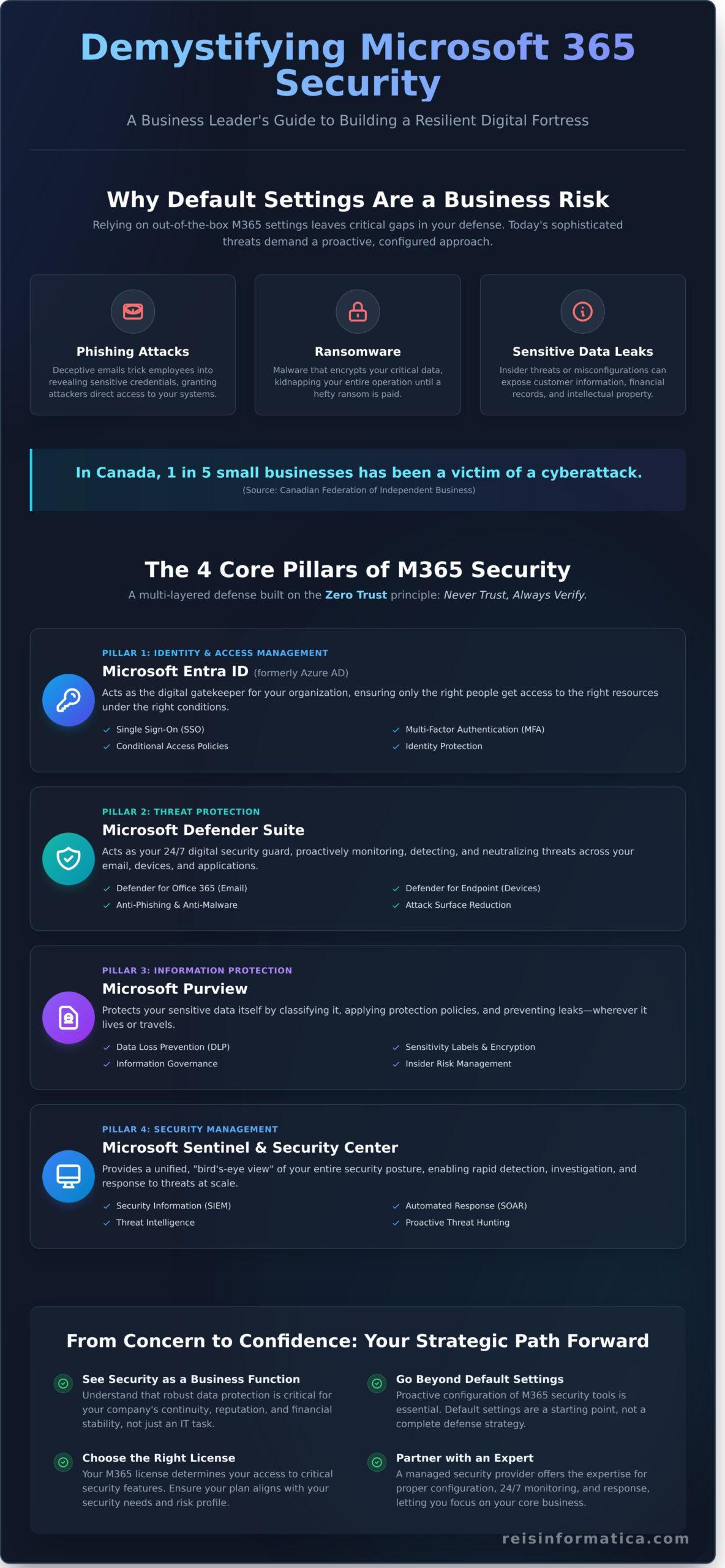
Cyber threats are more sophisticated and targeted than ever. Phishing attacks use deceptive emails to trick your employees into revealing sensitive credentials, while ransomware can digitally “kidnap” your entire operation, demanding a hefty payment for its release. For Canadian small and medium-sized businesses (SMBs), this isn’t a distant threat-it’s a daily reality. According to the Canadian Federation of Independent Business (CFIB), one in five small businesses has been the victim of a cyberattack. The rise of hybrid work models further expands your company’s attack surface, turning every remote employee’s network into a potential entry point for attackers.
The True Cost of a Security Breach for a Small Business
The financial damage from a security breach extends far beyond the initial ransom or theft. The true cost for a Canadian business includes a cascade of devastating consequences:
- Operational Downtime: Every hour your systems are offline translates directly to lost revenue and productivity.
- Reputational Damage: Rebuilding customer trust after their data has been compromised is a long, difficult, and expensive process.
- Regulatory Penalties: Non-compliance with Canadian privacy laws like the Personal Information Protection and Electronic Documents Act (PIPEDA) can result in significant fines.
- Recovery Expenses: The costs for forensic investigation, data recovery, and system restoration can easily reach tens of thousands of Canadian dollars.
How Microsoft 365 Provides a Foundation for Zero Trust Security
The traditional “castle-and-moat” approach to security is obsolete. A modern defense is built on the Zero Trust principle: never trust, always verify. This model assumes that threats can exist both outside and inside your network, so it requires strict verification for every user and device trying to access resources. The integrated nature of the Microsoft 365 ecosystem is designed to support this framework. By leveraging tools that control access based on user identity, location, and device health, you can ensure that sensitive data is only accessible by the right people, at the right time, and under the right conditions-a cornerstone of securing today’s mobile workforce.
The Core Pillars of Microsoft 365 Security: A Plain-English Breakdown
Navigating the suite of Microsoft security products can feel overwhelming due to evolving names and overlapping functions. To simplify this, we can organize the entire microsoft 365 security ecosystem into four logical pillars. Each pillar addresses a critical layer of defense, working in concert to create a comprehensive shield that protects your users, data, and devices, allowing you to focus on your core business.
Identity & Access Management: Microsoft Entra ID (formerly Azure AD)
Think of Microsoft Entra ID as the digital gatekeeper for your entire organization. It is the foundation of your security, managing who has access to what and ensuring only authorized personnel can enter. Key features like Single Sign-On (SSO) streamline user access to multiple applications, while Multi-Factor Authentication (MFA) adds a vital layer of verification. The business benefit is clear: it drastically reduces the risk of compromised accounts, the leading cause of data breaches.
Threat Protection: The Microsoft Defender Suite
The Microsoft Defender suite acts as your 24/7 digital security guard, proactively monitoring and neutralizing threats across your environment. Key components include:
- Defender for Office 365: Scans emails for phishing links, malware, and malicious attachments before they reach your team’s inboxes.
- Defender for Endpoint: Protects your company’s devices (laptops, desktops, mobile) from viruses, ransomware, and other advanced threats.
This unified defense stops attacks at the source, safeguarding your operational continuity and data integrity.
Information Protection & Governance: Microsoft Purview
Microsoft Purview is your data governance engine, responsible for discovering, classifying, and protecting your most sensitive information, no matter where it lives or travels. Its Data Loss Prevention (DLP) policies can, for example, automatically block an email containing a Canadian SIN number from being sent externally. Through tools like sensitivity labels and email encryption, Purview ensures your confidential data remains secure and compliant with regulations.
Security Management: Microsoft 365 Defender Portal
The Microsoft 365 Defender Portal is the central command center where all this security data comes together. It provides a single-pane-of-glass view to monitor threats, investigate incidents, and manage your overall security posture. A key feature is the ‘Secure Score,’ which grades your organization’s security configuration and provides actionable recommendations. Following these recommendations, along with expert advice from resources like this Microsoft 365 protection checklist, helps you continuously strengthen your defenses.
Beyond the Defaults: Essential M365 Security Best Practices to Implement Now
Microsoft 365 is an exceptionally powerful suite of tools, but it is crucial to understand that its default settings are merely a starting point, not a complete security solution. Relying on these out-of-the-box configurations leaves your organization exposed to significant risks. To truly protect your data, employees, and operations, you must proactively configure the platform. Viewing this as a core business function is essential, as detailed in this comprehensive Microsoft 365 security guide for business leaders. Implementing the following best practices will immediately strengthen your defenses and provide the peace of mind needed to focus on your business.
Enforce Multi-Factor Authentication (MFA) Company-Wide
In today’s threat landscape, a password alone is no longer a sufficient barrier. MFA adds a critical layer of verification, requiring users to prove their identity with something more than just what they know (their password). We recommend deploying app-based authenticators (like Microsoft Authenticator) as the standard. While initial employee pushback is common, a clear communication plan explaining the “why” behind the change and providing simple instructions ensures a smooth, secure rollout.
Configure Advanced Email Security with Defender for Office 365
Your inbox is the primary entry point for cyberattacks. Microsoft Defender for Office 365 provides the tools to lock it down. Start by enabling these essential policies:
- Safe Links: Scans URLs in real-time to block users from accessing malicious websites.
- Safe Attachments: Opens attachments in a virtual “sandbox” environment to detect malware before it reaches the user.
- Anti-Phishing Policies: Use machine learning to identify and quarantine sophisticated phishing and impersonation attempts.
These proactive measures work silently in the background, neutralizing threats before an employee can make a costly mistake.
Implement Foundational Data Loss Prevention (DLP) Policies
Accidental data breaches are a common and costly problem. A simple DLP policy can prevent sensitive information from leaving your organization. For example, you can create a rule that automatically blocks any outbound email containing a list of Canadian credit card numbers or Social Insurance Numbers (SINs). This foundational step acts as a vital safeguard, protecting both customer data and your company’s intellectual property from inadvertent exposure.
Train Your Team: Building a Human Firewall
Ultimately, your strongest defense is a security-conscious team. Technology provides the tools, but your employees are on the front lines. A robust microsoft 365 security strategy must include ongoing user education. Implement regular phishing simulation tests to train staff to spot suspicious emails and foster a culture where it is safe to report potential threats. When your team becomes a human firewall, your entire organization becomes more resilient.
M365 Plans & Licensing: Getting the Right Level of Security
Navigating Microsoft 365 licensing can feel complex, but choosing the right plan is a foundational step in your security strategy. The goal isn’t just to buy features; it’s to make a strategic investment in the protection that aligns with your business risks and operational needs. Viewing your license as a security tool ensures you get the best return on investment and the peace of mind to focus on your core business.
Security Features in Business Basic vs. Business Standard vs. Business Premium
For small to medium-sized businesses in Canada, the “Business” tier is the most common starting point. However, the security capabilities differ significantly between the plans:
- Business Basic & Standard: These plans provide a solid baseline, including secure cloud storage and data protection policies. They cover the essentials for collaboration but rely on foundational security measures.
- Business Premium: This plan represents a major leap forward for microsoft 365 security. It includes everything in Business Standard, plus advanced tools like Microsoft Defender for Business (endpoint protection, anti-phishing) and Microsoft Intune (device management). For any security-conscious SMB, Business Premium is the recommended starting point for proactive, enterprise-grade protection.
Advanced Capabilities in Enterprise Plans (E3 & E5)
Larger organizations or those in highly regulated industries (like finance or healthcare) often require the advanced features found in Enterprise plans. The Microsoft 365 E5 plan, for instance, introduces sophisticated threat hunting, automated investigation and response (AIR), and advanced analytics. These tools empower internal IT teams or a managed service provider to proactively identify and neutralize complex threats before they cause damage.
When Does It Make Sense to Upgrade Your Plan?
The decision to upgrade is driven by specific business triggers. You should consider a higher-tier plan if your organization:
- Handles sensitive client or patient data, requiring stricter access controls and data loss prevention.
- Needs to comply with Canadian regulations like PIPEDA, which mandates robust protection of personal information.
- Is growing its remote or hybrid workforce, increasing the need for secure device management through a tool like Intune.
- Wants to reduce the risk of sophisticated cyberattacks like targeted phishing or ransomware.
Investing in the right license is more cost-effective than dealing with the aftermath of a breach. Confused about licensing? Let’s find the right plan for you.
The Smart Choice: Partnering with a Managed Security Provider
Understanding the tools within Microsoft 365 is the first step. Mastering them is what truly protects your business. For many Canadian companies, managing the intricate layers of M365 security internally is a significant operational burden. This is where a strategic partnership with a Managed Security Provider (MSP) transforms your security posture from a reactive necessity into a proactive business advantage, allowing you to focus on your core objectives with confidence.
The Complexity Challenge: Why In-House Security Can Falter
The modern threat landscape operates 24/7, and so must your defences. Effective microsoft 365 security demands constant monitoring and the ability to respond to incidents in minutes, not hours. This is compounded by the relentless pace of Microsoft updates and the emergence of new, sophisticated threats. For most businesses, especially SMBs facing Canada’s cybersecurity skills gap, maintaining this level of vigilance in-house is simply not feasible. It diverts critical resources and leaves your organization vulnerable. Building a resilient foundation requires both security expertise and comprehensive infrastructure services that support your security strategy while ensuring operational stability.
Benefits of a Managed Security Partner for M365
Engaging an MSP is not about outsourcing a task; it’s about gaining a dedicated security team. This partnership delivers tangible results that strengthen your operational resilience and financial stability.
- Access to Certified Experts: Instantly leverage a team of specialists who live and breathe Microsoft security, without the high C$100,000+ annual salary and recruitment challenges of hiring a single in-house expert.
- Proactive Threat Management: A true partner moves beyond passive alerts. They actively hunt for threats, optimize your configurations, and harden your defences to prevent incidents before they can impact your operations.
- Predictable Costs, Reduced Risk: A fixed monthly investment provides comprehensive protection, a stark contrast to the devastating and unpredictable costs of a data breach, which can cripple a small business.
What to Look For in a Microsoft Security Partner
Choosing the right partner is crucial. Your provider should act as a vigilant guardian of your digital assets. When evaluating your options, demand clarity on these key areas:
- Official Microsoft Designations: Verify their credentials. Are they a recognized Microsoft Solutions Partner for Security? This confirms their expertise and commitment.
- Transparent Processes: Ask for their documented incident response plan. How do they communicate during a crisis, and what kind of reporting can you expect?
- Business-Centric Strategy: A true partner ensures their focus is on aligning security measures with your specific business goals, enabling growth, not hindering it.
The goal is to achieve a state where your technology is secure, efficient, and invisible, allowing you to focus completely on your business objectives. See how Reis Informática provides expert M365 security management.
Secure Your Digital Assets: Your Next Step in Microsoft 365 Security
Ultimately, securing your digital workspace is no longer just an IT concern-it’s a cornerstone of modern business leadership. As we’ve detailed, relying on default settings leaves your organization vulnerable. A proactive approach, which includes implementing best practices beyond the basics and choosing the right licensing, is essential for protecting your data, reputation, and continuity in today’s threat landscape.
Building and maintaining this level of defense requires specialized expertise. A robust microsoft 365 security strategy is not a one-time setup; it’s a continuous process of monitoring, adapting, and responding. As a certified Microsoft Solutions Partner with decades of experience protecting Canadian businesses, Reis Informatica delivers that peace of mind. With our 24/7 proactive monitoring and support, we act as your vigilant technology partner, handling the complexities so you can focus on your core business.
Take the decisive step towards safeguarding your operations. Schedule a free security assessment to protect your M365 environment. Let’s build a more secure future for your business, together.
Frequently Asked Questions About Microsoft 365 Security
Is Microsoft 365 secure enough right out of the box?
Microsoft 365 provides a powerful security foundation, but its default settings are not a complete solution. To achieve comprehensive protection against modern cyber threats, these tools must be professionally configured. Think of the default setup as the starting line, not the finish line. Proper implementation of security policies and controls is essential to truly secure your business data, ensuring your infrastructure is resilient and your team can work with confidence and tranquility.
What’s the single most important security feature I should enable in Microsoft 365?
Without question, Multi-Factor Authentication (MFA) is the most critical security feature to enable. It provides a vital layer of defense by requiring a second form of verification beyond just a password. According to Microsoft, MFA can block over 99.9% of account compromise attacks. Activating it is a simple, direct action that dramatically increases your security posture, making it the non-negotiable first step in protecting your corporate accounts from unauthorized access.
How does Microsoft 365 protect my business from phishing emails?
Microsoft 365 uses a sophisticated tool called Microsoft Defender for Office 365. It actively protects your business by scanning incoming emails in real-time. Features like Safe Links check web addresses for malicious content before a user can open them, while Safe Attachments analyzes email attachments in a secure environment to detect malware. This proactive system neutralizes threats before they can cause damage, safeguarding your employees and your operational continuity.
Can Microsoft 365 prevent data from being leaked by employees?
Yes, Microsoft 365 can significantly reduce the risk of data leaks through Data Loss Prevention (DLP) policies. These policies can be configured to automatically identify, monitor, and protect sensitive information, such as financial data or personal identification numbers specific to Canada, like SINs. For example, a DLP policy can block an employee from accidentally sending an email with a list of client credit card numbers, providing a critical safeguard for your company’s confidential data.
What is the difference between Microsoft Defender and a traditional antivirus?
Traditional antivirus software primarily relies on signature-based detection, meaning it looks for known threats. Microsoft Defender for Endpoint is a modern Endpoint Detection and Response (EDR) platform. It goes further by using behavioural analysis and artificial intelligence to identify and respond to new, unknown, and sophisticated threats. It offers proactive threat hunting and investigation capabilities, providing a much more advanced and vigilant defense than a conventional antivirus solution.
Do I still need a separate backup solution if I use Microsoft 365?
Yes, a separate, third-party backup solution is a critical component of a complete data protection strategy. Microsoft operates on a Shared Responsibility Model; they ensure service uptime, but you are responsible for your data. A dedicated backup protects against accidental or malicious deletion, ransomware attacks, and gaps in data retention policies. It provides the final layer of security, ensuring you can restore your data and maintain business operations under any circumstance.
Is my data safe from Microsoft employees in the cloud?
Yes, your data is protected by stringent access controls and operational procedures. Features like Customer Lockbox ensure that a Microsoft engineer cannot access your content to resolve a support issue without your explicit, time-limited approval. Every action is logged and audited. This layered approach of technical controls and strict policies is fundamental to the overall microsoft 365 security framework, providing transparency and giving you ultimate control over who can access your data.